本教程深入剖析 Model Context Protocol(MCP)的协议设计原理,并基于官方 TypeScript SDK 全面讲解 Tools、Resources、Prompts、Sampling、Roots、Notifications 六大核心能力。适合有 TypeScript 基础、希望理解 MCP 底层机制并构建生产级 MCP Server 的开发者。学完后,你将掌握 MCP 的 JSON-RPC 生命周期、高层/低层 API 的选择策略、以及测试与部署的最佳实践。
claude CLI 已安装)Model Context Protocol 是 Anthropic 主导的开放协议,标准化了 AI 模型与外部工具/数据源之间的通信方式。其核心思想很简单:任何 AI 应用都能通过统一协议连接任何工具服务器。
MCP 的架构是经典的 Client-Server 模型:
┌─────────────┐     MCP协议      ┌─────────────┐
│  AI 应用     │ ◄──────────────► │  MCP Server  │
│ (Client端)   │   JSON-RPC 2.0  │  (工具提供者) │
└─────────────┘                  └──────┬──────┘
                                        │
                                 ┌──────┴──────┐
                                 │ 外部资源/API  │
                                 │ 数据库/文件等  │
                                 └─────────────┘
MCP 建立在 JSON-RPC 2.0 之上。所有消息分为三类:
Request(请求):
{
  "jsonrpc": "2.0",
  "id": 1,
  "method": "tools/call",
  "params": {
    "name": "get_weather",
    "arguments": { "city": "Beijing" }
  }
}
Response(响应):
{
  "jsonrpc": "2.0",
  "id": 1,
  "result": {
    "content": [
      { "type": "text", "text": "Beijing: 22°C, 晴" }
    ]
  }
}
Notification(通知) — 无需回复的单向消息:
{
  "jsonrpc": "2.0",
  "method": "notifications/progress",
  "params": {
    "progressToken": "abc123",
    "progress": 50,
    "total": 100
  }
}
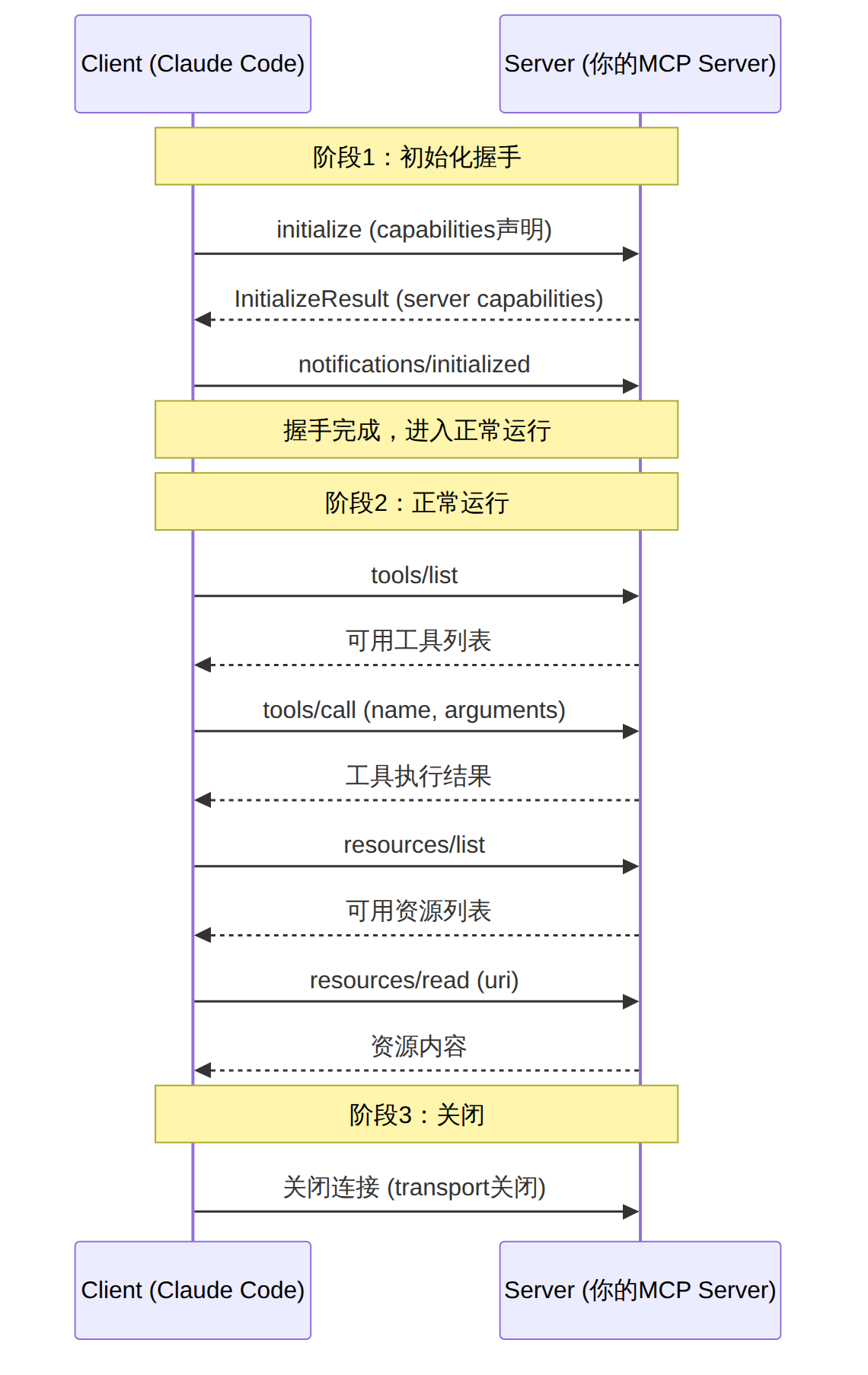
每个 MCP 连接经历三个阶段:初始化 → 正常运行 → 关闭。
图表 1
初始化握手是最关键的步骤。Client 发送 initialize 请求时,会声明自己的能力(capabilities):
// Client 发送的 initialize 请求
{
  protocolVersion: "2025-03-26",
  capabilities: {
    sampling: {},        // 支持让 Server 发起 LLM 请求
    roots: {             // 支持告知 Server 文件系统根目录
      listChanged: true  // 根目录变化时会通知
    }
  },
  clientInfo: {
    name: "claude-code",
    version: "1.0.0"
  }
}
Server 回复自己的能力:
// Server 回复
{
  protocolVersion: "2025-03-26",
  capabilities: {
    tools: { listChanged: true },
    resources: { subscribe: true, listChanged: true },
    prompts: { listChanged: true },
    logging: {}
  },
  serverInfo: {
    name: "my-mcp-server",
    version: "1.0.0"
  }
}
能力协商的意义:Client 和 Server 各自声明支持什么,对方只使用已声明的能力。这意味着你的 Server 可以安全地增加新功能而不影响旧 Client。
MCP 支持两种传输方式,适用于不同场景:
| 特性 | Stdio | Streamable HTTP |
|---|---|---|
| 通信方式 | 标准输入/输出管道 | HTTP POST + SSE 流 |
| 适用场景 | 本地工具(Claude Code) | 远程/云端部署 |
| 延迟 | 极低 | 略高(HTTP开销) |
| 安全性 | 进程级隔离 | 需要 OAuth/CORS |
| 生命周期 | Client 启动子进程 | 独立服务,多 Client 共享 |
| 部署复杂度 | 零配置 | 需要 HTTP 服务器 |
Stdio 模式(Claude Code 默认):Client 将 Server 作为子进程启动,通过 stdin/stdout 管道通信。
Streamable HTTP 模式:Server 作为独立 HTTP 服务运行,Client 通过 HTTP 请求连接。这是 2025-03 规范中引入的新传输方式,替代了旧的 SSE 传输。
TypeScript SDK 提供两层 API:
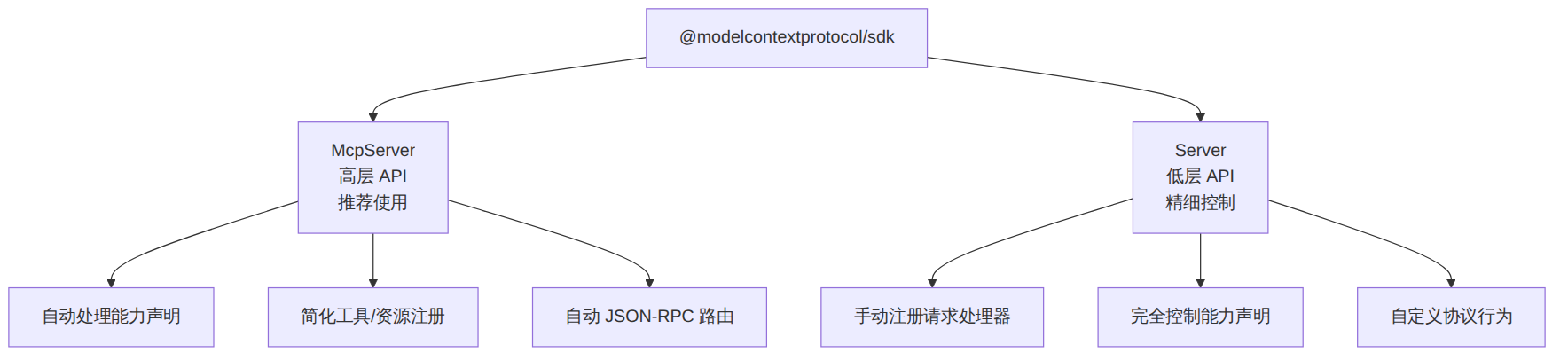
图表 2
选择原则:95% 的场景使用 McpServer。只有当你需要精确控制协议行为(如自定义能力声明、拦截原始请求)时才使用 Server。
# 创建项目
mkdir mcp-deep-dive && cd mcp-deep-dive
npm init -y

# 安装核心依赖
npm install @modelcontextprotocol/sdk zod

# 安装开发依赖
npm install -D typescript @types/node tsx vitest

# 初始化 TypeScript
npx tsc --init
tsconfig.json 关键配置:
{
  "compilerOptions": {
    "target": "ES2022",
    "module": "Node16",
    "moduleResolution": "Node16",
    "outDir": "./dist",
    "rootDir": "./src",
    "strict": true,
    "esModuleInterop": true,
    "skipLibCheck": true
  }
}
// src/index.ts
import { McpServer } from "@modelcontextprotocol/sdk/server/mcp.js";
import { StdioServerTransport } from "@modelcontextprotocol/sdk/server/stdio.js";

const server = new McpServer({
  name: "deep-dive-server",
  version: "1.0.0",
});

async function main() {
  const transport = new StdioServerTransport();
  await server.connect(transport);
}

main().catch(console.error);
在 Claude Code 中注册:
// .claude/settings.json
{
  "mcpServers": {
    "deep-dive": {
      "command": "npx",
      "args": ["tsx", "/path/to/mcp-deep-dive/src/index.ts"]
    }
  }
}
工具是 Server 暴露给 AI 调用的函数。AI 根据用户意图选择合适的工具并传入参数。
import { z } from "zod";

// 注册一个查询数据库的工具
server.tool(
  "query_database",                    // 工具名称
  "执行SQL查询并返回结果",               // 工具描述(AI 根据此描述决定是否调用)
  {
    sql: z.string().describe("SQL查询语句"),
    limit: z.number().optional().default(100).describe("返回行数上限"),
  },
  async ({ sql, limit }) => {
    // 实际业务逻辑
    const results = await executeSQL(sql, limit);
    return {
      content: [
        {
          type: "text",
          text: JSON.stringify(results, null, 2),
        },
      ],
    };
  }
);
工具返回多种内容类型:
server.tool(
  "generate_chart",
  "根据数据生成图表",
  { data: z.array(z.number()), title: z.string() },
  async ({ data, title }) => {
    const chartBuffer = await renderChart(data, title);
    return {
      content: [
        {
          type: "image",
          data: chartBuffer.toString("base64"),
          mimeType: "image/png",
        },
      ],
    };
  }
);
长耗时工具的进度通知:
server.tool(
  "train_model",
  "训练机器学习模型",
  {
    dataset: z.string(),
    epochs: z.number(),
  },
  async ({ dataset, epochs }, { signal, sendNotification }) => {
    const progressToken = crypto.randomUUID();

    for (let i = 0; i < epochs; i++) {
      if (signal?.aborted) {
        throw new Error("训练被取消");
      }

      await trainOneEpoch(dataset, i);

      // 发送进度通知
      await sendNotification({
        method: "notifications/progress",
        params: {
          progressToken,
          progress: i + 1,
          total: epochs,
        },
      });
    }

    return {
      content: [{ type: "text", text: `模型训练完成,共 ${epochs} 轮` }],
    };
  }
);
常见问题与解决:
| 问题 | 原因 | 解决方案 |
|---|---|---|
| AI 不调用工具 | 描述不清晰 | 描述要包含使用场景和输入要求 |
| 参数类型错误 | Zod schema 不匹配 | 检查 z.number() vs z.string() |
| 工具超时 | 默认 60 秒限制 | 使用 sendNotification 报告进度 |
| 返回内容被截断 | content 数组过大 | 分页返回或使用 resources |
资源是 Server 暴露给 AI 读取的结构化数据。与工具不同,资源是被动的 — AI 决定何时读取。
// 静态资源列表
server.resources([
  {
    uri: "config:///app/settings",
    name: "应用配置",
    description: "当前应用的配置文件",
    mimeType: "application/json",
  },
]);

// 资源读取处理器
server.resource(
  "config:///app/settings",
  async (uri) => {
    const config = await loadConfig();
    return {
      contents: [
        {
          uri: uri.href,
          mimeType: "application/json",
          text: JSON.stringify(config, null, 2),
        },
      ],
    };
  }
);
动态资源(带参数的 URI 模板):
// 声明动态资源模板
server.resources([
  {
    uriTemplate: "db:///tables/{table}/rows/{id}",
    name: "数据库行",
    description: "按表名和ID获取单行数据",
    mimeType: "application/json",
  },
]);

// 处理动态资源请求
server.resource(
  "db:///tables/{table}/rows/{id}",
  async (uri, { table, id }) => {
    const row = await db.query(`SELECT * FROM ${table} WHERE id = ?`, [id]);
    return {
      contents: [
        {
          uri: uri.href,
          text: JSON.stringify(row),
        },
      ],
    };
  }
);
资源订阅(实时更新):
// 声明支持订阅
const server = new McpServer({
  name: "realtime-server",
  version: "1.0.0",
});

// 当 Client 订阅某资源时
server.resource("logs:///app", async (uri) => {
  // 首次读取
  return { contents: [{ uri: uri.href, text: getRecentLogs() }] };
});

// 资源更新时通知所有订阅者
watchLogChanges(async (newContent) => {
  await server.notifyResourceChange("logs:///app");
});
提示模板是预定义的、可参数化的提示,帮助用户快速执行常见任务。
server.prompt(
  "code_review",
  "代码审查模板",
  {
    code: z.string().describe("待审查的代码"),
    language: z.string().optional().describe("编程语言"),
    focus: z
      .enum(["security", "performance", "readability", "all"])
      .optional()
      .default("all")
      .describe("审查重点"),
  },
  async ({ code, language, focus }) => {
    const langHint = language ? `语言:${language}\n` : "";
    const focusHint = `审查重点:${focus}\n`;

    return {
      messages: [
        {
          role: "user",
          content: {
            type: "text",
            text: [
              langHint,
              focusHint,
              "请对以下代码进行详细审查:\n",
              "```\n",
              code,
              "\n```",
              "\n\n请指出:",
              "1. 潜在的 Bug 或逻辑错误",
              "2. 安全漏洞",
              "3. 性能优化建议",
              "4. 代码风格和可读性改进",
              "5. 测试覆盖建议",
            ].join(""),
          },
        },
        {
          role: "assistant",
          content: {
            type: "text",
            text: "我将从多个维度审查这段代码。让我逐一分析...",
          },
        },
      ],
    };
  }
);
提示模板可以包含多轮对话(多组 user/assistant 消息),还可以嵌入资源引用:
server.prompt(
  "debug_error",
  "调试错误模板",
  { error_message: z.string() },
  async ({ error_message }) => {
    return {
      messages: [
        {
          role: "user",
          content: {
            type: "text",
            text: `遇到错误:${error_message}`,
          },
        },
        {
          role: "user",
          content: {
            // 嵌入资源引用 — AI 会自动读取
            type: "resource",
            resource: {
              uri: "logs:///app",
              mimeType: "text/plain",
            },
          },
        },
      ],
    };
  }
);
这是 MCP 最强大也最容易被忽视的能力。Sampling 允许 Server 反向请求 Client 的 LLM 能力 — 即 Server 可以构造 prompt 让 Client 端的 AI 模型生成回复。
server.tool(
  "smart_summarize",
  "使用AI智能摘要文档",
  { document_uri: z.string().describe("文档URI") },
  async ({ document_uri }, { session }) => {
    // 1. 读取文档内容
    const doc = await fetchDocument(document_uri);

    // 2. 构造采样请求 — 让 Client 端的 AI 来做摘要
    const result = await session.request({
      method: "sampling/createMessage",
      params: {
        messages: [
          {
            role: "user",
            content: {
              type: "text",
              text: `请将以下文档摘要为 200 字以内:\n\n${doc.content}`,
            },
          },
        ],
        maxTokens: 500,
        systemPrompt: "你是一个专业的文档摘要助手,用中文输出。",
      },
    });

    // 3. 使用 AI 的摘要结果
    return {
      content: [
        {
          type: "text",
          text: `文档摘要(AI 生成):\n${result.content.text}`,
        },
      ],
    };
  }
);
Sampling 的典型应用场景:
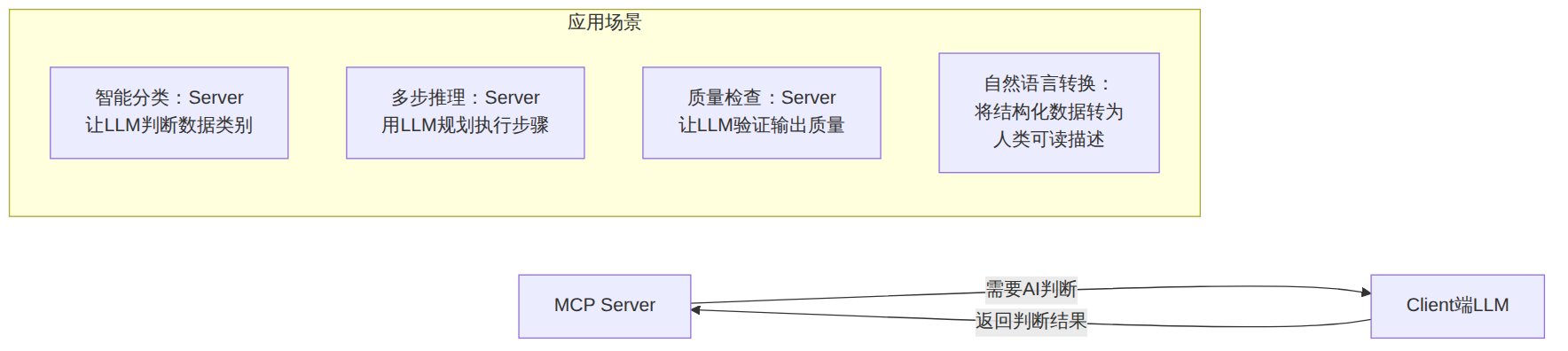
图表 3
安全注意事项:Sampling 需要 Client 端声明 sampling 能力。Claude Code 默认支持。但你的 Server 应该:
- 设置合理的 maxTokens 限制
- 不要在 systemPrompt 中注入敏感指令
- 对结果进行验证和清洗
Roots 让 Client 告诉 Server 可以访问的文件系统根目录。这在需要理解项目结构的场景中非常有用。
server.tool(
  "analyze_project",
  "分析项目结构和技术栈",
  {},
  async (_, { session }) => {
    // 请求 Client 提供根目录列表
    const rootsResult = await session.request({
      method: "roots/list",
      params: {},
    });

    const roots = rootsResult.roots;
    const analysis = [];

    for (const root of roots) {
      const files = await scanDirectory(root.uri);
      analysis.push({
        root: root.uri,
        fileCount: files.length,
        languages: detectLanguages(files),
        frameworks: detectFrameworks(files),
      });
    }

    return {
      content: [
        {
          type: "text",
          text: JSON.stringify(analysis, null, 2),
        },
      ],
    };
  }
);
通知是单向消息,不需要回复。用于进度报告、状态更新、资源变更等。
// 结构化日志通知
server.tool(
  "deploy",
  "部署应用",
  { environment: z.string() },
  async ({ environment }, { sendNotification }) => {
    // 发送日志通知
    await sendNotification({
      method: "notifications/message",
      params: {
        level: "info",
        logger: "deploy-tool",
        data: `开始部署到 ${environment}...`,
      },
    });

    await performDeployment(environment);

    await sendNotification({
      method: "notifications/message",
      params: {
        level: "info",
        logger: "deploy-tool",
        data: `部署完成!`,
      },
    });

    return {
      content: [{ type: "text", text: `${environment} 部署成功` }],
    };
  }
);
当你的 MCP Server 需要被多个 Client 共享、或部署在云端时,使用 Streamable HTTP 传输:
// src/server-http.ts
import { McpServer } from "@modelcontextprotocol/sdk/server/mcp.js";
import { StreamableHTTPServerTransport } from "@modelcontextprotocol/sdk/server/streamableHttp.js";
import express from "express";

const app = express();
app.use(express.json());

const server = new McpServer({
  name: "remote-deep-dive",
  version: "1.0.0",
});

// ... 注册工具、资源、提示 ...

// 处理所有 MCP 请求
app.all("/mcp", async (req, res) => {
  const transport = new StreamableHTTPServerTransport({
    sessionIdGenerator: undefined, // 无状态模式
  });

  await server.connect(transport);
  await transport.handleRequest(req, res, req.body);
});

// SSE 端点(用于服务器推送通知)
app.get("/mcp", async (req, res) => {
  const transport = new StreamableHTTPServerTransport({
    sessionIdGenerator: () => crypto.randomUUID(),
  });
  await server.connect(transport);
  await transport.handleRequest(req, res);
});

app.listen(3000, () => {
  console.log("MCP Server running on http://localhost:3000/mcp");
});
生产环境中必须对远程 MCP Server 进行认证:
import { OAuthServerProvider } from "@modelcontextprotocol/sdk/server/auth.js";

// 简化的 OAuth Provider 实现
const authProvider: OAuthServerProvider = {
  async getClient(clientId: string) {
    return { clientId, redirectUris: [], grantTypes: ["authorization_code"] };
  },
  async issueToken(clientId: string, scopes: string[]) {
    return { token: generateJWT(clientId, scopes), expiresAt: Date.now() + 3600000 };
  },
  async validateToken(token: string) {
    return verifyJWT(token);
  },
};

// 在 Express 中间件中验证 token
app.use("/mcp", async (req, res, next) => {
  const authHeader = req.headers.authorization;
  if (!authHeader?.startsWith("Bearer ")) {
    return res.status(401).json({ error: "unauthorized" });
  }
  const token = authHeader.slice(7);
  try {
    const claims = await authProvider.validateToken(token);
    req.user = claims;
    next();
  } catch {
    return res.status(401).json({ error: "invalid_token" });
  }
});
将 MCP Server 部署到 Cloudflare Workers 是目前最轻量的远程方案:
// wrangler.toml
// name = "my-mcp-server"
// compatibility_date = "2025-03-26"
// [vars]
// ENVIRONMENT = "production"

// src/worker.ts
import { McpServer } from "@modelcontextprotocol/sdk/server/mcp.js";
import { StreamableHTTPServerTransport } from "@modelcontextprotocol/sdk/server/streamableHttp.js";
import { z } from "zod";

export default {
  async fetch(request: Request): Promise<Response> {
    const url = new URL(request.url);

    if (url.pathname === "/mcp" && request.method === "POST") {
      const server = new McpServer({
        name: "cloudflare-mcp",
        version: "1.0.0",
      });

      server.tool("get_kv", "读取 KV 存储值", {
        key: z.string(),
      }, async ({ key }) => {
        const value = await MY_KV.get(key);
        return {
          content: [{ type: "text", text: value ?? "(not found)" }],
        };
      });

      const transport = new StreamableHTTPServerTransport({
        sessionIdGenerator: undefined,
      });

      await server.connect(transport);
      const body = await request.json();
      return transport.handleRequest(request, body);
    }

    return new Response("Not Found", { status: 404 });
  },
};
import { Server } from "@modelcontextprotocol/sdk/server/index.js";

const server = new Server(
  {
    name: "low-level-server",
    version: "1.0.0",
  },
  {
    capabilities: {
      tools: { listChanged: true },
      resources: { subscribe: true, listChanged: true },
      prompts: { listChanged: true },
      logging: {},
    },
  }
);

// 手动注册请求处理器
server.setRequestHandler(ListToolsRequestSchema, async () => {
  return {
    tools: [
      {
        name: "my_tool",
        description: "自定义工具",
        inputSchema: {
          type: "object",
          properties: {
            query: { type: "string", description: "查询字符串" },
          },
          required: ["query"],
        },
      },
    ],
  };
});

server.setRequestHandler(CallToolRequestSchema, async (request) => {
  if (request.params.name === "my_tool") {
    const { query } = request.params.arguments as { query: string };
    return {
      content: [{ type: "text", text: `处理查询:${query}` }],
    };
  }
  throw new Error(`Unknown tool: ${request.params.name}`);
});
低层 API 的优势在于完全控制:
// 自定义能力协商 — 只在特定条件下暴露工具
server.setRequestHandler(ListToolsRequestSchema, async () => {
  const tools = [
    { name: "public_tool", description: "公开工具", inputSchema: { ... } },
    { name: "admin_tool", description: "管理员工具", inputSchema: { ... } },
  ];

  // 根据连接信息过滤可用工具
  return {
    tools: isAdminConnection ? tools : tools.filter(t => !t.name.startsWith("admin_")),
  };
});
// 全局请求拦截
server.fallbackRequestHandler = async (request) => {
  // 审计日志
  auditLog({
    method: request.method,
    params: request.params,
    timestamp: new Date().toISOString(),
  });

  // 对未知方法返回标准错误
  throw new Error(`Method not found: ${request.method}`);
};
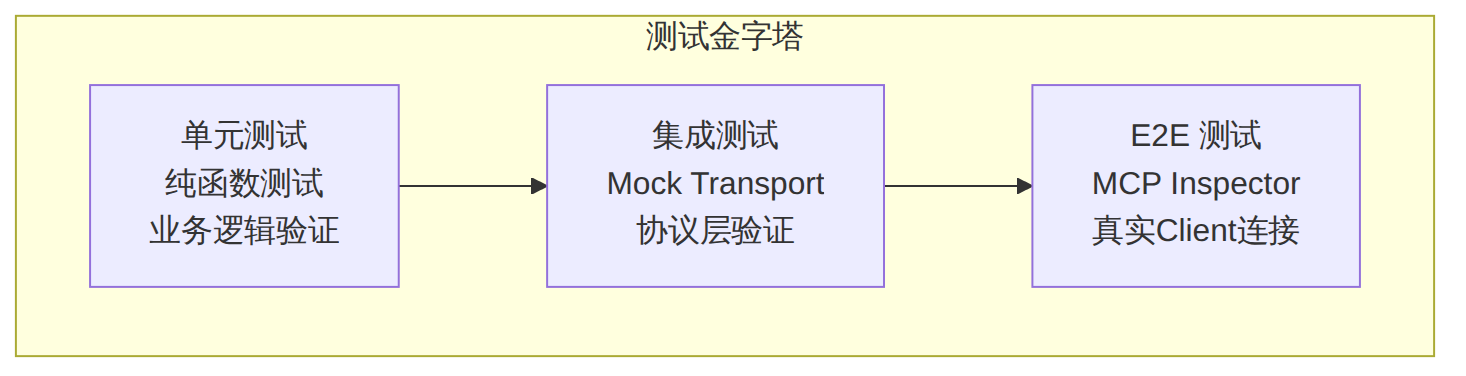
图表 4
// tests/tools.test.ts
import { describe, it, expect, vi } from "vitest";

// 将工具处理函数提取为独立函数以便测试
export async function handleQueryDatabase(
  sql: string,
  limit: number,
  dbExecutor: typeof executeSQL
) {
  if (sql.toLowerCase().includes("drop")) {
    throw new Error("不允许执行 DROP 操作");
  }
  const results = await dbExecutor(sql, limit);
  return {
    content: [{ type: "text" as const, text: JSON.stringify(results, null, 2) }],
  };
}

describe("query_database 工具", () => {
  it("正常查询应返回结果", async () => {
    const mockDB = vi.fn().mockResolvedValue([{ id: 1, name: "test" }]);
    const result = await handleQueryDatabase("SELECT * FROM users", 100, mockDB);
    expect(result.content[0].text).toContain("test");
  });

  it("应阻止 DROP 操作", async () => {
    await expect(
      handleQueryDatabase("DROP TABLE users", 100, vi.fn())
    ).rejects.toThrow("不允许执行 DROP 操作");
  });
});
MCP Inspector 是官方提供的调试/测试工具:
# 安装并启动 Inspector
npx @modelcontextprotocol/inspector npx tsx src/index.ts
Inspector 会打开一个 Web 界面,你可以: 1. 查看所有已注册的工具、资源、提示 2. 手动调用工具并检查返回值 3. 测试资源读取和订阅 4. 验证能力协商结果
// tests/integration.test.ts
import { describe, it, expect } from "vitest";
import { Client } from "@modelcontextprotocol/sdk/client/index.js";
import { StdioClientTransport } from "@modelcontextprotocol/sdk/client/stdio.js";

describe("MCP Server 集成测试", () => {
  it("应正确列出工具", async () => {
    const transport = new StdioClientTransport({
      command: "npx",
      args: ["tsx", "src/index.ts"],
    });

    const client = new Client({
      name: "test-client",
      version: "1.0.0",
    });

    await client.connect(transport);

    const tools = await client.request({
      method: "tools/list",
      params: {},
    }, ListToolsResultSchema);

    expect(tools.tools.length).toBeGreaterThan(0);
    expect(tools.tools.map(t => t.name)).toContain("query_database");

    await client.close();
  });

  it("应正确执行工具并返回结果", async () => {
    const transport = new StdioClientTransport({
      command: "npx",
      args: ["tsx", "src/index.ts"],
    });

    const client = new Client({
      name: "test-client",
      version: "1.0.0",
    });

    await client.connect(transport);

    const result = await client.request({
      method: "tools/call",
      params: {
        name: "query_database",
        arguments: { sql: "SELECT 1 as num", limit: 10 },
      },
    }, CallToolResultSchema);

    expect(result.content[0].text).toContain("num");

    await client.close();
  });
});
将以上所有能力整合为一个完整的 API 网关 MCP Server。
api-gateway-mcp/
├── src/
│   ├── index.ts           # 入口,传输配置
│   ├── server.ts          # Server 实例与能力注册
│   ├── tools/
│   │   ├── api-call.ts    # API 调用工具
│   │   ├── api-test.ts    # API 测试工具
│   │   └── api-docs.ts    # 文档生成工具
│   ├── resources/
│   │   ├── endpoints.ts   # 端点资源
│   │   └── schemas.ts     # Schema 资源
│   ├── prompts/
│   │   └── debug-api.ts   # API 调试提示
│   └── utils/
│       ├── http.ts        # HTTP 客户端
│       └── validation.ts  # 参数校验
├── tests/
│   ├── unit/
│   └── integration/
├── package.json
└── tsconfig.json
// src/server.ts
import { McpServer } from "@modelcontextprotocol/sdk/server/mcp.js";
import { z } from "zod";
import { registerApiCallTool } from "./tools/api-call.js";
import { registerApiTestTool } from "./tools/api-test.js";
import { registerApiDocsTool } from "./tools/api-docs.js";
import { registerEndpointResources } from "./resources/endpoints.js";
import { registerSchemaResources } from "./resources/schemas.js";
import { registerDebugPrompt } from "./prompts/debug-api.js";

export function createServer(): McpServer {
  const server = new McpServer({
    name: "api-gateway",
    version: "1.0.0",
  });

  // 注册所有能力
  registerApiCallTool(server);
  registerApiTestTool(server);
  registerApiDocsTool(server);
  registerEndpointResources(server);
  registerSchemaResources(server);
  registerDebugPrompt(server);

  return server;
}
// src/tools/api-call.ts
import { z } from "zod";
import type { McpServer } from "@modelcontextprotocol/sdk/server/mcp.js";

export function registerApiCallTool(server: McpServer) {
  server.tool(
    "api_call",
    "调用指定API端点并返回响应",
    {
      method: z.enum(["GET", "POST", "PUT", "DELETE"]).describe("HTTP方法"),
      url: z.string().describe("请求URL"),
      headers: z.record(z.string()).optional().describe("请求头"),
      body: z.string().optional().describe("请求体(JSON字符串)"),
    },
    async ({ method, url, headers, body }, { signal }) => {
      const controller = new AbortController();
      signal?.addEventListener("abort", () => controller.abort());

      const startTime = Date.now();

      try {
        const response = await fetch(url, {
          method,
          headers: {
            "Content-Type": "application/json",
            ...headers,
          },
          body: body || undefined,
          signal: controller.signal,
        });

        const duration = Date.now() - startTime;
        const responseText = await response.text();

        let formattedBody: string;
        try {
          formattedBody = JSON.stringify(JSON.parse(responseText), null, 2);
        } catch {
          formattedBody = responseText;
        }

        return {
          content: [
            {
              type: "text",
              text: [
                `状态码: ${response.status} ${response.statusText}`,
                `耗时: ${duration}ms`,
                `响应头: ${JSON.stringify(Object.fromEntries(response.headers), null, 2)}`,
                `响应体:`,
                formattedBody,
              ].join("\n"),
            },
          ],
        };
      } catch (error) {
        return {
          content: [
            {
              type: "text",
              text: `请求失败: ${error instanceof Error ? error.message : String(error)}`,
            },
          ],
          isError: true,
        };
      }
    }
  );
}
// src/resources/endpoints.ts
import type { McpServer } from "@modelcontextprotocol/sdk/server/mcp.js";

const endpoints = [
  { path: "/api/users", methods: ["GET", "POST"], description: "用户管理" },
  { path: "/api/users/{id}", methods: ["GET", "PUT", "DELETE"], description: "单个用户操作" },
  { path: "/api/orders", methods: ["GET", "POST"], description: "订单管理" },
];

export function registerEndpointResources(server: McpServer) {
  // 静态资源列表
  server.resources(
    endpoints.map((ep) => ({
      uri: `api:///endpoints${ep.path}`,
      name: `${ep.methods.join("/")} ${ep.path}`,
      description: ep.description,
      mimeType: "application/json",
    }))
  );

  // 每个端点的详细信息
  for (const ep of endpoints) {
    server.resource(`api:///endpoints${ep.path}`, async (uri) => {
      return {
        contents: [
          {
            uri: uri.href,
            mimeType: "application/json",
            text: JSON.stringify(
              {
                path: ep.path,
                methods: ep.methods,
                description: ep.description,
                parameters: getParamsForEndpoint(ep.path),
                exampleRequest: getExampleRequest(ep.path),
                exampleResponse: getExampleResponse(ep.path),
              },
              null,
              2
            ),
          },
        ],
      };
    });
  }
}
// src/prompts/debug-api.ts
import { z } from "zod";
import type { McpServer } from "@modelcontextprotocol/sdk/server/mcp.js";

export function registerDebugPrompt(server: McpServer) {
  server.prompt(
    "debug_api",
    "API调试助手 — 自动分析错误并建议修复",
    {
      error_response: z.string().describe("API返回的错误信息"),
      endpoint: z.string().optional().describe("出错的API端点"),
    },
    async ({ error_response, endpoint }) => {
      const context = endpoint
        ? `\n出错的端点: ${endpoint}\n请先读取该端点的文档资源。`
        : "";

      return {
        messages: [
          {
            role: "user",
            content: {
              type: "text",
              text: [
                "我遇到了一个API错误,请帮我分析原因并建议修复方案。",
                context,
                "\n错误信息:",
                "```",
                error_response,
                "```",
                "\n请分析:",
                "1. 错误的根本原因",
                "2. 可能的修复步骤",
                "3. 如何避免类似问题",
              ].join("\n"),
            },
          },
        ],
      };
    }
  );
}
// src/index.ts
import { createServer } from "./server.js";
import { StdioServerTransport } from "@modelcontextprotocol/sdk/server/stdio.js";

const server = createServer();

async function main() {
  const transport = new StdioServerTransport();
  await server.connect(transport);
}

main().catch((error) => {
  console.error("Server启动失败:", error);
  process.exit(1);
});
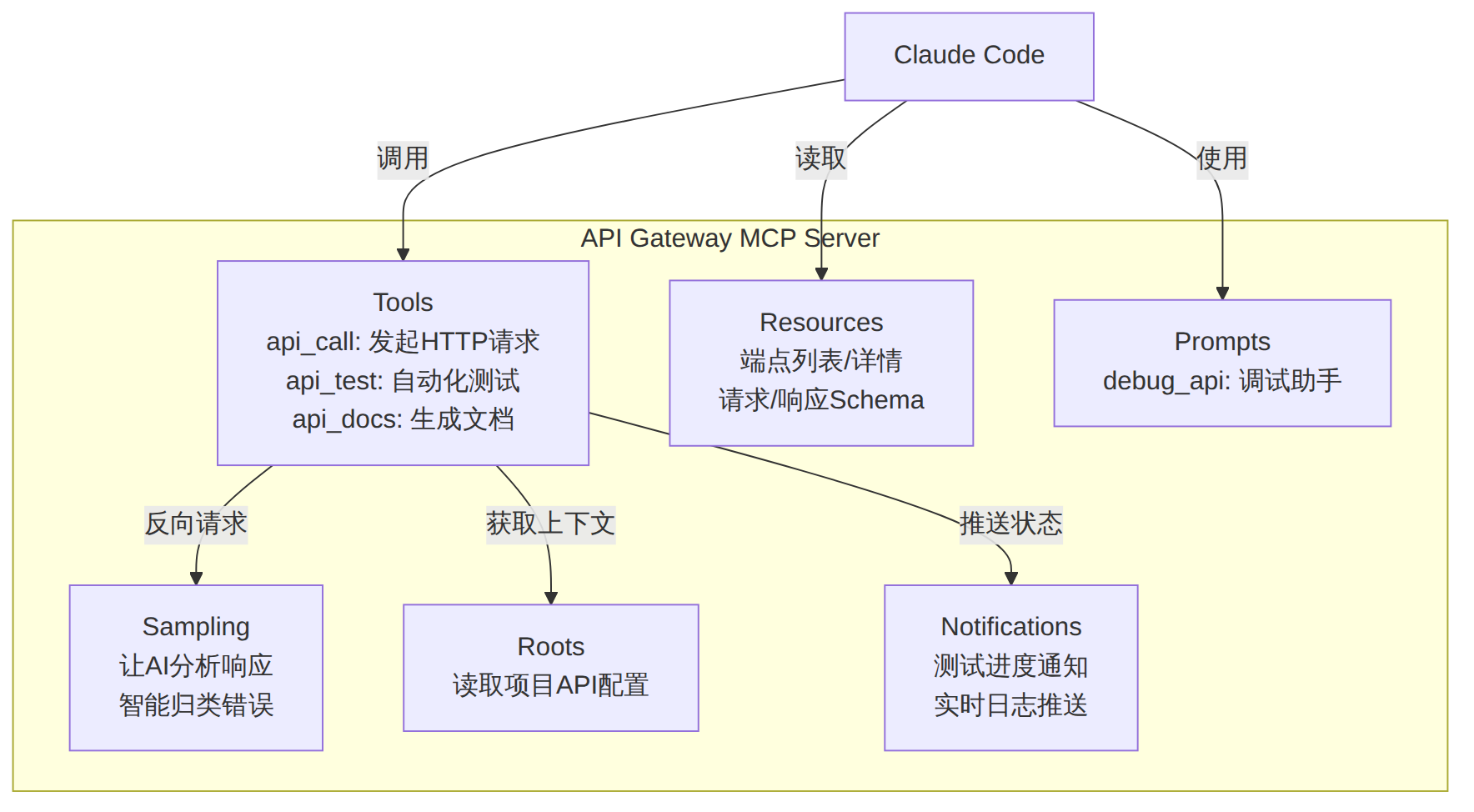
图表 5
| 原则 | 说明 | 示例 |
|---|---|---|
| 单一职责 | 每个工具做一件事 | ❌ manage_database → ✅ query_database + insert_record |
| 描述精确 | AI 依赖描述选择工具 | "查询PostgreSQL数据库并返回JSON格式结果,支持SELECT语句" |
| 错误可恢复 | 返回 isError: true 而非抛异常 |
让 AI 能根据错误信息自动重试 |
| 参数校验 | 用 Zod 的 .min() .max() 限制范围 |
z.string().min(1).max(1000) |
// 批量操作:一个工具完成多个操作
server.tool(
  "batch_query",
  "批量执行多个查询",
  {
    queries: z.array(z.object({
      sql: z.string(),
      label: z.string(),
    })).max(10).describe("最多10个查询"),
  },
  async ({ queries }) => {
    // 并行执行
    const results = await Promise.all(
      queries.map(async (q) => ({
        label: q.label,
        data: await executeSQL(q.sql, 100),
      }))
    );
    return {
      content: [{ type: "text", text: JSON.stringify(results, null, 2) }],
    };
  }
);
signal 支持请求取消,防止资源泄漏# 方法1:使用 MCP Inspector 可视化调试
npx @modelcontextprotocol/inspector npx tsx src/index.ts
# 方法2:启用 JSON-RPC 消息日志
DEBUG="mcp:*" npx tsx src/index.ts
# 方法3:Claude Code 中查看 MCP 状态
# 在 Claude Code 会话中输入:
/mcp
| 维度 | 评估 |
|---|---|
| 适用训练营类型 | AI 工具开发训练营、MCP 生态开发、后端工程师 AI 化 |
| 学员基础要求 | TypeScript 中级、Node.js 开发经验、了解 REST API |
| 预计教学时长 | 4-5 小时(含实操) |
| 实操比例 | 70% 编码 + 30% 原理讲解 |
| 建议分节 | 第一节:协议原理(1h)→ 第二节:六大能力(2h)→ 第三节:实战项目(1.5h)→ 测试与部署(0.5h) |
| 课后作业 | 为自己的工作场景开发一个 MCP Server,至少包含 2 个工具和 1 个资源 |
[!tip] 51学通信知识星球 星主:爱卫生(微信:gprshome201101)——公众号「51学通信」创办者,19 年通信行业运维与讲师经验,著有《GPRS网络信令实例详解》《EPC原理与实践》《5G核心网原理与实践》三本纸质书(各大电商平台有售)。 星球定位:深耕 5G 核心网、IMS、NFV/AI、云原生等 ICT 领域,主打运维岗位与信令分析。 当前规模:5200 篇主题 / 990 个回答,198 元/年。 加入福利:加入星球后请加爱卫生微信,拉您进知识星球年度陪伴与答疑群——不限量回复您的各种问题,另有群内分享。 AI 加持:51学通信知识星球已作为 skill 接入 WorkBuddy,使用 deepseek-4-flash 在海量星球帖子中精准找贴、找视频、找 FAQ 和案例,做总结、找文档和 PPT 等场景全覆盖。
