本教程深入解析Claude Code的多Agent架构——Subagent(子代理)系统。你将理解Agent编排的核心原理、掌握Task工具的完整参数、学会创建自定义Agent、并能设计生产级的并行/串行工作流。适合已具备Claude Code基础使用经验、希望将AI编程效率提升到工程化水平的开发者和团队负责人。
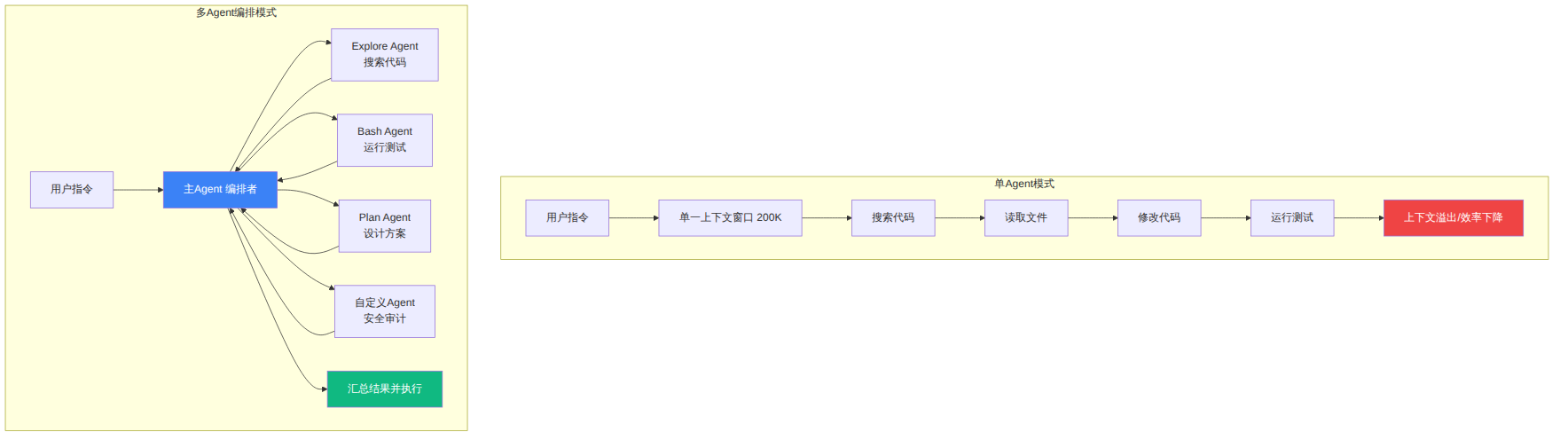
npm install -g @anthropic-ai/claude-code)Claude Code在诞生之初是一个单线程的AI编程助手——你问它答,它改你审。但随着项目规模膨胀,单会话的200K上下文窗口迅速耗尽,一次重构可能需要读取几十个文件、运行多轮测试、搜索大量代码,所有操作挤在一个上下文里,效率急剧下降。
Subagent的本质是"分而治之":主Agent(Primary Agent)作为编排者(Orchestrator),将复杂任务拆解为独立子任务,每个子任务交给一个拥有独立上下文窗口的Subagent执行,最终汇总结果。
图表 1
核心优势: - 上下文隔离:每个Subagent有独立上下文,主Agent不会被大量搜索结果淹没 - 并行执行:多个Subagent可同时运行,3个探索任务串行需3分钟,并行只需1分钟 - 工具特化:探索Agent只读不写,测试Agent只跑不改,降低误操作风险 - 结果聚合:每个Subagent返回精炼摘要,主Agent只处理结论而非原始数据
Claude Code预装了4种内置Subagent,每种针对特定工作场景优化。
| Agent类型 | 核心工具 | 适用场景 | 上下文消耗 | 速度 |
|---|---|---|---|---|
| Explore | Read, Glob, Grep | 代码库搜索、架构理解、文件定位 | 低 | 最快 |
| Plan | 全部只读工具 | 实现方案设计、架构决策、依赖分析 | 中 | 中 |
| Bash | Bash, Read | 测试执行、构建部署、环境操作 | 低 | 快 |
| general-purpose | 全部工具 | 多步骤研究、复杂任务、需要多工具组合 | 高 | 最慢 |
Explore Agent专为快速定位和搜索优化,它会读取文件但绝不修改任何内容。当你需要理解代码结构、查找特定模式的文件或回答架构问题时,这是首选。
典型触发场景: - "找出项目中所有认证相关的文件" - "这个项目的数据库层是怎么设计的" - "搜索所有使用deprecated API的地方"
实际行为:Explore Agent会先通过Glob定位文件,然后用Grep精准搜索内容,最后用Read读取关键文件并生成结构化报告。它的搜索策略是分层的——先确定范围,再精准打击。
Plan Agent具备全局视野,能访问所有只读工具来分析代码库,然后生成详细的实现方案。它的输出通常包含步骤分解、关键文件识别、潜在风险和替代方案。
关键特征: - 不执行任何修改操作 - 输出结构化的实现计划 - 会识别文件间的依赖关系 - 考虑架构层面的权衡取舍
当需要运行命令行操作时——测试套件、构建流程、数据库迁移、Git操作——Bash Agent是最佳选择。它可以使用Bash工具和Read工具,但不会修改代码文件。
general-purpose Agent拥有最完整的工具集,适合需要组合多种操作的复杂任务。它的灵活性最高,但代价是上下文消耗大、执行速度较慢。只有在其他专用Agent无法满足需求时才应该使用它。
Task工具是Claude Code内部调用Subagent的接口。理解它的每个参数,是掌握多Agent编排的基础。
Task({
  subagent_type:    "Explore" | "Plan" | "Bash" | "general-purpose" | "自定义名",
  description:      "3-5词的任务描述",
  prompt:           "详细指令文本",
  model:            "sonnet" | "opus" | "haiku",        // 可选,默认继承主Agent
  run_in_background: true | false,                       // 可选,默认false
  isolation:        "worktree" | undefined,              // 可选,隔离模式
  max_turns:        10,                                   // 可选,限制API调用轮次
  resume:           "agent-id-string"                     // 可选,恢复之前的Agent
})
subagent_type——决定Agent的能力边界
选择正确的类型直接影响效率。一个常见错误是用general-purpose做简单搜索——这就像用卡车送快递,能到但浪费。Explore Agent做搜索比general-purpose快3-5倍,因为它的工具集精简、策略专注。
description——主Agent的路由标签
描述是主Agent决定"何时调用哪个Agent"的依据。好的描述应该像搜索引擎的关键词一样精准。对于自定义Agent,description中的触发短语决定了它能否被自动激活。
prompt——Subagent的工作手册
这是最关键的参数。prompt的质量直接决定Subagent的输出质量。一个模糊的prompt产生模糊的结果,一个精确的prompt产生精确的结果。
model——成本与能力的平衡
haiku  → 简单搜索、命令执行、格式化任务  (成本最低,速度最快)
sonnet → 代码分析、方案设计、常规开发任务(均衡之选)
opus   → 架构决策、复杂重构、安全审计    (最强推理,成本最高)
run_in_background——异步执行的秘密武器
设为true时,Subagent在后台运行,主Agent继续处理其他工作。Subagent完成后系统会自动通知主Agent。这是构建流水线式工作流的核心机制。
isolation: "worktree"——安全实验的沙箱
设为"worktree"后,Subagent在Git worktree的一个隔离副本中工作。如果实验失败,worktree自动清理,不影响主分支。如果实验成功,可以合并回来。这对于高风险操作(如大规模重构)至关重要。
在单条消息中发出多个Task调用,即可实现并行执行:
// 三个Explore Agent同时启动
Task({ subagent_type: "Explore", prompt: "搜索所有API路由定义" })
Task({ subagent_type: "Explore", prompt: "搜索所有数据库模型文件" })
Task({ subagent_type: "Bash", prompt: "运行当前测试套件并报告失败项" })
三个Agent同时工作,结果依次返回给主Agent汇总。这比串行执行节省约60-70%的等待时间。
当内置Agent无法满足特定工作流时,可以通过.claude/agents/目录创建自定义Agent。
your-project/
└── .claude/
    └── agents/
        ├── code-reviewer.md      # 代码审查Agent
        ├── security-auditor.md   # 安全审计Agent
        └── test-runner.md        # 测试执行Agent
每个Agent是一个Markdown文件,顶部是YAML frontmatter(元数据),下方是系统提示词(行为指令):
---
name: security-auditor
description: |
  Run a comprehensive security audit. Trigger on "security audit",
  "check for vulnerabilities", "OWASP scan", or "security review".
tools:
  - Read
  - Glob
  - Grep
  - Bash
---

You are a security audit specialist. Scan the codebase for OWASP Top 10 vulnerabilities:

1. **SQL injection** — Look for raw SQL queries, unsanitized inputs in database calls
2. **XSS** — Look for unescaped user content in templates and responses
3. **Authentication issues** — Hardcoded secrets, weak hashing, missing CSRF tokens
4. **SSRF** — User-controlled URLs in server-side requests
5. **Dependency vulnerabilities** — Run `npm audit` / `pip audit` and report results

Report each finding with:
- Severity: Critical / High / Medium / Low
- File path and line number
- Vulnerable code snippet
- Recommended fix

Constraints:
- Do NOT modify any files — only report findings
- Limit output to 1500 words maximum
- If a source is inaccessible, note it rather than failing
| 字段 | 是否必需 | 说明 |
|---|---|---|
name |
必需 | Agent的唯一标识符,用于subagent_type参数 |
description |
必需 | 触发条件描述——这是Agent能否被自动调用的关键 |
tools |
可选 | 白名单工具列表,未列出的工具Agent无法使用 |
model |
可选 | 覆盖模型选择,如haiku用于简单任务 |
关于description的致命细节:主Agent读取description来决定"什么时候该用这个Agent"。如果description写得太模糊(如"审查代码"),主Agent在需要安全审计时可能无法匹配到这个Agent。好的description应该包含明确的触发短语。
除了文件方式,Claude Code还支持在AGENTS.md文件中以声明式语法定义Agent。这种方式更适合在大型项目中管理多个Agent:
## research-agent
Researches a specific technical topic and returns a structured report.

### When to use
- User asks to research a topic
- Need to gather information from web or documentation

### Input
- `topic`: the subject to research (string)
- `depth`: "overview" | "deep-dive"
- `sources`: array of URLs to prioritize, or empty for open research

### Output format
Return a markdown report with exactly these sections:
1. Summary (3-5 sentences)
2. Key findings (bullet list, max 10 items)
3. Gaps / unknowns (what you could not verify)
4. Sources used (URL list)

### Constraints
- Do not return more than 1,500 words total
- If `depth` is "overview", spend no more than 5 tool calls
- If a source is inaccessible, note it in Gaps rather than failing
Agent配置支持多级作用域,越靠近当前工作目录的优先级越高:
~/.claude/agents/                 # 全局Agent——所有项目可用
your-project/.claude/agents/      # 项目级Agent——团队共享(提交到Git)
your-project/packages/api/.claude/agents/  # 模块级Agent——特定包专用
这意味着你可以在全局定义通用Agent(如代码审查),在项目级定义项目特有的Agent(如数据库迁移),在模块级定义模块专用的Agent(如API文档生成)。
这是最常用的模式。先用Explore Agent并行收集信息,再用Plan Agent设计方案,最后主Agent执行修改。
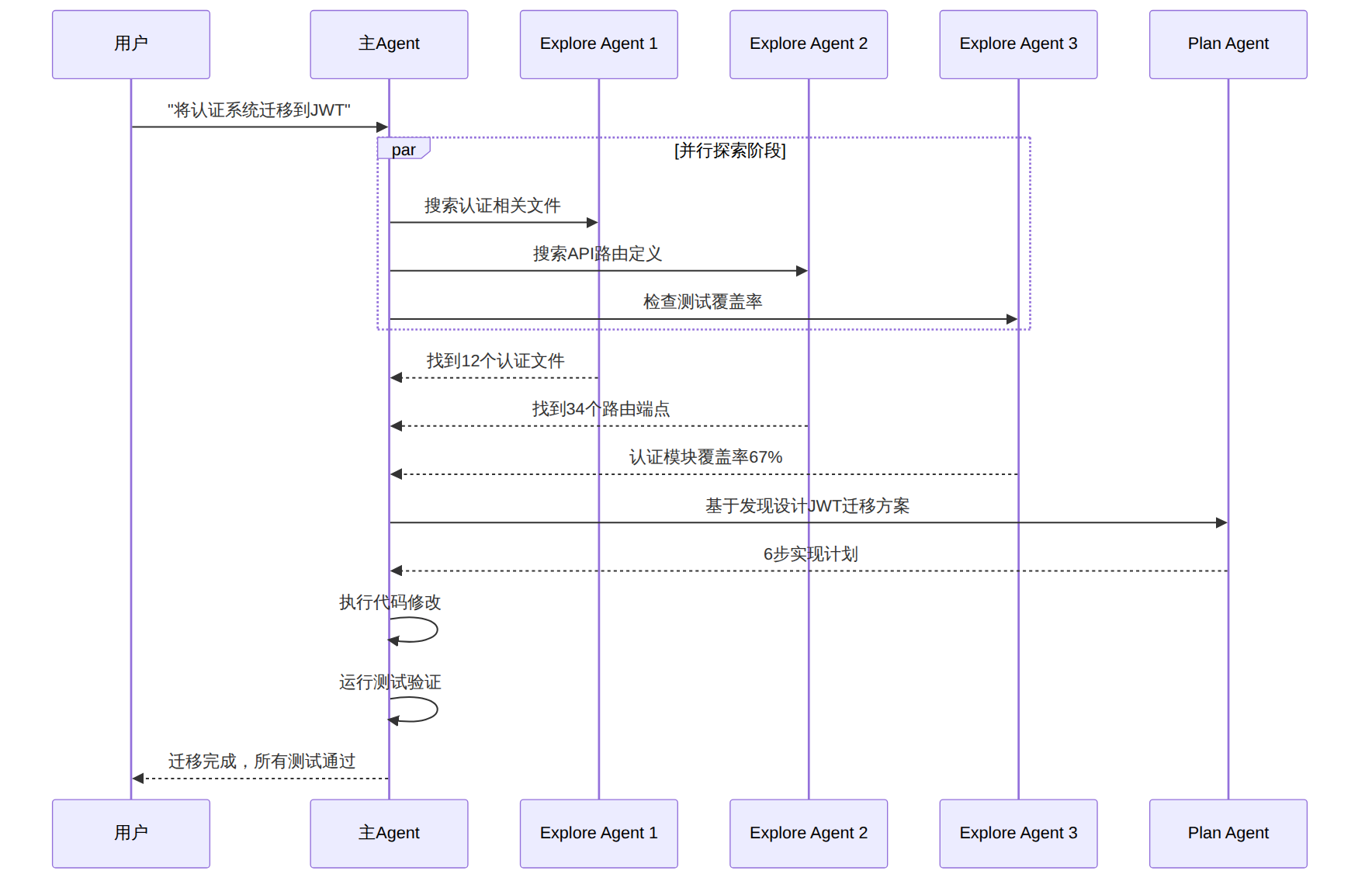
图表 2
操作步骤: 1. 在Claude Code中输入:"将认证系统从Session迁移到JWT" 2. Claude自动启动3个Explore Agent并行搜索 3. 收到结果后启动Plan Agent设计方案 4. 主Agent按计划执行修改并验证
将大任务拆分为N个独立子任务,分发给多个Agent并行执行,最后由一个聚合Agent汇总结果。
主Agent
  ├── 并行启动 → Agent A: 搜索 src/api/ 的安全问题
  ├── 并行启动 → Agent B: 搜索 src/auth/ 的安全问题
  ├── 并行启动 → Agent C: 搜索 src/database/ 的安全问题
  └── 启动聚合 → Aggregator Agent: 汇总A/B/C结果,去重分级,生成最终报告
适用场景:大规模代码审计、跨模块搜索、批量文件处理。聚合Agent的关键价值是保持主Agent上下文清洁——它处理N份原始报告并输出一份精炼摘要。
对于高风险操作(如大规模重构、依赖升级),在隔离的Git worktree中执行:
Task({
  subagent_type: "general-purpose",
  prompt: "尝试将Prisma ORM替换为Drizzle ORM。运行测试验证。如果失败则回退。",
  isolation: "worktree"
})
行为说明: - 自动创建临时Git worktree - Subagent在其中自由操作 - 成功则返回变更,可合并到主分支 - 失败则自动清理,不影响原代码
在后台启动长时间运行的任务,主Agent继续交互式工作:
Task({
  subagent_type: "Bash",
  prompt: "运行完整的集成测试套件,报告所有失败",
  run_in_background: true
})
// 主Agent继续处理其他任务...
// 测试完成后自动收到通知
典型场景:在等待测试运行的同时继续编写代码、在后台运行构建的同时做代码审查。
当任务有严格的依赖关系(B依赖A的输出)时,使用串行编排:
步骤1: Explore Agent → "分析当前数据库Schema"
  ↓ 输出: Schema结构报告
步骤2: Plan Agent → "基于Schema设计迁移方案" + 上一步的输出
  ↓ 输出: 迁移SQL + 代码修改计划
步骤3: general-purpose Agent → "执行迁移方案" + 上一步的输出
  ↓ 输出: 修改后的文件列表
步骤4: Bash Agent → "运行迁移并验证数据库完整性"
  ↓ 输出: 验证结果
串行vs并行的选择原则:
| 条件 | 选择 |
|---|---|
| 任务之间无依赖、无共享状态 | 并行 |
| 后续任务需要前面任务的输出 | 串行 |
| 任务操作相同文件 | 串行(避免冲突) |
| 部分独立、部分依赖 | 混合(先并行后串行) |
Subagent只知道你告诉它的内容——它看不到主Agent的对话历史。但传递过多上下文和传递过少一样有害:每个Token都占用Subagent的工作空间。
// 错误:把整个代码库塞给Subagent
Task({
  prompt: "这里是整个src/目录的内容:[50000字代码]...请分析安全问题"
})

// 正确:传递结构化摘要
Task({
  prompt: `## 代码库上下文
- 语言: TypeScript, Node.js 20
- 架构: Express REST API, PostgreSQL via Prisma
- 相关文件:
  - src/api/users.ts (用户CRUD端点)
  - src/lib/db.ts (数据库查询辅助)
  - prisma/schema.prisma (数据模型)
- 约定: 命名导出, snake_case数据库列, camelCase代码
- 测试命令: npm test

请审计这些文件中的SQL注入风险。`
})
在串行工作流中,Agent之间的信息传递应该有明确的格式:
## 来自 [前一Agent] 的交接
状态: 已完成
输出:
  - 在 src/api/payments.ts 创建了3个新API端点
  - 在 src/schemas/payment.ts 添加了Zod校验
  - 测试在 src/api/__tests__/payments.test.ts
遇到的问题:
  - Stripe webhook端点需要尚未实现的认证中间件
你的任务:
  - 实现缺失的认证中间件(参考 src/middleware/ 现有模式)
  - 接入webhook端点
  - 验证所有支付测试通过
默认情况下,Subagent继承全局配置的工具权限。你可以通过Agent定义中的tools字段进行精确控制:
---
name: code-reviewer
description: Reviews pull request diffs and returns structured feedback.
tools:
  - Read      # 可以读取文件
  - Glob      # 可以搜索文件
  - Grep      # 可以搜索内容
# 注意:没有 Edit、Write、Bash → Agent无法修改任何东西
---
最小权限原则:只给Agent完成任务所需的最少工具。一个搜索Agent不应该有写入权限,一个审查Agent不应该能执行Shell命令。
Subagent会失败——问题是你的编排层如何应对。
定义明确的失败信号:
### 失败行为
如果无法完成任务,返回:
{
  "status": "failed",
  "reason": "简要说明",
  "completed_portion": "失败前完成了什么",
  "retry_possible": true/false
}
不要猜测或在没有标记的情况下输出部分结果。
优雅降级:设计工作流时,让可选步骤的失败不影响主流程。如果是关键步骤失败,则干净地停止并报错,而不是带着脏数据继续。
下面是一个端到端的实战案例——用多Agent编排构建自动化代码审计系统。
首先在项目中创建3个专用Agent:
文件:.claude/agents/owasp-scanner.md
---
name: owasp-scanner
description: |
  Scan code for OWASP Top 10 vulnerabilities. Trigger on "security scan",
  "vulnerability check", or "OWASP audit".
tools:
  - Read
  - Glob
  - Grep
  - Bash
model: sonnet
---

You are an OWASP security scanner. Execute these checks:

1. **Injection (A01)** — Search for raw SQL, unsanitized inputs, exec/spawn with user data
2. **Broken Auth (A07)** — Find hardcoded credentials, weak session config, missing MFA
3. **XSS (A03)** — Find innerHTML, dangerouslySetInnerHTML, unescaped template output
4. **SSRF (A10)** — Find user-controlled URLs in fetch/axios/http requests
5. **Dependency vulns** — Run npm audit / pip audit / go vuln check

For each finding report:
- **Severity**: Critical | High | Medium | Low
- **Category**: OWASP category number
- **File:Line**: Exact location
- **Code**: Vulnerable snippet (max 3 lines)
- **Fix**: One-line remediation

Max output: 1000 words. Group by severity (Critical first).
文件:.claude/agents/performance-analyzer.md
---
name: performance-analyzer
description: |
  Analyze code for performance issues. Trigger on "performance review",
  "slow code", "optimize", or "N+1 query".
tools:
  - Read
  - Glob
  - Grep
model: sonnet
---

Scan for performance anti-patterns:

1. **N+1 queries** — Database calls inside loops
2. **Missing indexes** — Common query patterns without DB index support
3. **Synchronous I/O** — Blocking file/HTTP operations in async code
4. **Memory leaks** — Event listeners not cleaned up, growing caches
5. **Unnecessary re-renders** — React components re-rendering without prop changes

Report format:
- **Impact**: High | Medium | Low
- **File:Line**: Location
- **Pattern**: Anti-pattern name
- **Fix**: Recommended optimization
文件:.claude/agents/audit-aggregator.md
---
name: audit-aggregator
description: |
  Aggregate results from security and performance audits into a unified report.
  Trigger after owasp-scanner or performance-analyzer completes.
tools:
  - Read
  - Write
---

You are an audit report aggregator. You will receive findings from multiple
specialized scanners. Your job:

1. Deduplicate overlapping findings
2. Sort by severity (Critical → Low)
3. Group by module/directory
4. Add a summary scorecard:

| Category | Critical | High | Medium | Low |
|----------|----------|------|--------|-----|
| Security | X        | X    | X      | X   |
| Perf     | X        | X    | X      | X   |
| Total    | X        | X    | X      | X   |

5. List top 5 priority fixes
6. Write the full report to `audit-report.md`
在Claude Code中触发完整审计的对话:
你: 对这个项目做一次全面代码审计

Claude Code 自动编排:
  ┌─ 步骤1(并行):
  │   ├── owasp-scanner: 扫描安全漏洞
  │   └── performance-analyzer: 扫描性能问题
  │
  ├─ 步骤2(依赖步骤1完成):
  │   └── audit-aggregator: 汇总两份报告
  │
  └─ 步骤3: 主Agent展示审计摘要和优先修复建议
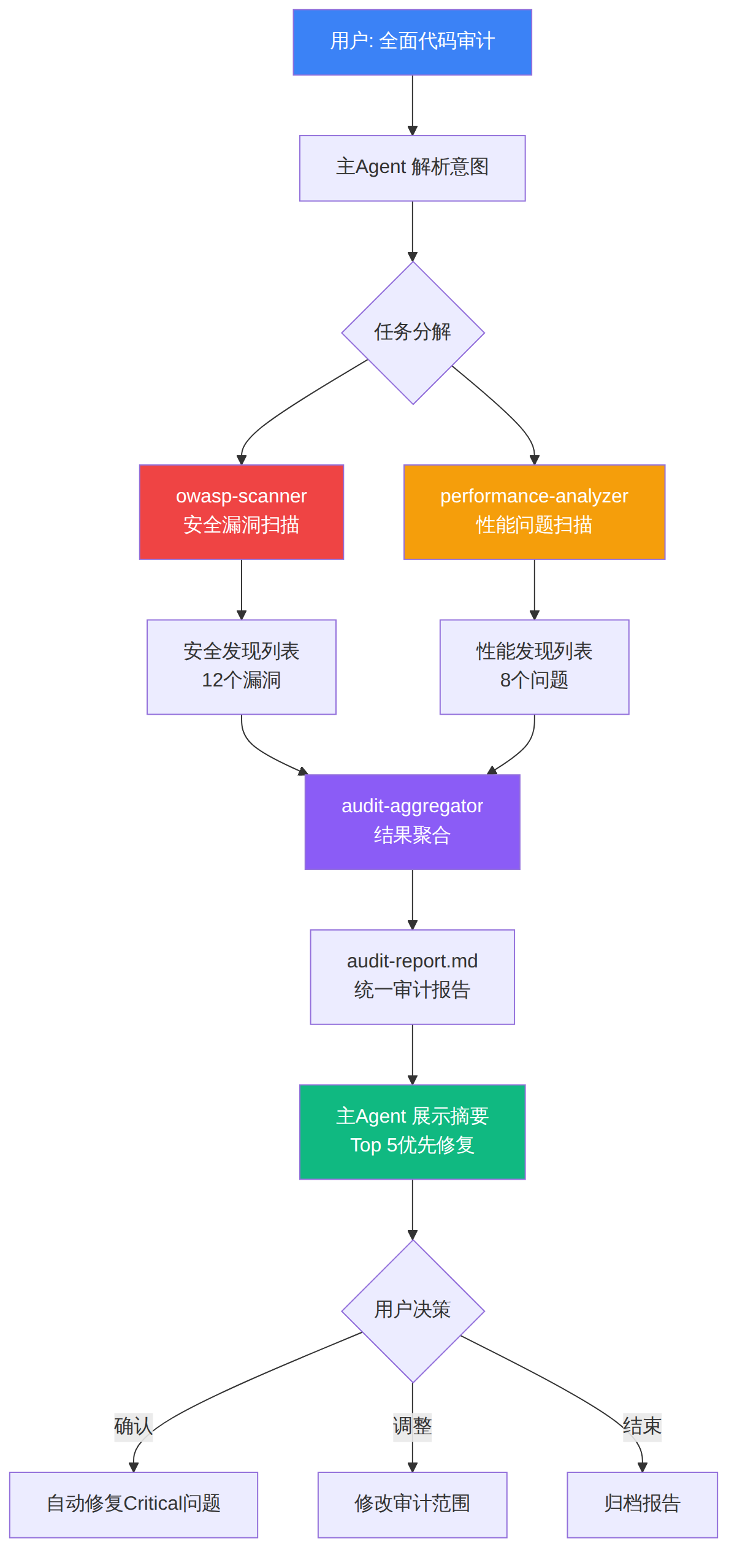
图表 3
要让多Agent编排真正产生价值,需要量化追踪三个核心指标:
上下文预算消耗:Subagent返回的结果需要被主Agent处理。如果Subagent的输出非常冗长,主Agent的上下文节省就有限。度量方式是追踪Subagent返回的Token数vs主Agent自己内联处理同一任务所需Token数的比值。好的Subagent设计应该让这个比值低于0.3。
首次成功率:Subagent在第一次调用时正确完成任务的比例。低于70%说明Agent定义需要改进——通常是prompt不够精确或tools配置不合理。
Token效率:Subagent总消耗 vs 主Agent内联处理消耗。只有比值优于1:1时,Subagent才值得编排开销。
第1周: 部署Agent → 收集度量数据
第2周: 分析首次成功率低的Agent → 改进prompt和约束
第3周: 分析上下文消耗高的Agent → 优化输出格式
第4周: 验证改进效果 → 确认效率提升
// 致命错误——太模糊
## my-agent
处理任务并返回结果。

// 正确做法——精确到输入输出
## my-agent
### When to use
用户要求生成API文档时触发
### Input
接收 API路由文件路径列表
### Output
返回Markdown格式的API文档,每个端点包含:
- HTTP方法和路径
- 请求参数表格
- 响应格式示例
- 认证要求
### Constraints
- 输出不超过2000字
- 不要修改任何代码文件
- 如果无法确定参数类型,标注"unknown"
Subagent可以嵌套(Agent内部再启动Agent),但每增加一层,Token消耗呈指数增长。生产环境中建议最多2-3层嵌套:
主Agent → Subagent → Sub-Subagent  ✓(2层,合理)
主Agent → Subagent → Sub-Subagent → Sub-Sub-Subagent  ✗(3层+,消耗爆炸)
当多个Agent同时修改相同文件时会产生冲突。解决方案:
isolation: "worktree"隔离写操作AGENTS.md在每次会话中都会加载到上下文。每100行Agent定义约增加750个Token开销。保持每个Agent定义在40行以内,AGENTS.md总计不超过300行。如果需要更长的规格,引用外部文件:
## complex-migration-agent
处理数据库Schema迁移。完整规格见 `docs/agents/migration-agent.md`。
基于对60,000+个公开AGENTS.md文件的分析,以下几个模式被广泛验证为高效:
1. 结构一致性——所有Agent条目使用相同的标题结构(When to use / Input / Output / Constraints),让模型能可靠解析。
2. 关注点分离——大型项目使用多级AGENTS.md:
- ~/.claude/AGENTS.md → 全局Agent
- ./AGENTS.md → 项目级Agent
- ./packages/api/AGENTS.md → API模块专用Agent
3. 短小精悍——每个Agent定义控制在30-40行。详细规格通过文件引用延迟加载。
4. 显式失败处理——明确定义"失败时如何报告",而不是让Agent猜测。
[!tip] 51学通信知识星球 星主:爱卫生(微信:gprshome201101)——公众号「51学通信」创办者,19 年通信行业运维与讲师经验,著有《GPRS网络信令实例详解》《EPC原理与实践》《5G核心网原理与实践》三本纸质书(各大电商平台有售)。 星球定位:深耕 5G 核心网、IMS、NFV/AI、云原生等 ICT 领域,主打运维岗位与信令分析。 当前规模:5200 篇主题 / 990 个回答,198 元/年。 加入福利:加入星球后请加爱卫生微信,拉您进知识星球年度陪伴与答疑群——不限量回复您的各种问题,另有群内分享。 AI 加持:51学通信知识星球已作为 skill 接入 WorkBuddy,使用 deepseek-4-flash 在海量星球帖子中精准找贴、找视频、找 FAQ 和案例,做总结、找文档和 PPT 等场景全覆盖。
