本教程面向已有 Claude Code 基础使用经验的开发者,系统讲解如何将 Claude Code 集成到 CI/CD 流水线中,重点覆盖官方 anthropics/claude-code-action 的配置、六大核心自动化场景的完整 YAML 模板、多平台适配方案(GitHub Actions / GitLab CI / Azure DevOps),以及生产环境中的安全与成本控制策略。学完后你将具备为自己的团队构建 AI 驱动代码审查流水线的能力。
npm install -g @anthropic-ai/claude-code)Claude Code 的 CI/CD 集成并非简单地在流水线中运行 Claude 命令,而是一个完整的 Agent 架构:
┌─────────────────────────────────────────────────────┐
│                   GitHub 事件层                       │
│  PR opened / PR updated / Issue opened / Comment     │
│  / PR Review / Schedule / Manual dispatch            │
└──────────────────────┬──────────────────────────────┘
                       │ webhook trigger
                       ▼
┌─────────────────────────────────────────────────────┐
│              GitHub Actions Runner                    │
│  ┌─────────────┐   ┌───────────────┐                │
│  │ checkout@v6 │──▶│ claude-code-  │                │
│  │             │   │ action@v1     │                │
│  └─────────────┘   └───────┬───────┘                │
│                            │                        │
│         ┌──────────────────┼──────────────────┐     │
│         ▼                  ▼                  ▼     │
│  ┌────────────┐  ┌──────────────┐  ┌──────────┐   │
│  │ gh CLI     │  │ Inline       │  │ File     │   │
│  │ comment    │  │ Comment MCP  │  │ R/W      │   │
│  └────────────┘  └──────────────┘  └──────────┘   │
└──────────────────────┬──────────────────────────────┘
                       │ API calls
                       ▼
              ┌─────────────────┐
              │  Anthropic API  │
              │  / Bedrock /    │
              │  Vertex AI      │
              └─────────────────┘
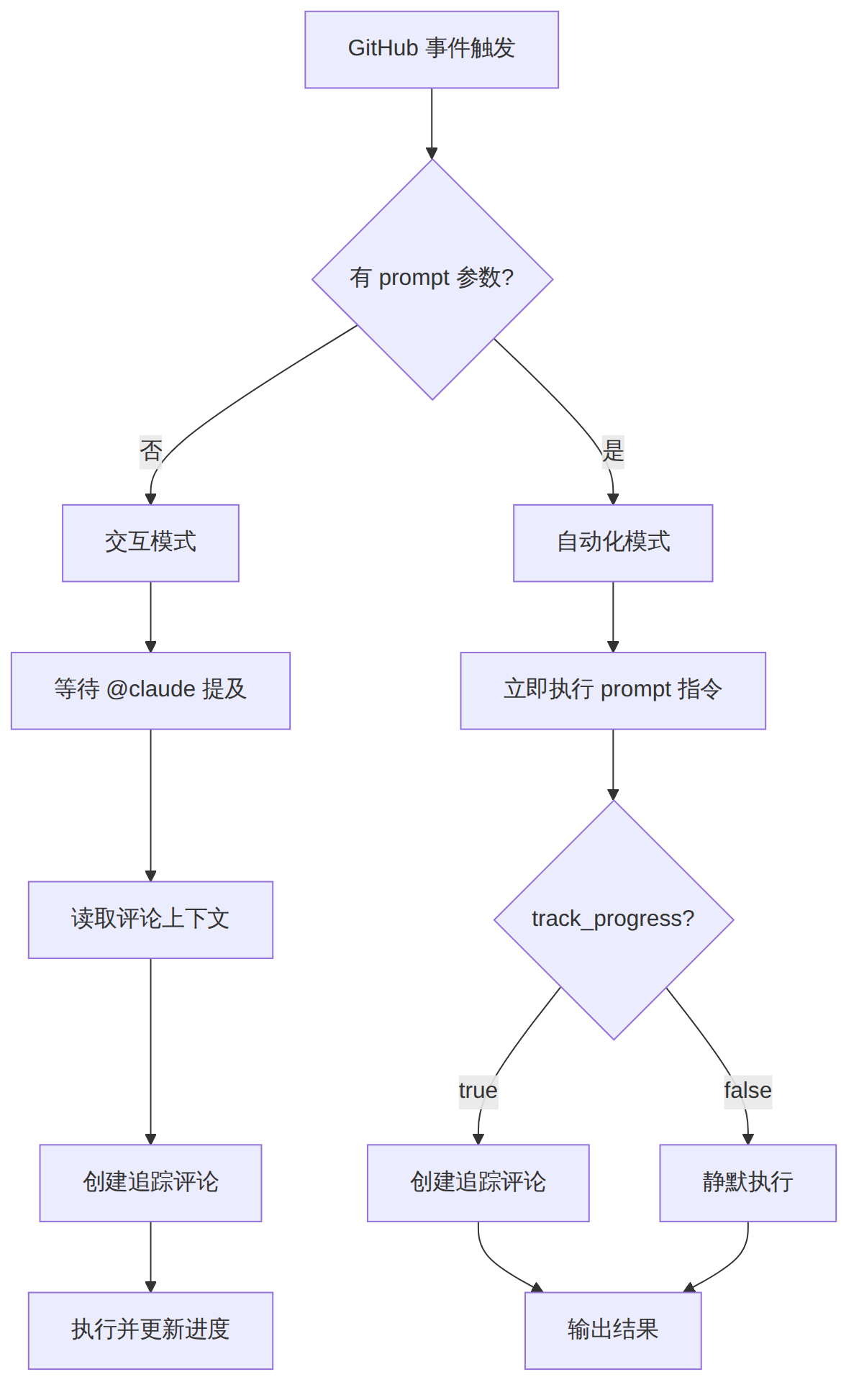
Claude Code Action 有两种运行模式,行为差异显著:
| 特性 | 交互模式(Interactive) | 自动化模式(Automation) |
|---|---|---|
| 触发方式 | 用户在 PR/Issue 中 @claude | 由 prompt 参数自动触发 |
| 进度追踪 | 自动创建带 checkbox 的追踪评论 | 默认不创建(可选 track_progress: true) |
| 适用场景 | 按需提问、手动审查 | 全自动流水线、定时任务 |
| 上下文获取 | 自动包含评论/PR 内容 | 需在 prompt 中用变量注入 |
图表 1
最简单的方式是直接在 Claude Code 终端中运行:
claude
> /install-github-app
该命令会引导你完成:
1. 在 GitHub 上安装 Claude Code App
2. 为你的仓库添加 ANTHROPIC_API_KEY secret
3. 自动生成基础 workflow 文件
注意:你必须是仓库管理员才能执行此操作。此方法仅支持 Anthropic 直连 API,AWS Bedrock / Google Vertex AI 用户需要手动配置。
步骤一:获取 API Key
登录 Anthropic Console 创建 API Key。
步骤二:添加 Repository Secret
# 使用 GitHub CLI 添加 secret
gh secret set ANTHROPIC_API_KEY --body "sk-ant-xxxxx" --repo your-org/your-repo
或在 GitHub 仓库页面:Settings → Secrets and variables → Actions → New repository secret。
步骤三:创建 Workflow 文件
创建 .github/workflows/claude-review.yml:
name: Claude PR Review

on:
  pull_request:
    types: [opened, synchronize]

jobs:
  review:
    runs-on: ubuntu-latest
    permissions:
      contents: read
      pull-requests: write
      id-token: write
    steps:
      - name: Checkout
        uses: actions/checkout@v6
        with:
          fetch-depth: 1

      - name: Claude Review
        uses: anthropics/claude-code-action@v1
        with:
          anthropic_api_key: ${{ secrets.ANTHROPIC_API_KEY }}
          prompt: |
            REPO: ${{ github.repository }}
            PR NUMBER: ${{ github.event.pull_request.number }}

            审查此 PR,关注以下方面:
            - 代码质量与最佳实践
            - 潜在 bug 或逻辑错误
            - 安全隐患
            - 性能问题

            使用 gh pr comment 发布审查意见。
            使用 mcp__github_inline_comment__create_inline_comment 标注具体代码问题。

          claude_args: |
            --allowedTools "mcp__github_inline_comment__create_inline_comment,Bash(gh pr comment:*),Bash(gh pr diff:*),Bash(gh pr view:*)"
步骤四:提交并测试
git add .github/workflows/claude-review.yml
git commit -m "Add Claude Code PR review workflow"
git push origin main
步骤五:验证
创建一个测试 PR,观察 Actions 面板中 Claude 是否成功运行并在 PR 中留下审查评论。
| 问题 | 原因 | 解决方案 |
|---|---|---|
Permission denied |
permissions 配置不完整 | 确保 pull-requests: write 和 id-token: write |
| API Key 报错 | Secret 名称不匹配 | 确认 secret 名称为 ANTHROPIC_API_KEY |
| Claude 不评论 | allowedTools 过于严格 | 检查是否包含 gh pr comment 权限 |
fetch-depth 不足 |
无法获取完整 diff | 设置 fetch-depth: 0 获取完整历史 |
对涉及认证、API、配置文件变更的 PR 自动执行安全审查:
name: Security Review

on:
  pull_request:
    types: [opened, synchronize]
    paths:
      - "src/auth/**"
      - "src/api/**"
      - "config/security.yml"
      - "**/middleware/**"

jobs:
  security-review:
    runs-on: ubuntu-latest
    permissions:
      contents: read
      pull-requests: write
      id-token: write
    steps:
      - uses: actions/checkout@v6
        with:
          fetch-depth: 1

      - uses: anthropics/claude-code-action@v1
        with:
          anthropic_api_key: ${{ secrets.ANTHROPIC_API_KEY }}
          prompt: |
            REPO: ${{ github.repository }}
            PR NUMBER: ${{ github.event.pull_request.number }}

            此 PR 修改了认证或 API 相关文件,请进行安全审计:

            检查项:
            - SQL 注入风险
            - XSS 跨站脚本攻击
            - 认证/授权绕过
            - 敏感信息泄露(硬编码密钥、日志中的密码)
            - CSRF 防护
            - 输入验证是否充分

            对每个发现的问题标注严重级别(Critical/High/Medium/Low)。

          claude_args: |
            --allowedTools "mcp__github_inline_comment__create_inline_comment,Bash(gh pr comment:*),Bash(gh pr diff:*)"
关键设计:paths 过滤器确保仅对安全敏感路径触发,避免不必要的 API 消耗。
对外部贡献者的 PR 施加更严格的审查标准:
name: External Contributor Review

on:
  pull_request:
    types: [opened, synchronize]

jobs:
  external-review:
    if: github.event.pull_request.author_association == 'FIRST_TIME_CONTRIBUTOR'
    runs-on: ubuntu-latest
    permissions:
      contents: read
      pull-requests: write
      id-token: write
    steps:
      - uses: actions/checkout@v6

      - uses: anthropics/claude-code-action@v1
        with:
          anthropic_api_key: ${{ secrets.ANTHROPIC_API_KEY }}
          prompt: |
            REPO: ${{ github.repository }}
            PR NUMBER: ${{ github.event.pull_request.number }}
            CONTRIBUTOR: ${{ github.event.pull_request.user.login }}

            这是 @${{ github.event.pull_request.user.login }} 的首次贡献。

            请进行全面审查:
            - 是否符合项目编码规范
            - 测试覆盖是否充分
            - 文档是否更新
            - 是否有破坏性变更
            - License 头是否正确

            态度友好但审查要彻底,用 inline comment 给出具体建议。

          claude_args: |
            --allowedTools "mcp__github_inline_comment__create_inline_comment,Bash(gh pr comment:*),Bash(gh pr view:*)"
author_association 可选值:FIRST_TIME_CONTRIBUTOR、FIRST_TIMER、CONTRIBUTOR、COLLABORATOR、MEMBER、OWNER、NONE。
新 Issue 创建时自动分类、打标签、评估优先级:
name: Issue Triage

on:
  issues:
    types: [opened]

jobs:
  triage:
    runs-on: ubuntu-latest
    permissions:
      issues: write
      id-token: write
    steps:
      - uses: actions/checkout@v6

      - uses: anthropics/claude-code-action@v1
        with:
          anthropic_api_key: ${{ secrets.ANTHROPIC_API_KEY }}
          prompt: |
            REPO: ${{ github.repository }}
            ISSUE NUMBER: ${{ github.event.issue.number }}

            分析此 Issue 并执行:
            1. 判断类型:bug / feature / docs / question / enhancement
            2. 评估优先级:P0(紧急) / P1(高) / P2(中) / P3(低)
            3. 如果是 bug,判断涉及哪个模块
            4. 添加合适的标签(使用 gh issue edit --add-label)
            5. 如果信息不足,评论请求补充

          claude_args: |
            --allowedTools "Bash(gh issue:*)"
每周自动扫描仓库健康状态:
name: Weekly Maintenance

on:
  schedule:
    - cron: "0 2 * * 0"  # 每周日凌晨2点 UTC
  workflow_dispatch:

jobs:
  maintenance:
    runs-on: ubuntu-latest
    permissions:
      contents: write
      issues: write
      pull-requests: write
      id-token: write
    steps:
      - uses: actions/checkout@v6
        with:
          fetch-depth: 0

      - uses: anthropics/claude-code-action@v1
        with:
          anthropic_api_key: ${{ secrets.ANTHROPIC_API_KEY }}
          prompt: |
            REPO: ${{ github.repository }}

            执行每周仓库维护:
            1. 运行 npm audit 检查依赖安全漏洞
            2. 检查 package.json 中过时的依赖
            3. 扫描 90 天以上的 open issue,建议关闭或标注 stale
            4. 检查近期 commit 中的 TODO 注释
            5. 汇总为一份维护报告,创建新 Issue

            如果发现 Critical 级别安全问题,立即在相关 PR 中评论。

          claude_args: |
            --max-turns 20
            --allowedTools "Read,Bash(npm:*),Bash(gh issue:*),Bash(gh pr:*),Bash(git log:*)"
API 代码变更时自动更新文档:
name: Doc Sync

on:
  pull_request:
    types: [opened, synchronize]
    paths:
      - "src/api/**/*.ts"
      - "src/api/**/*.py"

jobs:
  doc-sync:
    runs-on: ubuntu-latest
    permissions:
      contents: write
      pull-requests: write
      id-token: write
    steps:
      - uses: actions/checkout@v6

      - uses: anthropics/claude-code-action@v1
        with:
          anthropic_api_key: ${{ secrets.ANTHROPIC_API_KEY }}
          prompt: |
            REPO: ${{ github.repository }}
            PR NUMBER: ${{ github.event.pull_request.number }}

            此 PR 修改了 API 代码,请同步更新文档:
            1. 更新 README.md 中的 API 端点说明
            2. 更新 docs/api-reference.md
            3. 如果有新增端点,添加请求/响应示例

            直接修改文件并提交到当前分支。

          claude_args: |
            --allowedTools "Read,Edit,Write,Bash(git add:*),Bash(git commit:*),Bash(git push:*)"
强制执行团队编码规范清单:
name: Team Checklist Review

on:
  pull_request:
    types: [opened, synchronize]

jobs:
  checklist:
    runs-on: ubuntu-latest
    permissions:
      contents: read
      pull-requests: write
      id-token: write
    steps:
      - uses: actions/checkout@v6

      - uses: anthropics/claude-code-action@v1
        with:
          anthropic_api_key: ${{ secrets.ANTHROPIC_API_KEY }}
          track_progress: true
          prompt: |
            REPO: ${{ github.repository }}
            PR NUMBER: ${{ github.event.pull_request.number }}

            按照团队清单逐项审查:

            ## 代码质量
            - 代码是否符合风格指南
            - 是否有注释掉的代码
            - 变量命名是否清晰
            - 是否遵循 DRY 原则

            ## 测试
            - 新函数是否有单元测试
            - 新端点是否有集成测试
            - 边界情况是否覆盖
            - 测试覆盖率是否 > 80%

            ## 安全
            - 无硬编码凭证
            - 有输入验证
            - 错误处理完善
            - 日志不含敏感信息

            逐项检查,在 PR 中发布汇总评论。

          claude_args: |
            --allowedTools "mcp__github_inline_comment__create_inline_comment,Bash(gh pr comment:*),Bash(gh pr diff:*)"
claude_args 完整参数指南claude_args 是控制 Claude 行为的核心入口,支持 Claude Code CLI 的全部参数:
claude_args: |
  --model claude-sonnet-4-6-20250805
  --max-turns 15
  --allowedTools "Edit,Read,Write,Bash(npm:*),Bash(gh pr:*)"
  --system-prompt "你是高级安全审计专家。严格遵循 OWASP Top 10 标准。"
常用参数组合:
| 用途 | 推荐参数 |
|---|---|
| 成本敏感 | --model claude-haiku-4-5-20251001 --max-turns 5 |
| 高质量审查 | --model claude-opus-4-6-20250805 --max-turns 20 |
| 仅审查不修改 | --allowedTools "Read,Bash(gh pr comment:*),Bash(gh pr diff:*)" |
| 允许修改文件 | --allowedTools "Read,Edit,Write,Bash(git:*)" |
permissions:
  # 仅审查(不修改代码)
  contents: read
  pull-requests: write
  id-token: write

  # 需要修改代码时
  contents: write
  pull-requests: write
  id-token: write
  actions: read    # Claude 读取 CI 结果时需要
安全建议:
- 审查类 workflow 只给 contents: read
- 修改类 workflow 给 contents: write,但限制 paths 触发
- 永远不要给 actions: write 权限
- API Key 使用 Organization Secret 管理而非个人 Secret
Claude Code Action 支持 AWS Bedrock 和 Google Vertex AI:
# AWS Bedrock
- uses: anthropics/claude-code-action@v1
  with:
    use_bedrock: true
    aws_access_key_id: ${{ secrets.AWS_ACCESS_KEY_ID }}
    aws_secret_access_key: ${{ secrets.AWS_SECRET_ACCESS_KEY }}
    aws_region: us-east-1

# Google Vertex AI
- uses: anthropics/claude-code-action@v1
  with:
    use_vertex: true
    google_api_key: ${{ secrets.GOOGLE_API_KEY }}
    google_region: us-east5
# 策略一:使用便宜模型做初筛
claude_args: |
  --model claude-haiku-4-5-20251001
  --max-turns 5

# 策略二:仅对特定路径触发
on:
  pull_request:
    paths:
      - "src/**"
      - "!**/*.test.*"    # 排除测试文件
      - "!**/*.md"        # 排除文档

# 策略三:限制并发
concurrency:
  group: claude-review-${{ github.event.pull_request.number }}
  cancel-in-progress: true
Claude Code 同样支持 GitLab CI/CD:
# .gitlab-ci.yml
stages:
  - review

claude-review:
  stage: review
  image: node:20
  only:
    - merge_requests
  variables:
    CLAUDE_CODE_USE_BEDROCK: "0"
  before_script:
    - npm install -g @anthropic-ai/claude-code
  script:
    - |
      claude --dangerously-skip-permissions \
        -p "Review this merge request for code quality, security issues, and best practices.
        REPO: ${CI_PROJECT_PATH}
        MR NUMBER: ${CI_MERGE_REQUEST_IID}

        Post your findings as a comment on the merge request using:
        curl --header 'PRIVATE-TOKEN: ${GITLAB_TOKEN}' \
          --data-urlencode 'body@-' \
          '${CI_API_V4_URL}/projects/${CI_PROJECT_ID}/merge_requests/${CI_MERGE_REQUEST_IID}/notes' <<'EOF'
      [审查结果将写入此处]
      EOF
      "
  variables:
    ANTHROPIC_API_KEY: $ANTHROPIC_API_KEY
# azure-pipelines.yml
trigger:
  - main

pr:
  - main

jobs:
  - job: ClaudeReview
    displayName: "Claude Code Review"
    pool:
      vmImage: "ubuntu-latest"
    steps:
      - task: NodeTool@0
        inputs:
          versionSpec: "20.x"

      - script: npm install -g @anthropic-ai/claude-code
        displayName: "Install Claude Code"

      - script: |
          claude --dangerously-skip-permissions \
            -p "Review the changes in this PR. Focus on code quality and security.
            Post findings as a PR comment using the Azure DevOps REST API."
        displayName: "Run Claude Review"
        env:
          ANTHROPIC_API_KEY: $(ANTHROPIC_API_KEY)
          SYSTEM_ACCESSTOKEN: $(System.AccessToken)
#!/bin/bash
# 通用 Claude Code CI 脚本
# 适用于 Jenkins、TeamCity 等任何 CI 系统

# 安装 Claude Code
npm install -g @anthropic-ai/claude-code

# 获取变更的文件列表
CHANGED_FILES=$(git diff --name-only origin/main...HEAD)

# 运行 Claude 审查
claude --dangerously-skip-permissions \
  -p "审查以下文件的变更:${CHANGED_FILES}

  请检查:
  1. 代码质量问题
  2. 安全隐患
  3. 性能瓶颈

  输出格式:JSON,包含 file、line、severity、description 字段。" \
  --output-format json \
  --max-turns 10 \
  > claude-review-result.json

# 解析结果并发布到你的系统
cat claude-review-result.json
将以上所有场景整合为一个完整的 CI/CD 配置:
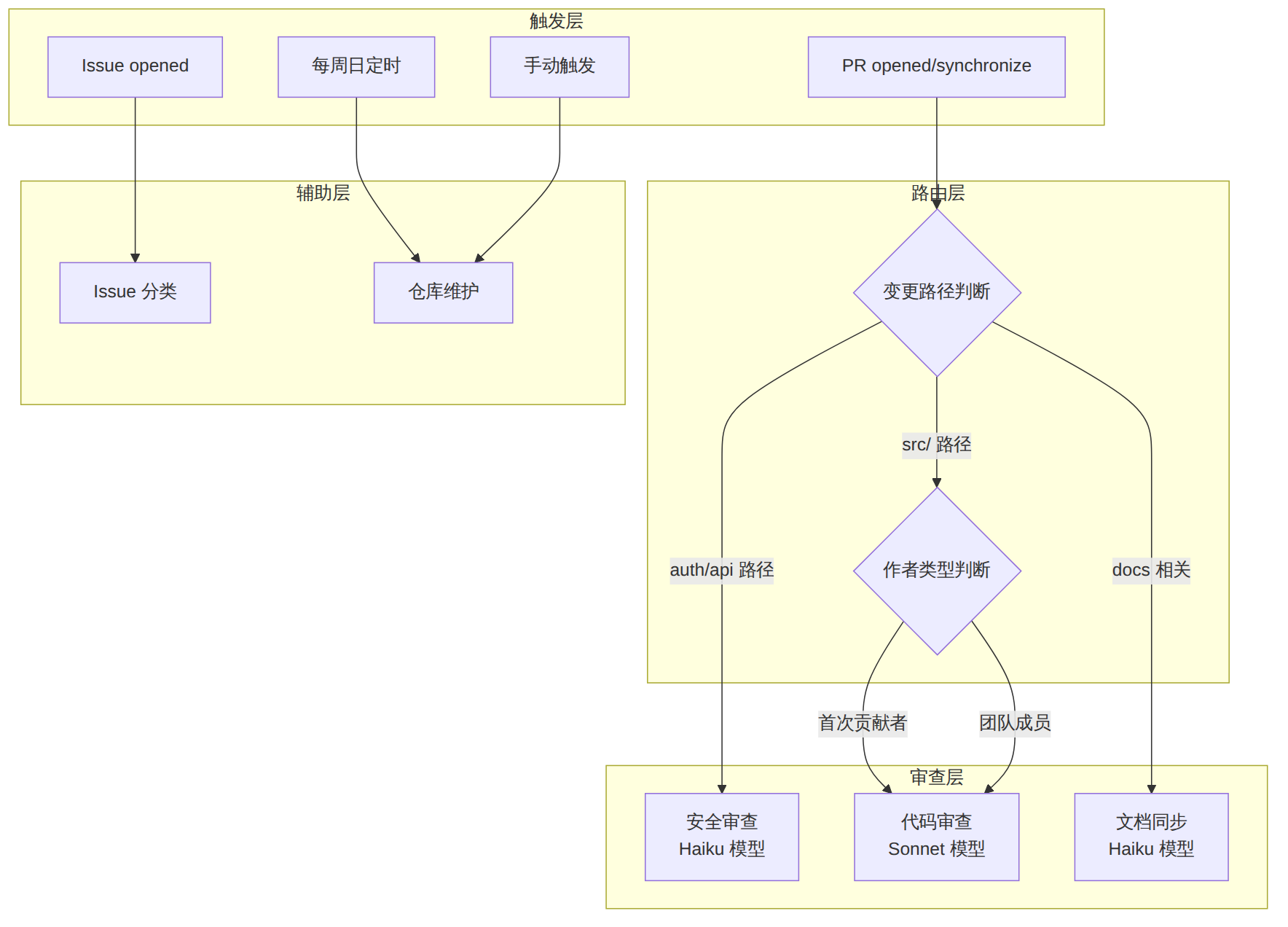
图表 2
完整的项目结构:
your-repo/
├── .github/
│   └── workflows/
│       ├── claude-security-review.yml   # 安全审查
│       ├── claude-pr-review.yml         # 代码审查
│       ├── claude-doc-sync.yml          # 文档同步
│       ├── claude-issue-triage.yml      # Issue 分类
│       └── claude-weekly-maintenance.yml # 定时维护
├── src/
│   ├── auth/
│   ├── api/
│   └── ...
├── CLAUDE.md                            # Claude Code 项目配置
└── docs/
在 CLAUDE.md 中添加 CI/CD 相关指令,让 Claude 在本地和 CI 中保持一致行为:
# CLAUDE.md

## 代码审查标准
- 所有新函数必须有 TypeScript 类型注解
- API 端点必须有输入验证(使用 zod schema)
- 不允许 any 类型
- 测试覆盖率目标:80%+

## CI/CD 注意事项
- PR 审查时参考本文件的标准
- 安全审查重点关注 OWASP Top 10
- 文档更新时使用中文
在 GitHub Actions 面板中找到对应 workflow run,展开 "Run Claude Code" 步骤即可看到完整的交互日志。
| 错误信息 | 原因 | 解决 |
|---|---|---|
401 Unauthorized |
API Key 无效或过期 | 重新生成 Key 并更新 Secret |
429 Rate Limited |
API 调用频率超限 | 添加 concurrency 控制,降低触发频率 |
Tool not allowed |
allowedTools 未包含所需工具 | 扩展 allowedTools 白名单 |
fetch-depth insufficient |
浅克隆无法获取完整 diff | 设置 fetch-depth: 0 |
Permission denied |
permissions 不够 | 添加缺失的权限声明 |
在 Anthropic Console 的 Usage 页面可以查看 API 消耗。建议配置预算告警:
# 在 workflow 中添加成本估算步骤
- name: Cost Estimate
  run: |
    echo "Estimated cost per review:"
    echo "Haiku:   ~$0.01-0.05 per PR"
    echo "Sonnet:  ~$0.05-0.20 per PR"
    echo "Opus:    ~$0.20-1.00 per PR"
训练营适用性评估
| 评估维度 | 说明 |
|---|---|
| 适合训练营类型 | DevOps 工程师训练营、AI 辅助开发工作坊、团队工程效能提升营 |
| 学员基础要求 | 熟悉 Git/GitHub PR 流程,了解 YAML 语法,有 Claude Code 基础使用经验 |
| 预计教学时长 | 3-4 小时(含实操) |
| 推荐教学节奏 | 1h 架构讲解 → 1h 快速搭建实操 → 1h 六大场景动手练习 → 30min 成本/安全讨论 |
| 实验环境需求 | 每人一个 GitHub 仓库 + Anthropic API Key,建议统一提供 Organization 付费 Key |
[!tip] 51学通信知识星球 星主:爱卫生(微信:gprshome201101)——公众号「51学通信」创办者,19 年通信行业运维与讲师经验,著有《GPRS网络信令实例详解》《EPC原理与实践》《5G核心网原理与实践》三本纸质书(各大电商平台有售)。 星球定位:深耕 5G 核心网、IMS、NFV/AI、云原生等 ICT 领域,主打运维岗位与信令分析。 当前规模:5200 篇主题 / 990 个回答,198 元/年。 加入福利:加入星球后请加爱卫生微信,拉您进知识星球年度陪伴与答疑群——不限量回复您的各种问题,另有群内分享。 AI 加持:51学通信知识星球已作为 skill 接入 WorkBuddy,使用 deepseek-4-flash 在海量星球帖子中精准找贴、找视频、找 FAQ 和案例,做总结、找文档和 PPT 等场景全覆盖。
