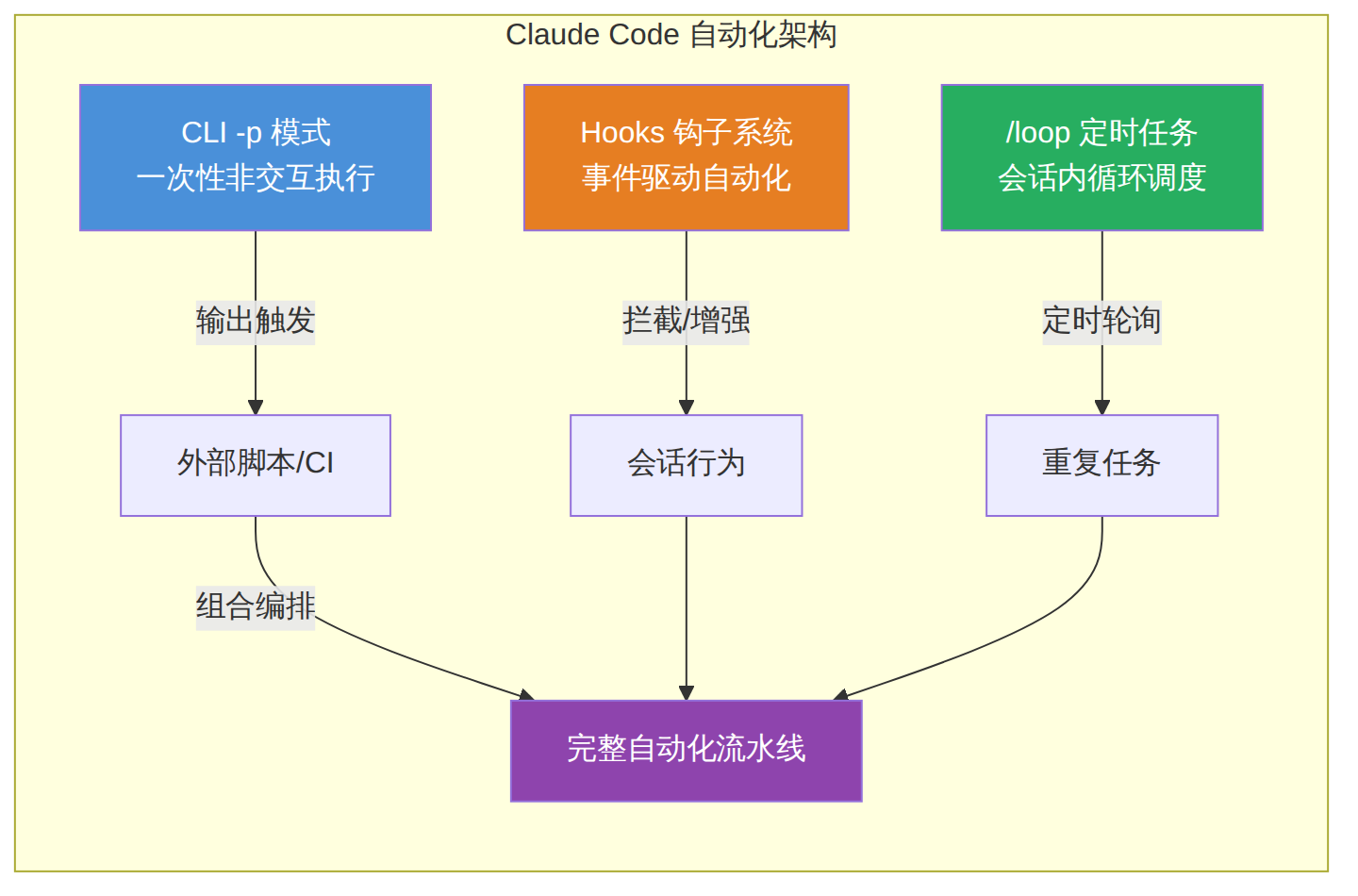
学习目标:掌握 Claude Code 的非交互式运行模式(
-p)、Hooks 生命周期钩子系统、/loop定时任务,以及如何将三者组合为完整的自动化流水线。适合有一定 Claude Code 使用经验、希望将其集成到 CI/CD 或日常脚本中的开发者。前置条件:已安装 Claude Code v2.1.72+(
claude --version检查),熟悉基本命令行操作,有一个可用的 Anthropic API Key。
Claude Code 提供了三种互补的自动化路径,覆盖从"一次性脚本"到"持续运行后台任务"的全部场景:
| 特性 | -p(Print Mode) |
Hooks(钩子系统) | /loop(定时任务) |
|---|---|---|---|
| 触发方式 | 命令行单次执行 | 事件驱动自动触发 | 会话内定时循环 |
| 适用场景 | CI/CD、脚本、批量处理 | 安全策略、自动格式化、通知 | 轮询部署、PR 看护、提醒 |
| 需要打开会话 | 否 | 否(嵌入会话生命周期) | 是(会话内运行) |
| 持久性 | 进程级别 | 会话级别 | 最长 7 天 |
| 访问本地文件 | 是 | 是 | 是 |
| 最小间隔 | N/A | 毫秒级 | 1 分钟 |
图表 1
-p 模式:非交互式执行核心-p(或 --print)标志将 Claude Code 从交互式 TUI 模式切换为纯输出模式:接收 prompt,执行 agentic 循环,将结果打印到 stdout,然后退出。
# 最简用法:问一个问题,获得回答
claude -p "这个项目的入口文件在哪里?"

# 管道输入:将构建日志传入 Claude 分析
cat build-error.txt | claude -p '简要说明这个构建错误的根本原因'

# 将输出保存到文件
claude -p "分析 src/ 目录的代码质量" > code-review.md
-p 模式真正的威力在于与其他标志的组合使用:
# --allowedTools: 控制可用工具(白名单)
claude -p "修复 auth.py 中的 bug" --allowedTools "Read,Edit,Bash"

# --max-turns: 限制 agent 循环次数(防止无限执行)
claude -p "找出所有 TypeScript 错误" --max-turns 10

# --max-budget-usd: 控制成本上限
claude -p "重构整个 API 模块" --max-budget-usd 5.00

# --output-format json: 结构化 JSON 输出
claude -p "总结这个项目" --output-format json

# --bare: 跳过 hooks、skills、plugins、CLAUDE.md 加载(推荐用于 CI)
claude --bare -p "检查代码风格问题" --allowedTools "Read"

# --model: 指定模型
claude -p "快速回答这个问题" --model sonnet
当你需要 Claude 返回符合特定格式的数据时,--json-schema 标志非常强大:
# 提取函数名列表,返回结构化 JSON
claude -p "提取 auth.py 中的所有函数名" \
  --output-format json \
  --json-schema '{
    "type": "object",
    "properties": {
      "functions": {
        "type": "array",
        "items": {"type": "string"}
      }
    },
    "required": ["functions"]
  }'
返回结果包含 result(文本)和 structured_output(结构化数据)两个字段:
# 用 jq 提取结构化输出
claude -p "列出所有 API 端点" \
  --output-format json \
  --json-schema '{"type":"object","properties":{"endpoints":{"type":"array","items":{"type":"string"}}}}' \
  | jq '.structured_output'
对于长时间运行的任务,使用 stream-json 获取实时输出:
# 实时流式输出
claude -p "解释递归" \
  --output-format stream-json \
  --verbose \
  --include-partial-messages

# 只过滤文本内容(像 ChatGPT 一样的打字效果)
claude -p "写一首诗" \
  --output-format stream-json \
  --verbose \
  --include-partial-messages | \
  jq -rj 'select(.type == "stream_event" and .event.delta.type? == "text_delta") | .event.delta.text'
-p 模式支持多轮对话:
# --continue: 继续上一次会话
claude -p "继续修复剩下的测试" --continue

# --resume: 恢复指定会话
claude -p "检查之前修复的结果" --resume auth-refactor

# --session-id: 使用特定会话 ID
claude -p "继续之前的对话" --session-id "550e8400-e29b-41d4-a716-446655440000"
| 问题 | 原因 | 解决方案 |
|---|---|---|
| 命令挂起不返回 | 遇到权限提示 | 添加 --allowedTools 或使用 --bare |
| 输出中混入乱码 | TUI 转义序列 | 使用 --output-format json |
| stdin 超过 10MB | v2.1.128+ 限制 | 写入文件,在 prompt 中引用文件路径 |
| 成本不可控 | Agent 无限循环 | 添加 --max-turns 和 --max-budget-usd |
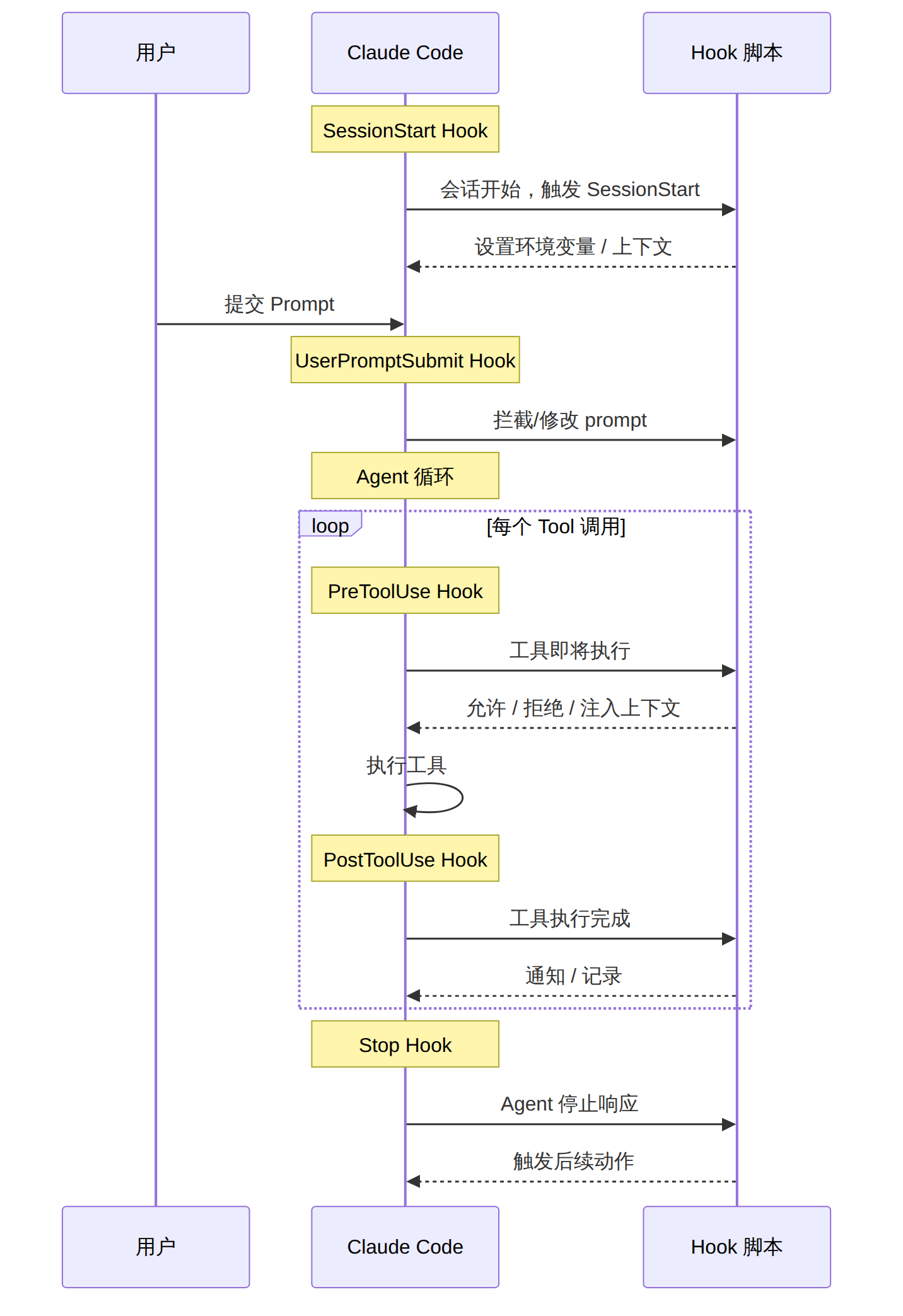
Hooks 是用户定义的 shell 命令、HTTP 端点或 LLM prompt,在 Claude Code 会话生命周期的特定节点自动执行。它们不是"可选的插件",而是 Claude Code 自动化的核心基础设施。
图表 2
Claude Code 提供了 20+ 个 Hook 事件,按触发频率分为三类:
每会话一次:
- SessionStart — 会话开始或恢复
- SessionEnd — 会话终止
- Setup — --init-only 或 -p --init 模式下的初始化
每轮一次:
- UserPromptSubmit — 用户提交 prompt
- Stop — Claude 完成响应
- StopFailure — API 错误导致终止
每个 Tool 调用:
- PreToolUse — 工具执行前(可阻止)
- PostToolUse — 工具执行后
- PostToolUseFailure — 工具执行失败后
- PermissionRequest — 权限对话框出现时
- PermissionDenied — 权限被拒绝时
Hook 定义在 JSON 配置文件中,有三个层级的作用域:
~/.claude/settings.json        → 全局,所有项目
.claude/settings.json          → 项目级,可提交到 Git
.claude/settings.local.json    → 项目级,本地专用(.gitignore)
配置结构是三层嵌套:事件 → 匹配器 → 处理器:
{
  "hooks": {
    "PreToolUse": [
      {
        "matcher": "Bash",
        "hooks": [
          {
            "type": "command",
            "command": "${CLAUDE_PROJECT_DIR}/.claude/hooks/block-rm.sh"
          }
        ]
      }
    ]
  }
}
阻止所有 rm -rf 命令的执行:
{
  "hooks": {
    "PreToolUse": [
      {
        "matcher": "Bash",
        "hooks": [
          {
            "type": "command",
            "if": "Bash(rm *)",
            "command": ".claude/hooks/block-rm.sh"
          }
        ]
      }
    ]
  }
}
#!/bin/bash
# .claude/hooks/block-rm.sh
COMMAND=$(jq -r '.tool_input.command')
if echo "$COMMAND" | grep -q 'rm -rf'; then
  jq -n '{
    hookSpecificOutput: {
      hookEventName: "PreToolUse",
      permissionDecision: "deny",
      permissionDecisionReason: "危险命令 rm -rf 已被 Hook 拦截"
    }
  }'
else
  exit 0
fi
每次编辑文件后自动运行 Prettier:
{
  "hooks": {
    "PostToolUse": [
      {
        "matcher": "Edit|Write",
        "hooks": [
          {
            "type": "command",
            "command": ".claude/hooks/auto-format.sh"
          }
        ]
      }
    ]
  }
}
#!/bin/bash
# .claude/hooks/auto-format.sh
FILE_PATH=$(jq -r '.tool_input.file_path // .tool_input.path')
if [[ "$FILE_PATH" == *.ts || "$FILE_PATH" == *.tsx ]]; then
  npx prettier --write "$FILE_PATH" 2>/dev/null
fi
exit 0
禁止 Claude 读写 .env 文件:
{
  "hooks": {
    "PreToolUse": [
      {
        "matcher": "Read|Edit|Write",
        "hooks": [
          {
            "type": "command",
            "command": ".claude/hooks/protect-env.sh"
          }
        ]
      }
    ]
  }
}
#!/bin/bash
# .claude/hooks/protect-env.sh
FILE_PATH=$(jq -r '.tool_input.file_path // .tool_input.path')
if [[ "$FILE_PATH" == *".env"* ]]; then
  jq -n '{
    hookSpecificOutput: {
      hookEventName: "PreToolUse",
      permissionDecision: "deny",
      permissionDecisionReason: "敏感文件 .env 被 Hook 保护,禁止访问"
    }
  }'
else
  exit 0
fi
任务完成时发送通知:
{
  "hooks": {
    "Stop": [
      {
        "matcher": "",
        "hooks": [
          {
            "type": "command",
            "command": ".claude/hooks/notify-slack.sh"
          }
        ]
      }
    ]
  }
}
#!/bin/bash
# .claude/hooks/notify-slack.sh
SESSION_ID=$(jq -r '.session_id')
curl -s -X POST "$SLACK_WEBHOOK_URL" \
  -H 'Content-type: application/json' \
  -d "{\"text\": \"✅ Claude Code 任务完成 (Session: ${SESSION_ID:0:8})\"}" \
  > /dev/null 2>&1
exit 0
每次会话开始时设置环境变量和加载上下文:
{
  "hooks": {
    "SessionStart": [
      {
        "matcher": "",
        "hooks": [
          {
            "type": "command",
            "command": ".claude/hooks/session-init.sh"
          }
        ]
      }
    ]
  }
}
#!/bin/bash
# .claude/hooks/session-init.sh
# 输出 JSON 以注入环境变量和上下文
jq -n '{
  hookSpecificOutput: {
    hookEventName: "SessionStart",
    environment: {
      PROJECT_STAGE: "development",
      DEPLOY_ENV: "staging"
    }
  }
}'
每次编辑后运行 Lint 检查:
{
  "hooks": {
    "PostToolUse": [
      {
        "matcher": "Edit|Write",
        "hooks": [
          {
            "type": "command",
            "command": ".claude/hooks/lint-check.sh"
          }
        ]
      }
    ]
  }
}
#!/bin/bash
# .claude/hooks/lint-check.sh
FILE_PATH=$(jq -r '.tool_input.file_path // .tool_input.path')

if [[ "$FILE_PATH" == *.py ]]; then
  LINT_OUTPUT=$(ruff check "$FILE_PATH" 2>&1)
  if [ $? -ne 0 ]; then
    jq -n --arg lint "$LINT_OUTPUT" '{
      hookSpecificOutput: {
        hookEventName: "PostToolUse",
        message: ("⚠️ Lint 警告:\n" + $lint)
      }
    }'
  fi
fi
exit 0
Matcher 决定 Hook 何时触发:
| Matcher 值 | 匹配规则 | 示例 |
|---|---|---|
"*" 或省略 |
匹配所有 | 所有工具调用都触发 |
纯字母/数字/\| |
精确匹配 | "Bash" 或 "Edit\|Write" |
| 包含其他字符 | 正则表达式 | "mcp__memory__.*" 匹配所有 memory 工具 |
if 字段提供二次过滤(避免不必要的进程启动开销):
{
  "matcher": "Bash",
  "hooks": [
    {
      "type": "command",
      "if": "Bash(git push*)",
      "command": ".claude/hooks/approve-push.sh"
    }
  ]
}
输入(通过 stdin 传入 JSON):
{
  "tool_name": "Bash",
  "tool_input": {
    "command": "npm test"
  },
  "session_id": "550e8400-...",
  "conversation_turn": 5
}
输出(通过 stdout 返回 JSON):
exit 0 — 允许继续,无额外操作exit 2 — 阻止操作并返回原因/loop:会话内定时任务/loop 是 Claude Code v2.1.72+ 内置的定时任务技能,在活跃会话中按计划重复执行 prompt:
# 固定间隔 + 指定 prompt
/loop 5m check if the deployment finished and tell me what happened

# 自适应间隔(Claude 根据情况动态选择间隔)
/loop check whether CI passed and address any review comments

# 纯维护模式(无 prompt,执行内置维护任务)
/loop
支持以下时间单位:
| 格式 | 含义 |
|---|---|
30s |
30 秒(向上取整到分钟) |
5m |
5 分钟 |
2h |
2 小时 |
1d |
1 天 |
非标准间隔(如 7m、90m)会被取整到最近的可用 cron 表达式。
模式一:固定间隔
/loop 20m /review-pr 1234
Claude 转换为 cron 表达式,按固定计划执行。
模式二:自适应间隔
/loop check CI status and review comments
Claude 在每次迭代后动态选择延迟(1 分钟到 1 小时):构建活跃时短等待,PR 安静时长等待。
模式三:内置维护
/loop
执行内置维护流程:继续未完成的工作 → 处理 PR 评论 → 修复 CI → 清理代码。
创建 .claude/loop.md 替换内置维护 prompt:
<!-- .claude/loop.md -->
检查 `release/next` PR:
- 如果 CI 红灯,拉取失败日志,诊断并推送最小修复
- 如果有新的 review comments,逐条回应
- 如果一切正常绿灯,用一行确认
文件查找优先级:.claude/loop.md(项目级)> ~/.claude/loop.md(用户级)。
# 列出所有活动任务
/scheduled

# 取消特定任务
/cancel <job-id>

# 一次性提醒(用 /schedule 或自然语言)
提醒我下午3点检查部署状态
--resume 恢复:未过期的任务会随会话恢复这是官方推荐的 claude-code-action,通过 @claude 评论触发:
# .github/workflows/claude-review.yml
name: Claude Code Review
on:
  pull_request:
    types: [opened, synchronize]
  issue_comment:
    types: [created]

jobs:
  review:
    if: |
      github.event_name == 'issue_comment' &&
      contains(github.event.comment.body, '@claude') ||
      github.event_name == 'pull_request'
    runs-on: ubuntu-latest
    permissions:
      contents: write
      pull-requests: write
      issues: write
    steps:
      - uses: actions/checkout@v4
        with:
          fetch-depth: 0
      - uses: anthropics/claude-code-action@v1
        with:
          anthropic_api_key: ${{ secrets.ANTHROPIC_API_KEY }}
更精细的控制需要手动编写 workflow:
# .github/workflows/ai-lint.yml
name: AI Code Quality Check
on: [pull_request]

jobs:
  ai-lint:
    runs-on: ubuntu-latest
    steps:
      - uses: actions/checkout@v4
      - uses: actions/setup-node@v4
        with:
          node-version: '20'
      - run: npm install -g @anthropic-ai/claude-code
      - name: Run AI Lint
        env:
          ANTHROPIC_API_KEY: ${{ secrets.ANTHROPIC_API_KEY }}
        run: |
          # --bare: 跳过 hooks/skills/plugins,确保可重复性
          # --allowedTools: 只读权限
          # --max-turns: 防止无限循环
          # --max-budget-usd: 成本控制
          # --output-format json: 机器可解析
          claude --bare -p \
            "Review the diff for this PR. Report:
             1. Security issues
             2. Logic errors
             3. Style violations
             Format: one issue per line as 'file:line: severity: description'" \
            --allowedTools "Read,Grep,Glob" \
            --max-turns 5 \
            --max-budget-usd 1.00 \
            --output-format json > review-result.json
      - name: Post Review
        if: always()
        run: |
          RESULT=$(jq -r '.result' review-result.json)
          gh pr comment ${{ github.event.pull_request.number }} \
            --body "## AI Code Review
            $RESULT"
将 Claude Code 作为 Git pre-commit 检查:
#!/bin/bash
# .git/hooks/pre-commit

# 先跑快速本地检查
npm run lint || exit 1
npm run typecheck || exit 1

# 只在基础检查通过后才运行 AI 分析
STAGED_FILES=$(git diff --cached --name-only --diff-filter=ACM | head -20)
if [ -n "$STAGED_FILES" ]; then
  RESULT=$(echo "$STAGED_FILES" | claude --bare -p \
    "检查这些文件中是否有明显的 bug 或安全问题。只在发现问题时输出 'ISSUE FOUND' 开头的描述,否则不输出任何内容。" \
    --allowedTools "Read" \
    --max-turns 3 \
    --max-budget-usd 0.50 2>/dev/null)

  if echo "$RESULT" | grep -q "ISSUE FOUND"; then
    echo "$RESULT"
    exit 1
  fi
fi
对项目中的所有组件文件批量添加文档注释:
#!/bin/bash
# scripts/batch-document.sh

for file in src/components/*.tsx; do
  echo "Processing: $file"
  claude --bare -p \
    "Add JSDoc comments to all exported functions in this file. Keep comments concise." \
    --allowedTools "Read,Edit" \
    --max-turns 5 \
    --max-budget-usd 0.50
  echo "---"
done
#!/bin/bash
# scripts/batch-with-retry.sh

MAX_RETRIES=3
PROMPT_FILE="scripts/prompts.txt"

while IFS= read -r prompt; do
  RETRY=0
  while [ $RETRY -lt $MAX_RETRIES ]; do
    echo "[$(date)] Executing: $prompt (attempt $((RETRY+1)))"

    timeout 300 claude --bare -p "$prompt" \
      --allowedTools "Read,Edit,Bash" \
      --max-turns 10 \
      --max-budget-usd 2.00 \
      --output-format json > "output-$(date +%s).json" 2>/dev/null

    if [ $? -eq 0 ]; then
      echo "✅ Success"
      break
    fi

    RETRY=$((RETRY + 1))
    echo "❌ Failed, retrying in 10s..."
    sleep 10
  done
done < "$PROMPT_FILE"
结合 cron + -p 模式实现定时夜间代码清理:
#!/bin/bash
# scripts/nightly-cleanup.sh
# 通过 crontab 每晚 2:00 执行:0 2 * * * /path/to/nightly-cleanup.sh

cd /path/to/project
export ANTHROPIC_API_KEY=$(cat ~/.anthropic-api-key)

LOG_FILE="logs/cleanup-$(date +%Y%m%d).log"

# 1. 清理未使用的 imports
echo "[$(date)] Phase 1: Remove unused imports" | tee -a "$LOG_FILE"
claude --bare -p \
  "Remove all unused imports across the codebase in src/. Do not change any logic." \
  --allowedTools "Read,Edit,Grep,Glob" \
  --max-turns 20 \
  --max-budget-usd 3.00 2>&1 | tee -a "$LOG_FILE"

# 2. 修复 lint 错误
echo "[$(date)] Phase 2: Fix linting errors" | tee -a "$LOG_FILE"
claude --bare -p \
  "Run 'npm run lint' and fix all fixable errors. Commit with message 'chore: nightly lint fix'." \
  --allowedTools "Read,Edit,Bash" \
  --max-turns 15 \
  --max-budget-usd 2.00 2>&1 | tee -a "$LOG_FILE"

# 3. 生成质量报告
echo "[$(date)] Phase 3: Generate quality report" | tee -a "$LOG_FILE"
claude --bare -p \
  "Analyze the codebase and generate a quality report covering: security, performance, code style.
   Format as markdown." \
  --allowedTools "Read,Grep,Glob" \
  --max-turns 10 \
  --max-budget-usd 1.00 \
  --output-format json | jq -r '.result' > "reports/quality-$(date +%Y%m%d).md"

echo "[$(date)] Nightly cleanup complete" | tee -a "$LOG_FILE"
-p 模式 + /loop 组合编排将三种自动化机制组合成完整的 DevOps 流水线:

图表 3
将以下内容保存为 .claude/settings.json:
{
  "hooks": {
    "SessionStart": [
      {
        "matcher": "",
        "hooks": [
          {
            "type": "command",
            "command": ".claude/hooks/session-init.sh"
          }
        ]
      }
    ],
    "PreToolUse": [
      {
        "matcher": "Bash",
        "hooks": [
          {
            "type": "command",
            "if": "Bash(rm -rf*)",
            "command": ".claude/hooks/block-destructive.sh"
          }
        ]
      },
      {
        "matcher": "Read|Edit|Write",
        "hooks": [
          {
            "type": "command",
            "command": ".claude/hooks/protect-sensitive.sh"
          }
        ]
      }
    ],
    "PostToolUse": [
      {
        "matcher": "Edit|Write",
        "hooks": [
          {
            "type": "command",
            "command": ".claude/hooks/auto-format.sh"
          }
        ]
      }
    ],
    "Stop": [
      {
        "matcher": "",
        "hooks": [
          {
            "type": "command",
            "command": ".claude/hooks/on-complete.sh"
          }
        ]
      }
    ]
  }
}
然后在会话中启动定时任务:
# 在 Claude Code 交互式会话中
/loop 10m check CI status, if red then pull the log and diagnose
/loop 30m check for new PR review comments and address them
# 层级 1:Turn 限制
--max-turns 10

# 层级 2:预算限制
--max-budget-usd 5.00

# 层级 3:系统级超时
timeout 600 claude --bare -p "task" --max-turns 10 --max-budget-usd 5.00
# 只读审查(最安全)
claude --bare -p "Review code" --allowedTools "Read,Grep,Glob"

# 允许编辑但不允许执行命令
claude --bare -p "Fix bugs" --allowedTools "Read,Edit,Grep,Glob"

# 完全信任(仅用于本地开发,不要用于 CI)
claude --bare -p "Full refactor" --allowedTools "Read,Edit,Bash,Grep,Glob"
#!/bin/bash
# .claude/hooks/audit-log.sh
EVENT=$(jq -c .)
TIMESTAMP=$(date -Iseconds)
echo "$TIMESTAMP $EVENT" >> .claude/audit.log
exit 0
--bare 模式深入理解--bare 是 -p 模式的关键伴侣标志,专为确保可重复性而设计:
| 行为 | 不带 --bare |
带 --bare |
|---|---|---|
| 加载 CLAUDE.md | 是 | 否 |
| 加载 hooks | 是 | 否 |
| 加载 skills/plugins | 是 | 否 |
| 加载 MCP 服务器 | 是 | 否 |
| 加载自动记忆 | 是 | 否 |
| 认证方式 | OAuth + API Key | 仅 API Key |
在 --bare 模式下,只有你显式传入的标志才会生效:
# 裸模式 + 手动注入必要上下文
claude --bare -p "Review this code" \
  --allowedTools "Read" \
  --append-system-prompt "You are a security auditor" \
  --mcp-config ./mcp-servers.json
Anthropic 官方明确表示:--bare 是脚本和 SDK 调用的推荐模式,并将在未来版本中成为 -p 的默认行为。
将所有知识整合为一个完整的 PR 看护系统:
project/
├── .claude/
│   ├── settings.json          # Hook 配置
│   ├── loop.md                # /loop 自定义 prompt
│   └── hooks/
│       ├── block-destructive.sh
│       ├── auto-format.sh
│       ├── protect-sensitive.sh
│       └── notify-slack.sh
├── scripts/
│   ├── pr-babysit.sh          # 主入口脚本
│   └── nightly-review.sh      # 夜间审查
└── .github/
    └── workflows/
        └── claude-ci.yml       # CI/CD 集成
#!/bin/bash
# scripts/pr-babysit.sh
# 用法: ./pr-babysit.sh <PR_NUMBER>

PR_NUMBER=${1:?"Usage: $0 <PR_NUMBER>"}
export ANTHROPIC_API_KEY=$(cat ~/.anthropic-api-key)

echo "🚀 Starting PR babysitter for PR #$PR_NUMBER"

# 步骤 1: 初始代码审查
echo "📋 Phase 1: Initial review"
claude --bare -p \
  "Review PR #$PR_NUMBER using 'gh pr view $PR_NUMBER' and 'gh pr diff $PR_NUMBER'.
   Report issues found and suggest improvements." \
  --allowedTools "Read,Bash" \
  --max-turns 8 \
  --max-budget-usd 2.00

# 步骤 2: 在交互式会话中启动 /loop 监控
echo "🔄 Phase 2: Starting continuous monitoring"
claude -n "pr-$PR_NUMBER-babysitter"
# 在 Claude Code 会话中手动执行:
# /loop 10m check CI status for PR #$PR_NUMBER, if failed then diagnose and push fix
#!/bin/bash
# scripts/nightly-review.sh

cd /path/to/project
export ANTHROPIC_API_KEY=$(cat ~/.anthropic-api-key)

# 获取今天所有更新的 PR
PRS=$(gh pr list --state open --json number,title --jq '.[] | .number')

for PR in $PRS; do
  echo "Reviewing PR #$PR..."

  RESULT=$(claude --bare -p \
    "Review PR #$PR thoroughly. Focus on:
     1. Security vulnerabilities
     2. Performance regressions
     3. Test coverage gaps
     Post the review as a PR comment using 'gh pr comment'" \
    --allowedTools "Read,Bash" \
    --max-turns 10 \
    --max-budget-usd 3.00 \
    --output-format json 2>/dev/null)

  COST=$(echo "$RESULT" | jq -r '.total_cost_usd // "unknown"')
  echo "PR #$PR reviewed. Cost: \$$COST"
done
| 维度 | 评估 |
|---|---|
| 适合训练营类型 | DevOps 自动化训练营、AI 辅助开发训练营、企业级 Claude Code 培训 |
| 学员基础要求 | 熟悉 Shell 脚本、Git、CI/CD 基础概念,有 Claude Code 交互式使用经验 |
| 预计教学时长 | 4-6 小时(含实操) |
| 实操环节建议 | ① 从零配置 Hook 安全策略 → ② 编写 -p 模式批处理脚本 → ③ 搭建 GitHub Actions 审查流程 → ④ 组合为完整流水线 |
| 难度评级 | ⭐⭐⭐⭐(中高级) |
[!tip] 51学通信知识星球 星主:爱卫生(微信:gprshome201101)——公众号「51学通信」创办者,19 年通信行业运维与讲师经验,著有《GPRS网络信令实例详解》《EPC原理与实践》《5G核心网原理与实践》三本纸质书(各大电商平台有售)。 星球定位:深耕 5G 核心网、IMS、NFV/AI、云原生等 ICT 领域,主打运维岗位与信令分析。 当前规模:5200 篇主题 / 990 个回答,198 元/年。 加入福利:加入星球后请加爱卫生微信,拉您进知识星球年度陪伴与答疑群——不限量回复您的各种问题,另有群内分享。 AI 加持:51学通信知识星球已作为 skill 接入 WorkBuddy,使用 deepseek-4-flash 在海量星球帖子中精准找贴、找视频、找 FAQ 和案例,做总结、找文档和 PPT 等场景全覆盖。
