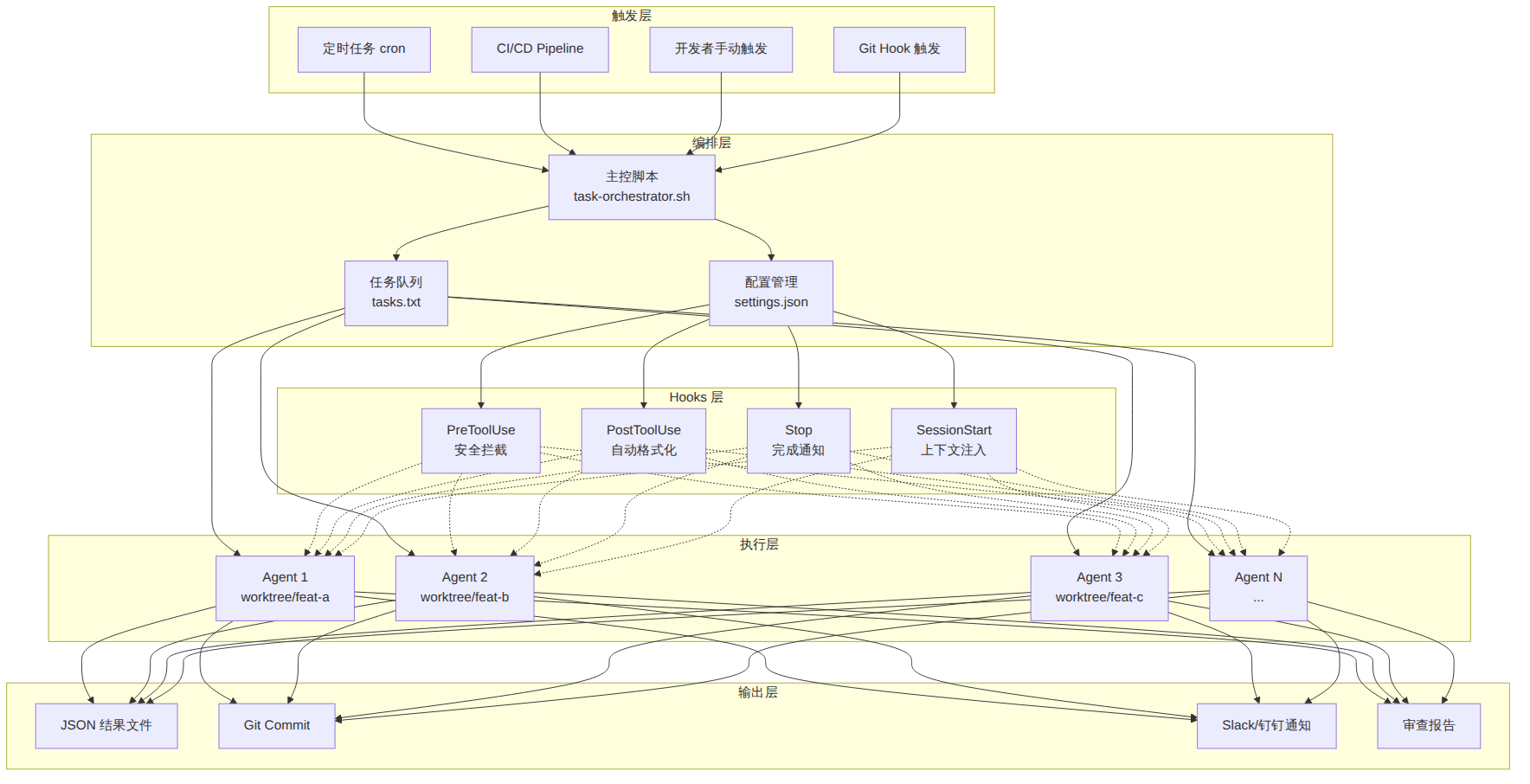
-p 模式到 Hooks 全攻略本教程面向已掌握 Claude Code 基础交互、希望将其纳入自动化流水线的开发者。你将学会:用 -p 标志实现无头(headless)批量任务、用 Hooks 事件系统在工具调用前后注入确定性逻辑、用 Agent SDK 在 Python/TypeScript 中编排多步骤 Agent 工作流。学完后,你能在 CI/CD 管道、定时脚本、并行开发工作树中大规模调度 Claude Code。
适用人群:中高级开发者、DevOps 工程师、AI 工具链架构师。
| 条件 | 说明 |
|---|---|
| Claude Code CLI ≥ 2.0 | claude --version 确认 |
| Node.js ≥ 18 | Agent SDK 运行时依赖 |
| Python ≥ 3.10(可选) | 使用 claude-agent-sdk Python 版本时需要 |
| Git 基础 | 并行 worktree、分支操作 |
| JSON / Shell 脚本 | Hook 编写需要 |
安装 Claude Code:
npm install -g @anthropic-ai/claude-code
claude --version
# 首次运行需完成 OAuth 登录
claude
-p 模式——无头执行的基石-p(即 --print)让 Claude Code 在非交互模式下运行:接收 prompt、执行、输出结果、退出。不进入 REPL。
# 最简用法
claude -p "解释这段代码的作用" < src/utils.ts

# 等价写法(长标志)
claude --print "解释这段代码的作用" < src/utils.ts

# 结合管道
cat error.log | claude -p "分析这个错误日志,给出修复建议"
核心行为: - 读取 stdin(如有)作为附加上下文 - 执行 prompt 中的指令 - 将最终结果写入 stdout - 进程退出码 0 表示成功,非 0 表示错误
--output-format 输出格式控制这是构建自动化管道的关键参数。三种格式各有用途:
# text —— 纯文本,适合人类阅读或简单脚本
claude -p "给这个函数写单元测试" --output-format text < src/math.ts

# json —— 单个 JSON 对象,适合程序消费
claude -p "列出所有 TODO 注释" --output-format json --allowedTools Grep,Glob

# stream-json —— NDJSON(换行分隔 JSON),实时事件流
claude -p "重构整个 auth 模块" --output-format stream-json --verbose
json 模式的输出结构:
{
  "result": "重构完成。修改了 5 个文件...",
  "cost_usd": 0.0342,
  "duration_ms": 12450,
  "num_turns": 8,
  "session_id": "abc-123-def"
}
stream-json 模式的事件流:
{"type":"system","subtype":"init","session_id":"abc-123","tools":["Bash","Read","Edit"]}
{"type":"assistant","subtype":"text","content":"我来分析这个文件..."}
{"type":"tool_use","name":"Read","input":{"file_path":"/src/auth.ts"}}
{"type":"tool_result","name":"Read","output":"file contents here..."}
{"type":"assistant","subtype":"text","content":"我发现以下问题..."}
{"type":"result","subtype":"success","cost_usd":0.028,"duration_ms":8200}
每个事件占一行,你可以用 jq 或自定义脚本实时过滤:
# 只提取工具调用事件
claude -p "重构 auth 模块" --output-format stream-json 2>/dev/null | \
  jq -c 'select(.type == "tool_use") | {name: .name, input: .input}'
--allowedTools 精细权限控制在无头模式下,Claude 默认需要人工审批每次工具调用。自动化场景下你有两种选择:
# 方案 A:白名单模式(推荐)—— 只开放指定工具
claude -p "运行测试并修复失败的用例" \
  --allowedTools "Bash(npm test*)","Edit","Read","Glob","Grep"

# 方案 B:完全跳过权限(危险,仅限可信环境)
claude -p "全量重构" --dangerously-skip-permissions
白名单语法详解:
--allowedTools "Tool1,Tool2(pattern),Tool3"
Bash — 允许所有 Bash 命令Bash(npm test*) — 只允许匹配 npm test* 模式的 Bash 命令Edit — 允许编辑任何文件Glob,Grep — 只读工具,可放心开放典型安全配置:
# CI 环境中只允许读和测试,不允许写入
claude -p "检查代码风格并报告问题" \
  --allowedTools "Read,Glob,Grep,Bash(npm run lint*),Bash(npm test*)"
#!/bin/bash
# batch-review.sh —— 批量审查多个仓库的最近提交
set -euo pipefail

REPOS=("frontend" "backend" "shared-lib" "infra")
BRANCH="${1:-main}"

for repo in "${REPOS[@]}"; do
  echo "========== Reviewing $repo =========="

  cd "/workspace/$repo"

  # 获取最近 5 条 commit 的 diff
  DIFF=$(git log -5 --oneline --stat)
  FULL_DIFF=$(git diff "origin/${BRANCH}~5..origin/${BRANCH}" 2>/dev/null || git diff "HEAD~5..HEAD")

  # 调用 Claude Code 无头审查
  REVIEW=$(echo "$FULL_DIFF" | claude -p \
    "你是一位高级代码审查员。审查以下 diff,重点关注:
    1. 安全漏洞
    2. 性能问题
    3. 逻辑错误
    4. 代码风格

    近期提交:${DIFF}

    请用中文给出审查意见,标注严重程度 [高/中/低]。" \
    --output-format json \
    --allowedTools "Read,Glob,Grep" \
    --max-turns 3 \
    2>/dev/null)

  # 提取结果
  RESULT=$(echo "$REVIEW" | jq -r '.result // "审查失败"')
  COST=$(echo "$REVIEW" | jq -r '.cost_usd // 0')

  echo "$RESULT"
  echo "--- 费用: \$$COST ---"
  echo ""
done

echo "全部审查完成"
运行:
chmod +x batch-review.sh
./batch-review.sh develop
Hooks 是 Claude Code 的生命周期钩子系统。你可以在特定事件发生时执行 Shell 命令,实现: - 拦截:在工具执行前阻止危险操作 - 增强:在工具执行后自动格式化、通知、记录 - 注入:在会话启动时加载上下文
与 Claude 本身的非确定性不同,Hooks 是确定性的 Shell 命令,每次都执行相同的逻辑。
| 事件 | 触发时机 | 典型用途 |
|---|---|---|
PreToolUse |
工具调用之前 | 拦截危险命令、注入额外参数 |
PostToolUse |
工具调用之后 | 自动格式化、日志记录、通知 |
Notification |
Claude 需要通知用户时 | 桌面提醒、Slack/钉钉推送 |
Stop |
Agent 完成任务时 | 任务完成通知、结果汇总 |
SessionStart |
会话启动时 | 加载上下文、环境检查 |
UserPromptSubmit |
用户提交 prompt 时 | 校验输入、注入额外指令 |
Hooks 在 settings.json 中配置,支持三级作用域:
~/.claude/settings.json           # 全局(所有项目)
.claude/settings.json             # 项目级(团队共享)
.claude/settings.local.json       # 项目本地(个人覆盖,不提交 Git)
{
  "hooks": {
    "PreToolUse": [
      {
        "matcher": "Bash",
        "hooks": [
          {
            "type": "command",
            "command": "python3 .claude/hooks/pre-bash.py"
          }
        ]
      }
    ],
    "PostToolUse": [
      {
        "matcher": "Edit|Write",
        "hooks": [
          {
            "type": "command",
            "command": "npx prettier --write $CLAUDE_FILE_PATH"
          }
        ]
      }
    ],
    "Notification": [
      {
        "matcher": "",
        "hooks": [
          {
            "type": "command",
            "command": "notify-send 'Claude Code' '$CLAUDE_NOTIFICATION'"
          }
        ]
      }
    ]
  }
}
关键字段:
matcher:正则表达式,匹配工具名。"Bash" 匹配 Bash 工具,"Edit|Write" 匹配两者,".*" 匹配所有type:目前只有 "command"command:要执行的 Shell 命令Hook 通过 stdin 接收 JSON,通过 stdout 返回结果,通过 exit code 控制行为:
stdin JSON 结构(PreToolUse 为例):
{
  "session_id": "abc-123",
  "tool_name": "Bash",
  "tool_input": {
    "command": "rm -rf /tmp/old-data",
    "description": "清理临时数据"
  }
}
exit code 含义:
| 退出码 | 含义 | 适用事件 |
|---|---|---|
| 0 | 通过,继续执行 | PreToolUse, PostToolUse |
| 2 | 阻止该工具调用 | 仅 PreToolUse |
| 其他 | 发生错误,停止当前操作 | 所有 |
stdout 输出格式:
{
  "decision": "block",
  "reason": "禁止使用 rm -rf,请使用更安全的删除方式"
}
或注入额外上下文:
{
  "supplementary": "请同时检查 test/ 目录下对应的测试文件"
}
案例 1:防止危险命令
#!/usr/bin/env python3
""" .claude/hooks/block-dangerous-commands.py """
import json, sys

def main():
    data = json.load(sys.stdin)
    tool_name = data.get("tool_name", "")
    tool_input = data.get("tool_input", {})

    if tool_name == "Bash":
        cmd = tool_input.get("command", "")
        # 危险模式列表
        dangerous_patterns = [
            "rm -rf /",
            "rm -rf ~",
            "git push --force",
            "git reset --hard",
            "DROP TABLE",
            ":(){ :|:& };:",  # fork bomb
        ]
        for pattern in dangerous_patterns:
            if pattern in cmd:
                print(json.dumps({
                    "decision": "block",
                    "reason": f"安全策略:禁止执行包含 '{pattern}' 的命令"
                }))
                sys.exit(2)

    sys.exit(0)

if __name__ == "__main__":
    main()
配置:
{
  "hooks": {
    "PreToolUse": [
      {
        "matcher": "Bash",
        "hooks": [
          {
            "type": "command",
            "command": "python3 .claude/hooks/block-dangerous-commands.py"
          }
        ]
      }
    ]
  }
}
案例 2:自动格式化(PostToolUse)
{
  "hooks": {
    "PostToolUse": [
      {
        "matcher": "Edit|Write",
        "hooks": [
          {
            "type": "command",
            "command": "file=\"$CLAUDE_FILE_PATH\"; ext=\"${file##*.}\"; case \"$ext\" in ts|tsx|js|jsx) npx prettier --write \"$file\" ;; py) python3 -m black \"$file\" ;; go) gofmt -w \"$file\" ;; esac"
          }
        ]
      }
    ]
  }
}
案例 3:保护敏感文件
#!/usr/bin/env python3
""" .claude/hooks/protect-secrets.py """
import json, sys, os

PROTECTED_PATTERNS = [
    ".env", ".env.local", ".env.production",
    "credentials.json", "service-account.json",
    "id_rsa", "id_ed25519",
]

def main():
    data = json.load(sys.stdin)
    tool_name = data.get("tool_name", "")
    tool_input = data.get("tool_input", {})

    # 检查 Edit/Write 工具的目标文件
    if tool_name in ("Edit", "Write"):
        file_path = tool_input.get("file_path", "")
        basename = os.path.basename(file_path)
        if any(p in basename.lower() for p in PROTECTED_PATTERNS):
            print(json.dumps({
                "decision": "block",
                "reason": f"安全策略:禁止修改敏感文件 {file_path}"
            }))
            sys.exit(2)

    # 检查 Bash 命令中是否引用敏感文件
    if tool_name == "Bash":
        cmd = tool_input.get("command", "")
        for pattern in PROTECTED_PATTERNS:
            if pattern in cmd and ("cat" in cmd or "echo" in cmd or ">" in cmd):
                print(json.dumps({
                    "decision": "block",
                    "reason": f"安全策略:禁止在命令中暴露敏感文件 {pattern}"
                }))
                sys.exit(2)

    sys.exit(0)

if __name__ == "__main__":
    main()
案例 4:任务完成通知(Stop Hook)
#!/bin/bash
# .claude/hooks/notify-done.sh
# 读取 stdin JSON 中的信息
read -r INPUT

SESSION_ID=$(echo "$INPUT" | jq -r '.session_id // "unknown"')

# macOS 桌面通知
if [[ "$(uname)" == "Darwin" ]]; then
  osascript -e "display notification \"Agent 任务完成\" with title \"Claude Code\" subtitle \"Session: ${SESSION_ID}\""
fi

# Linux 桌面通知
if command -v notify-send &>/dev/null; then
  notify-send "Claude Code" "Agent 任务完成 (Session: ${SESSION_ID})"
fi

# Slack 通知(如果有 webhook)
if [[ -n "$SLACK_WEBHOOK_URL" ]]; then
  curl -s -X POST "$SLACK_WEBHOOK_URL" \
    -H 'Content-type: application/json' \
    -d "{\"text\": \"Claude Code 任务完成 - Session: ${SESSION_ID}\"}" \
    >/dev/null 2>&1
fi

exit 0
配置:
{
  "hooks": {
    "Stop": [
      {
        "matcher": "",
        "hooks": [
          {
            "type": "command",
            "command": "bash .claude/hooks/notify-done.sh"
          }
        ]
      }
    ]
  }
}
案例 5:会话启动时注入项目上下文
#!/usr/bin/env python3
""" .claude/hooks/session-context.py """
import json, sys, subprocess

def main():
    # 收集当前分支和最近提交
    try:
        branch = subprocess.check_output(
            ["git", "rev-parse", "--abbrev-ref", "HEAD"],
            stderr=subprocess.DEVNULL
        ).decode().strip()

        recent = subprocess.check_output(
            ["git", "log", "--oneline", "-5"],
            stderr=subprocess.DEVNULL
        ).decode().strip()

        diff_stat = subprocess.check_output(
            ["git", "diff", "--stat", "HEAD~1"],
            stderr=subprocess.DEVNULL
        ).decode().strip()
    except Exception:
        branch = "unknown"
        recent = ""
        diff_stat = ""

    context = f"""[自动注入的项目上下文]
当前分支: {branch}
最近 5 条提交:
{recent}

最新变更:
{diff_stat}
"""

    print(json.dumps({"supplementary": context}))
    sys.exit(0)

if __name__ == "__main__":
    main()
配置:
{
  "hooks": {
    "SessionStart": [
      {
        "matcher": "",
        "hooks": [
          {
            "type": "command",
            "command": "python3 .claude/hooks/session-context.py"
          }
        ]
      }
    ]
  }
}
# 开启 verbose 日志查看 hook 输入输出
claude --verbose

# 在 hook 脚本中写日志
exec >> .claude/hooks/debug.log 2>&1
echo "=== $(date) ==="
cat  # 打印 stdin
最简单的方式——循环 + -p 模式:
#!/bin/bash
# serial-batch.sh —— 对多个文件执行相同操作
set -euo pipefail

FILES=$(find ./src -name "*.ts" -not -path "*/node_modules/*")

for file in $FILES; do
  echo "Processing: $file"
  claude -p "为这个文件添加 JSDoc 注释,只添加缺失的,不要修改已有注释。" \
    --allowedTools "Edit,Read" \
    --max-turns 5 \
    < "$file"
  echo "--- Done ---"
done
#!/bin/bash
# parallel-batch.sh —— 使用 GNU Parallel 加速
set -euo pipefail

# 将任务列表写入文件
find ./src -name "*.ts" -not -path "*/node_modules/*" > /tmp/files-to-process.txt

# 定义单文件处理函数
process_file() {
  local file="$1"
  claude -p "为这个 TypeScript 文件添加缺失的类型注解和 JSDoc。" \
    --allowedTools "Edit,Read,Grep,Glob" \
    --max-turns 5 \
    < "$file"
}
export -f process_file

# 并行执行,最多 4 个并发
cat /tmp/files-to-process.txt | parallel -j 4 --eta process_file {}

echo "全部完成"
多个 Agent 在同一个仓库的不同 worktree 上并行工作,互不冲突:
#!/bin/bash
# parallel-agents.sh —— 多 Agent 并行特性开发
set -euo pipefail

REPO_ROOT="/workspace/my-project"
TASKS=(
  "feat/auth-refactor:重构认证模块,使用 JWT 替代 session"
  "feat/api-pagination:为所有列表 API 添加分页支持"
  "feat/error-handling:统一错误处理中间件"
)

# 创建 worktree 并启动 Agent
for task in "${TASKS[@]}"; do
  BRANCH="${task%%:*}"
  PROMPT="${task##*:}"

  echo "=== 启动 Agent: $BRANCH ==="

  # 创建 worktree
  git -C "$REPO_ROOT" worktree add "/tmp/worktrees/$BRANCH" -b "$BRANCH" 2>/dev/null || true

  # 在后台启动 Claude Code Agent
  (
    cd "/tmp/worktrees/$BRANCH"
    claude -p "$PROMPT" \
      --allowedTools "Edit,Read,Write,Bash(npm test*),Bash(npm run lint*),Glob,Grep" \
      --max-turns 20 \
      --output-format json \
      > "/tmp/results/${BRANCH}.json" 2>/dev/null

    # 完成后自动 commit
    git add -A
    git commit -m "feat: ${PROMPT}" --no-verify
  ) &

  echo "Agent $BRANCH 已在后台启动 (PID: $!)"
done

# 等待所有 Agent 完成
echo "等待所有 Agent 完成..."
wait

echo "========== 结果汇总 =========="
for task in "${TASKS[@]}"; do
  BRANCH="${task%%:*}"
  if [[ -f "/tmp/results/${BRANCH}.json" ]]; then
    COST=$(jq -r '.cost_usd // 0' "/tmp/results/${BRANCH}.json")
    TURNS=$(jq -r '.num_turns // 0' "/tmp/results/${BRANCH}.json")
    echo "✓ $BRANCH — ${TURNS} 轮对话,费用 \$${COST}"
  else
    echo "✗ $BRANCH — 执行失败"
  fi
done
图表 1
pip install claude-agent-sdk
最简调用:
import asyncio
from claude_agent_sdk import query

async def main():
    result = await query(
        prompt="分析当前项目的依赖安全性",
        allowed_tools=["Read", "Bash(npm audit*)", "Glob", "Grep"],
        max_turns=5,
    )
    print(result.output)      # 文本结果
    print(f"费用: ${result.cost_usd:.4f}")
    print(f"对话轮次: {result.num_turns}")

asyncio.run(main())
import asyncio
from claude_agent_sdk import ClaudeSDKClient

async def stream_example():
    client = ClaudeSDKClient()

    # 流式处理每个事件
    async for event in client.stream(
        prompt="重构 src/utils.ts,将所有函数转为纯函数",
        allowed_tools=["Edit", "Read", "Write", "Bash(npm test*)"],
        max_turns=15,
    ):
        if event.type == "tool_use":
            print(f"🔧 使用工具: {event.name}")
            print(f"   输入: {event.input}")
        elif event.type == "assistant":
            print(f"🤖 {event.content[:100]}...")
        elif event.type == "result":
            print(f"\n✅ 完成!费用: ${event.cost_usd:.4f}")

asyncio.run(stream_example())
import asyncio
from claude_agent_sdk import ClaudeSDKClient, ClaudeCodeOptions

async def run_agent(task_name: str, prompt: str, cwd: str):
    """在指定目录启动一个 Agent"""
    client = ClaudeSDKClient()
    result = await client.query(
        prompt=prompt,
        options=ClaudeCodeOptions(
            allowed_tools=["Edit", "Read", "Write", "Glob", "Grep", "Bash(npm test*)"],
            max_turns=20,
            cwd=cwd,
        ),
    )
    return task_name, result

async def main():
    tasks = [
        ("user-service", "实现用户注册/登录/密码重置 API,包含完整的输入校验和错误处理", "/tmp/worktrees/feat-user-service"),
        ("payment-service", "实现支付模块,支持微信支付和支付宝,包含幂等性处理", "/tmp/worktrees/feat-payment-service"),
        ("notification-service", "实现通知服务,支持邮件、短信、WebSocket 推送三种渠道", "/tmp/worktrees/feat-notification-service"),
    ]

    # 并行启动所有 Agent
    results = await asyncio.gather(*[
        run_agent(name, prompt, cwd)
        for name, prompt, cwd in tasks
    ])

    # 汇总结果
    total_cost = 0
    for name, result in results:
        print(f"\n{'='*40}")
        print(f"任务: {name}")
        print(f"状态: {'✅ 成功' if result.success else '❌ 失败'}")
        print(f"轮次: {result.num_turns}")
        print(f"费用: ${result.cost_usd:.4f}")
        total_cost += result.cost_usd

    print(f"\n总费用: ${total_cost:.4f}")

asyncio.run(main())
SDK 中可以同时使用文件系统 Hooks 和代码定义的 Hooks:
import asyncio
from claude_agent_sdk import ClaudeSDKClient, ClaudeCodeOptions, HookConfig

async def main():
    client = ClaudeSDKClient()

    # 定义代码级 Hook
    async def on_pre_tool_use(event):
        """在每次工具调用前记录日志"""
        print(f"[Hook] 即将执行: {event.tool_name}({event.tool_input})")

        # 阻止危险操作
        if event.tool_name == "Bash":
            cmd = event.tool_input.get("command", "")
            if "rm -rf" in cmd and "/" in cmd:
                return {"decision": "block", "reason": "SDK Hook: 禁止 rm -rf 根目录"}
        return None  # None 表示通过

    async def on_post_tool_use(event):
        """工具执行后自动格式化"""
        if event.tool_name in ("Edit", "Write"):
            file_path = event.tool_input.get("file_path", "")
            if file_path.endswith((".ts", ".tsx")):
                # 这里可以调用格式化工具
                print(f"[Hook] 已自动格式化: {file_path}")

    result = await client.query(
        prompt="重构整个 src/ 目录,将所有 any 类型替换为具体类型",
        options=ClaudeCodeOptions(
            allowed_tools=["Edit", "Read", "Write", "Bash(npm run lint*)", "Glob", "Grep"],
            max_turns=30,
            hooks={
                "PreToolUse": on_pre_tool_use,
                "PostToolUse": on_post_tool_use,
            },
        ),
    )

    print(result.output)

asyncio.run(main())
# .github/workflows/claude-code-review.yml
name: Claude Code Review

on:
  pull_request:
    types: [opened, synchronize]

jobs:
  review:
    runs-on: ubuntu-latest
    permissions:
      contents: read
      pull-requests: write

    steps:
      - uses: actions/checkout@v4
        with:
          fetch-depth: 0

      - uses: anthropics/claude-code-action@v1
        with:
          anthropic_api_key: ${{ secrets.ANTHROPIC_API_KEY }}
          prompt: |
            审查这个 PR 的代码变更,重点关注:
            1. 安全漏洞(SQL 注入、XSS、CSRF)
            2. 性能问题
            3. 错误处理是否完善
            4. 是否有遗漏的测试

            用中文给出审查意见,按严重程度排序。
          allowed_tools: "Read,Glob,Grep,Bash(npm test*)"
          max_turns: 10
#!/bin/bash
# nightly-security-scan.sh —— 每夜安全扫描
set -euo pipefail

DATE=$(date +%Y-%m-%d)
REPORT_DIR="/tmp/claude-reports/$DATE"
mkdir -p "$REPORT_DIR"

# 扫描依赖漏洞
claude -p "运行 npm audit 和 Snyk 扫描,分析所有依赖漏洞,按 CVSS 评分排序,给出修复建议。" \
  --allowedTools "Bash(npm audit*),Bash(npm ls*),Read,Glob,Grep" \
  --max-turns 10 \
  --output-format json \
  > "$REPORT_DIR/dependency-scan.json"

# 扫描代码安全
claude -p "扫描 src/ 目录中所有代码,查找以下安全问题:硬编码密钥、SQL 注入、XSS、不安全的随机数、敏感信息泄露。" \
  --allowedTools "Read,Glob,Grep" \
  --max-turns 15 \
  --output-format json \
  > "$REPORT_DIR/code-scan.json"

# 生成汇总报告
claude -p "基于以下两份扫描报告,生成一份中文安全摘要报告。" \
  --allowedTools "Read" \
  --max-turns 5 \
  --output-format json \
  < <(cat "$REPORT_DIR/dependency-scan.json" "$REPORT_DIR/code-scan.json" | jq -s '{deps: .[0].result, code: .[1].result}') \
  > "$REPORT_DIR/summary.json"

echo "安全报告已生成: $REPORT_DIR/summary.json"

# 如果发现高危漏洞,发送告警
HIGH_RISK=$(jq -r '.result' "$REPORT_DIR/summary.json" | grep -c "\[高\]" || true)
if [[ "$HIGH_RISK" -gt 0 ]]; then
  curl -s -X POST "$SLACK_WEBHOOK" \
    -H 'Content-type: application/json' \
    -d "{\"text\": \"🚨 安全扫描发现 $HIGH_RISK 个高危漏洞 - $DATE\"}"
fi
Cron 配置:
# 每天凌晨 2 点运行
0 2 * * * /path/to/nightly-security-scan.sh >> /var/log/claude-scan.log 2>&1
将前面所有知识组合成一个可运行的多仓库自动重构系统。
claude-refactor-pipeline/
├── config/
│   ├── tasks.json              # 任务定义
│   └── hooks/                  # Hook 脚本
│       ├── block-dangerous.py
│       ├── auto-format.sh
│       ├── notify-done.sh
│       └── session-context.py
├── orchestrator.py             # Python 编排器
├── run.sh                      # Shell 入口
└── .claude/
    └── settings.json           # 项目 Hooks 配置
{
  "tasks": [
    {
      "name": "esm-migration",
      "repo": "frontend",
      "branch": "refactor/esm-migration",
      "prompt": "将所有 CommonJS require/module.exports 语法迁移为 ESM import/export。确保所有测试通过。",
      "allowed_tools": ["Edit", "Read", "Write", "Bash(npm test*)", "Glob", "Grep"],
      "max_turns": 30
    },
    {
      "name": "strict-types",
      "repo": "shared-lib",
      "branch": "refactor/strict-types",
      "prompt": "启用 TypeScript strict 模式,修复所有类型错误。不要修改公共 API 签名。",
      "allowed_tools": ["Edit", "Read", "Write", "Bash(npm run build*)", "Bash(npm test*)", "Glob", "Grep"],
      "max_turns": 40
    },
    {
      "name": "error-handling",
      "repo": "backend",
      "branch": "refactor/error-handling",
      "prompt": "统一所有 API 端点的错误处理模式,使用自定义 AppError 类,添加全局错误中间件。",
      "allowed_tools": ["Edit", "Read", "Write", "Bash(npm test*)", "Glob", "Grep"],
      "max_turns": 25
    }
  ],
  "settings": {
    "max_parallel": 3,
    "notification_webhook": "${SLACK_WEBHOOK_URL}",
    "report_output": "/tmp/refactor-reports"
  }
}
{
  "hooks": {
    "PreToolUse": [
      {
        "matcher": "Bash",
        "hooks": [
          {
            "type": "command",
            "command": "python3 config/hooks/block-dangerous.py"
          }
        ]
      },
      {
        "matcher": "Edit|Write",
        "hooks": [
          {
            "type": "command",
            "command": "python3 config/hooks/protect-secrets.py"
          }
        ]
      }
    ],
    "PostToolUse": [
      {
        "matcher": "Edit|Write",
        "hooks": [
          {
            "type": "command",
            "command": "bash config/hooks/auto-format.sh"
          }
        ]
      }
    ],
    "Stop": [
      {
        "matcher": "",
        "hooks": [
          {
            "type": "command",
            "command": "bash config/hooks/notify-done.sh"
          }
        ]
      }
    ],
    "SessionStart": [
      {
        "matcher": "",
        "hooks": [
          {
            "type": "command",
            "command": "python3 config/hooks/session-context.py"
          }
        ]
      }
    ]
  }
}
#!/usr/bin/env python3
"""
多仓库自动重构编排器
用法: python3 orchestrator.py [--config config/tasks.json] [--parallel 3]
"""
import asyncio
import json
import os
import sys
import subprocess
import argparse
from datetime import datetime
from pathlib import Path


async def run_task(task: dict, worktrees_root: str, report_dir: str) -> dict:
    """在 worktree 中执行单个重构任务"""
    name = task["name"]
    repo = task["repo"]
    branch = task["branch"]
    prompt = task["prompt"]
    allowed_tools = task.get("allowed_tools", ["Edit", "Read", "Glob", "Grep"])
    max_turns = task.get("max_turns", 20)

    worktree_path = os.path.join(worktrees_root, name)
    report_path = os.path.join(report_dir, f"{name}.json")

    print(f"[{name}] 创建 worktree: {branch}")
    repo_root = os.environ.get("REPO_ROOT", f"/workspace/{repo}")

    # 创建 worktree
    subprocess.run(
        ["git", "worktree", "add", worktree_path, "-b", branch],
        cwd=repo_root,
        capture_output=True,
    )

    # 构造 Claude Code 命令
    tools_str = ",".join(allowed_tools)
    cmd = [
        "claude", "-p", prompt,
        "--allowedTools", tools_str,
        "--max-turns", str(max_turns),
        "--output-format", "json",
    ]

    print(f"[{name}] 启动 Agent (max_turns={max_turns})")
    start_time = datetime.now()

    # 运行 Claude Code
    proc = await asyncio.create_subprocess_exec(
        *cmd,
        stdout=asyncio.subprocess.PIPE,
        stderr=asyncio.subprocess.PIPE,
        cwd=worktree_path,
    )

    stdout, stderr = await proc.communicate()
    end_time = datetime.now()
    duration = (end_time - start_time).total_seconds()

    # 解析结果
    try:
        result = json.loads(stdout)
    except json.JSONDecodeError:
        result = {"error": "Failed to parse output", "raw": stdout.decode()[:500]}

    result["task_name"] = name
    result["branch"] = branch
    result["duration_seconds"] = duration
    result["started_at"] = start_time.isoformat()
    result["finished_at"] = end_time.isoformat()

    # 如果成功,自动 commit
    if proc.returncode == 0 and "error" not in result:
        subprocess.run(["git", "add", "-A"], cwd=worktree_path, capture_output=True)
        subprocess.run(
            ["git", "commit", "-m", f"refactor: {name} (automated)", "--no-verify"],
            cwd=worktree_path,
            capture_output=True,
        )
        result["committed"] = True
    else:
        result["committed"] = False

    # 保存报告
    with open(report_path, "w") as f:
        json.dump(result, f, indent=2, ensure_ascii=False)

    print(f"[{name}] 完成 - {duration:.1f}s, ${result.get('cost_usd', 0):.4f}")
    return result


async def main():
    parser = argparse.ArgumentParser(description="多仓库自动重构编排器")
    parser.add_argument("--config", default="config/tasks.json")
    parser.add_argument("--parallel", type=int, default=3)
    args = parser.parse_args()

    # 加载配置
    with open(args.config) as f:
        config = json.load(f)

    tasks = config["tasks"]
    max_parallel = args.parallel or config.get("settings", {}).get("max_parallel", 3)
    report_dir = config.get("settings", {}).get("report_output", "/tmp/refactor-reports")
    worktrees_root = "/tmp/worktrees"

    os.makedirs(report_dir, exist_ok=True)
    os.makedirs(worktrees_root, exist_ok=True)

    timestamp = datetime.now().strftime("%Y%m%d_%H%M%S")
    report_dir = f"{report_dir}/{timestamp}"
    os.makedirs(report_dir, exist_ok=True)

    print(f"启动 {len(tasks)} 个任务,最大并行数: {max_parallel}")
    print(f"报告目录: {report_dir}")
    print("=" * 60)

    # 使用信号量控制并发
    semaphore = asyncio.Semaphore(max_parallel)

    async def bounded_task(task):
        async with semaphore:
            return await run_task(task, worktrees_root, report_dir)

    # 并行执行
    results = await asyncio.gather(*[bounded_task(t) for t in tasks])

    # 汇总报告
    total_cost = sum(r.get("cost_usd", 0) for r in results)
    total_turns = sum(r.get("num_turns", 0) for r in results)
    success_count = sum(1 for r in results if r.get("committed"))

    summary = {
        "timestamp": timestamp,
        "total_tasks": len(tasks),
        "successful": success_count,
        "failed": len(tasks) - success_count,
        "total_cost_usd": total_cost,
        "total_turns": total_turns,
        "results": results,
    }

    summary_path = os.path.join(report_dir, "summary.json")
    with open(summary_path, "w") as f:
        json.dump(summary, f, indent=2, ensure_ascii=False)

    print("\n" + "=" * 60)
    print(f"全部完成: {success_count}/{len(tasks)} 成功")
    print(f"总费用: ${total_cost:.4f}")
    print(f"总对话轮次: {total_turns}")
    print(f"详细报告: {summary_path}")


if __name__ == "__main__":
    asyncio.run(main())
# 安装依赖
pip install claude-agent-sdk

# 设置环境变量
export SLACK_WEBHOOK_URL="https://hooks.slack.com/services/..."
export REPO_ROOT="/workspace"

# 运行
python3 orchestrator.py --config config/tasks.json --parallel 3
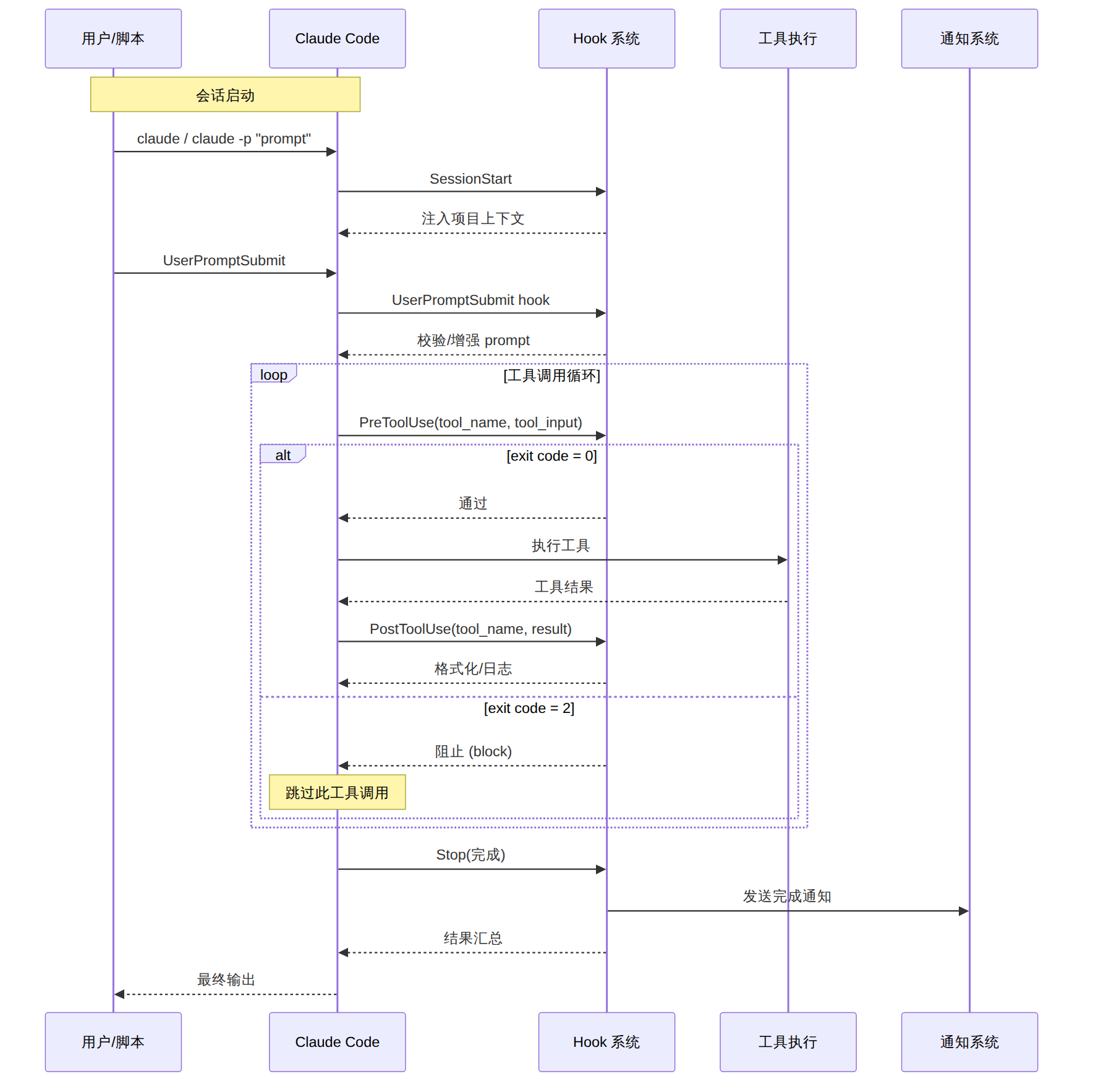
图表 2
-p 模式下如何传递多行 prompt?# 方法 1:Heredoc
claude -p "$(cat <<'EOF'
请分析这个项目的整体架构:
1. 列出主要模块
2. 分析依赖关系
3. 找出循环依赖
EOF
)"
# 方法 2:文件输入
claude -p "根据以下需求文档实现功能" < requirements.md
# 方法 3:环境变量
PROMPT="重构代码"
claude -p "$PROMPT" --allowedTools "Edit,Read"
同级 Hooks 按配置顺序执行。如果任何 PreToolUse hook 返回 exit code 2,后续 hook 和工具调用都会被跳过。
--dangerously-skip-permissions?不要用。使用 --allowedTools 白名单代替:
# 安全的 CI 配置
claude -p "$TASK" \
  --allowedTools "Read,Edit,Write,Bash(npm*),Glob,Grep" \
  --output-format json \
  --max-turns 20
只要每个 Agent 在独立的 Git worktree 中工作,就不会有文件冲突。Worktree 是 Git 原生功能,共享 .git 目录但拥有独立的工作区。
# 方法 1:JSON 输出中直接读取
claude -p "task" --output-format json | jq '.cost_usd'

# 方法 2:stream-json 中累积计算
claude -p "task" --output-format stream-json 2>/dev/null | \
  jq -c 'select(.type=="result") | {cost: .cost_usd, turns: .num_turns}'
| 实践 | 原因 |
|---|---|
永远使用 --allowedTools 白名单 |
避免意外操作 |
| 为每个并行任务使用独立 worktree | 防止文件冲突 |
设置 --max-turns 上限 |
控制成本,防止无限循环 |
使用 --output-format json |
便于程序化处理结果 |
在 PreToolUse hook 中拦截 rm -rf、git push --force |
安全底线 |
| 在 PostToolUse hook 中自动格式化 | 保持代码风格一致 |
| 在 Stop hook 中发送通知 | 及时获知任务完成 |
| 保存每次运行的 JSON 报告 | 成本审计、效果追踪 |
| 维度 | 评估 |
|---|---|
| 适合训练营类型 | DevOps 自动化营、AI 工程师进阶营、企业工具链培训 |
| 教学时长 | 4-6 小时(含实操) |
| 难度级别 | 中高级(需 CLI 和脚本基础) |
| 前置课程 | Claude Code 入门篇 + Skills 开发实战 |
| 实操设备要求 | 每人一台有 Node.js 18+ 和 Claude Code 的开发机 |
| 分组建议 | 2-3 人一组,每组负责一个 Hook + 一个批量任务 |
[!tip] 51学通信知识星球 星主:爱卫生(微信:gprshome201101)——公众号「51学通信」创办者,19 年通信行业运维与讲师经验,著有《GPRS网络信令实例详解》《EPC原理与实践》《5G核心网原理与实践》三本纸质书(各大电商平台有售)。 星球定位:深耕 5G 核心网、IMS、NFV/AI、云原生等 ICT 领域,主打运维岗位与信令分析。 当前规模:5200 篇主题 / 990 个回答,198 元/年。 加入福利:加入星球后请加爱卫生微信,拉您进知识星球年度陪伴与答疑群——不限量回复您的各种问题,另有群内分享。 AI 加持:51学通信知识星球已作为 skill 接入 WorkBuddy,使用 deepseek-4-flash 在海量星球帖子中精准找贴、找视频、找 FAQ 和案例,做总结、找文档和 PPT 等场景全覆盖。
