# Claude Code自动化实战:从-p模式到Hooks全攻略
## 概述
本教程面向已具备Claude Code基础使用经验的开发者,系统讲解三大自动化能力:**非交互式Print模式**(`-p`标志)、**Hooks生命周期钩子系统**、以及**批量任务编排**。学完可构建CI/CD集成、代码自动审查流水线、多仓库批量操作等生产级自动化工作流。
**适用人群**:有Claude Code使用经验,希望将AI编码能力嵌入自动化流程的工程师。
## 前置条件
- Claude Code CLI已安装并完成API Key配置(`claude` 命令可用)
- 熟悉JSON配置文件编辑
- 基本的Shell脚本编写能力
- 了解Git工作流和CI/CD概念
---
## 第一部分:Print模式(`-p`)—— 非交互式执行
### 1.1 核心概念
Print模式是Claude Code自动化的基石。添加`-p`(或`--print`)标志后,Claude Code以单轮、非交互方式运行:接收一个prompt,执行Agent循环,将结果输出到stdout,然后退出。整个过程**无需人工输入**。

> *图表 1*
### 1.2 基础用法
**最简调用**:
```bash
# 单行prompt
claude -p "分析当前项目的目录结构并给出架构建议"
# 从stdin读取prompt(适合多行文本)
echo "请检查src/目录下所有TypeScript文件,找出潜在的内存泄漏" | claude -p
# 从文件读取prompt
cat my_prompt.txt | claude -p
```
**指定模型**:
```bash
# 使用Sonnet模型(成本更低)
claude -p "重构这个函数" --model claude-sonnet-4-6
# 使用Haiku模型(速度最快,成本最低)
claude -p "为这些函数添加JSDoc注释" --model claude-haiku-4-5-20251001
```
### 1.3 控制输出格式
输出格式决定了自动化脚本如何解析Claude Code的返回值:
```bash
# 纯文本输出(默认)—— 适合人类阅读或日志记录
claude -p "总结这个文件的变更" --output-format text
# JSON输出 —— 适合脚本解析
claude -p "列出所有TODO注释的位置" --output-format json
# 流式JSON输出 —— 适合实时监控长任务
claude -p "重构整个src目录" --output-format stream-json
```
**JSON输出结构**(`--output-format json`):
```json
{
"result": "文件重构完成。共修改了12个文件...",
"cost_usd": 0.042,
"duration_ms": 15320,
"num_turns": 8,
"session_id": "abc123-def456"
}
```
**stream-json模式**会持续输出事件流,每个事件一行JSON,包含工具调用、文件编辑、命令执行等实时信息,非常适合需要进度追踪的场景。
### 1.4 限制Agent行为
在自动化场景中,**安全边界**至关重要。通过以下标志精确控制Agent的权限:
```bash
# 只允许读取文件,不允许修改
claude -p "审查代码并给出建议" \
--allowedTools "Read,Glob,Grep"
# 允许读取和编辑,但不允许执行Shell命令
claude -p "修复lint错误" \
--allowedTools "Read,Write,Edit,Glob,Grep"
# 限制最大交互轮数(防止无限循环)
claude -p "重构代码" \
--max-turns 10
# 组合使用:安全的代码审查
claude -p "审查最近的git diff,给出改进建议" \
--allowedTools "Read,Glob,Grep,Bash" \
--max-turns 5 \
--output-format json
```
### 1.5 会话恢复
Print模式支持恢复之前的会话,这在长任务中断或需要延续上下文时极为有用:
```bash
# 继续上一次对话(自动加载最近的session)
claude -p "继续上次的任务" --continue
# 恢复指定session
claude -p "继续工作" --resume abc123-def456
# 查看所有session ID
claude sessions list
```
### 1.6 常见问题
| 问题 | 原因 | 解决方案 |
|------|------|----------|
| `-p`模式卡住不输出 | Agent进入了需要权限确认的工具调用 | 使用`--allowedTools`预授权工具 |
| JSON输出被ANSI颜色码污染 | 终端转义序列混入 | 设置`NO_COLOR=1`环境变量 |
| Agent修改了不该改的文件 | 默认权限过于宽松 | 限制`--allowedTools`,设置`--max-turns` |
| 长任务超时 | 默认超时限制 | 在脚本中用`timeout`命令控制 |
---
## 第二部分:Hooks系统 —— 生命周期钩子
### 2.1 Hooks架构总览
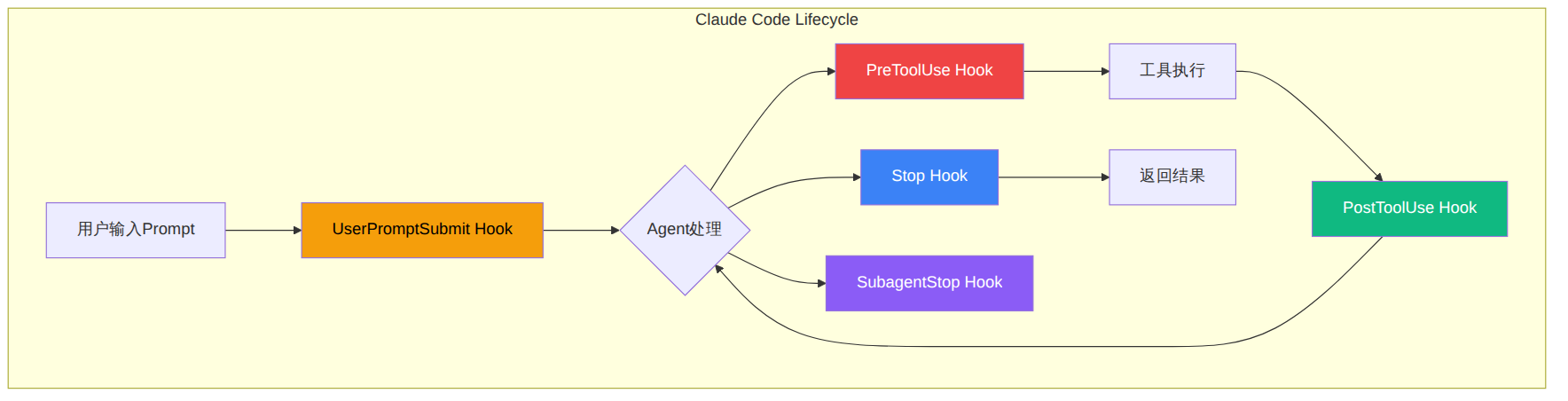
Hooks是Claude Code内置的事件驱动机制,允许你在Agent执行的关键节点注入自定义逻辑。配置在`settings.json`中声明,当对应事件触发时,Claude Code会执行你指定的Shell命令。
> *图表 2*
### 2.2 核心Hook事件
Claude Code提供了多个生命周期Hook事件,以下是自动化场景中最关键的几个:
| 事件 | 触发时机 | 典型用途 |
|------|----------|----------|
| `UserPromptSubmit` | 用户发送prompt后,Agent处理前 | 注入上下文、改写prompt |
| `PreToolUse` | 工具调用执行前 | 拦截危险操作、注入参数 |
| `PostToolUse` | 工具调用完成后 | 自动格式化、日志记录 |
| `Stop` | Agent完成当前任务时 | 通知、汇总、清理 |
| `SubagentStop` | 子Agent(Task工具)完成时 | 收集子任务结果 |
### 2.3 配置结构
Hooks配置位于`.claude/settings.json`(项目级)或`~/.claude/settings.json`(全局级):
```json
{
"hooks": {
"事件名称": [
{
"matcher": "工具名称(可选过滤条件)",
"hooks": [
{
"type": "command",
"command": "要执行的Shell命令"
}
]
}
]
}
}
```
**关键参数说明**:
- **matcher**:可选,用于过滤特定工具。例如`"matcher": "Write"`只在Write工具调用时触发
- **type**:钩子类型,`command`(执行Shell命令)是最常用的
- **command**:实际执行的Shell命令,可以通过环境变量获取上下文信息
### 2.4 Hook输入输出协议
Hooks通过**环境变量**和**stdin/stdout**与Claude Code通信:
**输入**(Claude Code → Hook):
- `CLAUDE_TOOL_NAME`:当前工具名称
- `CLAUDE_PROJECT_DIR`:项目根目录
- stdin会传入JSON格式的工具参数详情
**输出**(Hook → Claude Code):
- 退出码`0`:允许继续(对于PreToolUse)或静默成功
- 退出码`2`:阻止操作(对于PreToolUse,会阻止工具执行)
- stdout输出:特定格式的JSON可修改Agent行为
### 2.5 实战配置示例
#### 示例1:代码保存后自动格式化
每次Agent编辑文件后,自动运行Prettier格式化:
```json
{
"hooks": {
"PostToolUse": [
{
"matcher": "Write|Edit",
"hooks": [
{
"type": "command",
"command": "file=$(cat | jq -r '.tool_input.file_path // .tool_input.file // empty'); if [ -n \"$file\" ] && echo \"$file\" | grep -qE '\\.(ts|tsx|js|jsx|json|css|md)$'; then npx prettier --write \"$file\" 2>/dev/null; fi"
}
]
}
]
}
}
```
#### 示例2:阻止修改生产配置文件
防止Agent意外修改关键配置:
```json
{
"hooks": {
"PreToolUse": [
{
"matcher": "Write|Edit",
"hooks": [
{
"type": "command",
"command": "input=$(cat); file=$(echo \"$input\" | jq -r '.tool_input.file_path // .tool_input.file // empty'); if echo \"$file\" | grep -qE '(production|\.env|docker-compose\\.yml|nginx\\.conf)$'; then echo 'BLOCKED: 不允许修改生产环境配置文件' >&2; exit 2; fi; exit 0"
}
]
}
]
}
}
```
#### 示例3:任务完成后发送Slack通知
```json
{
"hooks": {
"Stop": [
{
"hooks": [
{
"type": "command",
"command": "curl -s -X POST \"$SLACK_WEBHOOK_URL\" -H 'Content-Type: application/json' -d '{\"text\":\"Claude Code任务完成: '$(pwd | xargs basename)'\"}' 2>/dev/null; exit 0"
}
]
}
]
}
}
```
#### 示例4:Prompt增强 —— 自动注入项目上下文
在每次用户prompt发送前,自动附加项目信息:
```json
{
"hooks": {
"UserPromptSubmit": [
{
"hooks": [
{
"type": "command",
"command": "echo '【项目信息】技术栈: React 19 + TypeScript + Vite | 测试框架: Vitest | 包管理: pnpm'"
}
]
}
]
}
}
```
### 2.6 多层配置优先级
Hooks支持三级配置,优先级从高到低:
```
项目级 (.claude/settings.json)
↓ 覆盖
用户级 (~/.claude/settings.json)
↓ 覆盖
企业级 (管理员配置)
```
这意味着你可以在个人全局配置中设置通用Hook(如代码格式化),同时在特定项目中用项目级配置添加专用Hook(如阻止修改特定文件)。
---
## 第三部分:批量任务与脚本编排
### 3.1 Shell脚本批量执行
将`-p`模式与Shell脚本结合,实现批量任务处理:
```bash
#!/bin/bash
# batch_review.sh —— 批量代码审查脚本
REPOS=(
"/home/dev/project-a"
"/home/dev/project-b"
"/home/dev/project-c"
)
for repo in "${REPOS[@]}"; do
echo "========== 审查仓库: $(basename $repo) =========="
cd "$repo" || continue
# 获取最近的变更
DIFF=$(git diff HEAD~5 --stat 2>/dev/null)
if [ -z "$DIFF" ]; then
echo "无变更,跳过"
continue
fi
# 执行AI审查
claude -p "你是高级代码审查员。审查以下Git仓库最近5次提交的变更。
重点关注:
1. 安全漏洞(SQL注入、XSS等)
2. 性能问题
3. 代码架构合理性
4. 缺失的错误处理
$(git diff HEAD~5)" \
--allowedTools "Read,Glob,Grep" \
--max-turns 5 \
--output-format json \
> "/tmp/review_$(basename $repo).json"
echo "审查结果已保存"
done
```
### 3.2 并行任务执行
对于独立的任务,使用`&`和`wait`实现并行:
```bash
#!/bin/bash
# parallel_tasks.sh —— 并行执行多个独立任务
set -e
# 任务1:生成API文档(后台执行)
claude -p "分析src/api/目录下的所有路由文件,生成OpenAPI 3.0规范的YAML文档" \
--allowedTools "Read,Glob,Grep,Write" \
--max-turns 15 \
--output-format json \
> /tmp/api_docs.json &
# 任务2:编写单元测试(后台执行)
claude -p "为src/utils/目录下的所有工具函数编写Vitest单元测试,覆盖所有边界情况" \
--allowedTools "Read,Write,Edit,Glob,Grep,Bash" \
--max-turns 20 \
--output-format json \
> /tmp/test_results.json &
# 任务3:依赖安全审计(后台执行)
claude -p "检查package.json中的所有依赖,标记有已知安全漏洞的包,并建议替代方案" \
--allowedTools "Read,Bash" \
--max-turns 5 \
--output-format json \
> /tmp/security_audit.json &
# 等待所有后台任务完成
wait
echo "所有任务完成"
echo "文档生成: $(jq -r '.result[:50]' /tmp/api_docs.json 2>/dev/null)..."
echo "测试编写: $(jq -r '.result[:50]' /tmp/test_results.json 2>/dev/null)..."
echo "安全审计: $(jq -r '.result[:50]' /tmp/security_audit.json 2>/dev/null)..."
```
### 3.3 多轮任务链
通过`--continue`串联多步任务,每一步基于前一步的上下文:
```bash
#!/bin/bash
# task_chain.sh —— 多步任务链
set -e
# 第1步:分析代码结构
echo "步骤1/3: 分析代码结构..."
claude -p "分析当前项目的完整代码结构,列出所有模块及其依赖关系" \
--output-format json > /tmp/step1.json
# 第2步:基于分析结果生成重构方案(延续上下文)
echo "步骤2/3: 生成重构方案..."
claude -p "基于刚才的分析结果,为耦合度最高的3个模块生成详细的重构方案。包括:
1. 当前问题诊断
2. 重构后的模块划分
3. 迁移步骤(确保向后兼容)" \
--continue \
--output-format json > /tmp/step2.json
# 第3步:执行重构(延续上下文)
echo "步骤3/3: 执行重构..."
claude -p "请按照刚才的重构方案开始执行第一步重构。只修改第一个模块,确保所有测试通过。" \
--continue \
--allowedTools "Read,Write,Edit,Bash,Glob,Grep" \
--max-turns 15 \
--output-format json > /tmp/step3.json
echo "任务链完成"
```
### 3.4 错误处理与重试
生产级自动化脚本需要健壮的错误处理:
```bash
#!/bin/bash
# robust_automation.sh —— 带错误处理的自动化脚本
MAX_RETRIES=3
TIMEOUT_SECONDS=300
run_claude_task() {
local prompt="$1"
local output_file="$2"
local attempt=1
while [ $attempt -le $MAX_RETRIES ]; do
echo "尝试 $attempt/$MAX_RETRIES..."
# 使用timeout防止卡死
if timeout $TIMEOUT_SECONDS claude -p "$prompt" \
--allowedTools "Read,Write,Edit,Bash,Glob,Grep" \
--max-turns 15 \
--output-format json \
> "$output_file" 2>/tmp/claude_stderr.log; then
# 验证输出是否有效
if jq -e '.result' "$output_file" >/dev/null 2>&1; then
echo "任务成功完成"
return 0
else
echo "输出JSON无效,重试..."
fi
else
echo "命令超时或失败 (exit code: $?)"
cat /tmp/claude_stderr.log
fi
attempt=$((attempt + 1))
sleep 5
done
echo "所有重试均失败"
return 1
}
# 使用示例
run_claude_task "将所有class组件重构为函数式组件" "/tmp/refactor_result.json"
```
---
## 第四部分:CI/CD集成
### 4.1 GitHub Actions集成
Anthropic提供了官方的GitHub Action —— `anthropics/claude-code-action`,支持在PR和Issue中通过`@claude`触发AI操作。
**基础配置**(`.github/workflows/claude-review.yml`):
```yaml
name: Claude Code Review
on:
pull_request:
types: [opened, synchronize]
issue_comment:
types: [created]
jobs:
claude-review:
if: |
github.event_name == 'pull_request' ||
(github.event_name == 'issue_comment' &&
contains(github.event.comment.body, '@claude'))
runs-on: ubuntu-latest
permissions:
contents: write
pull-requests: write
issues: write
steps:
- uses: actions/checkout@v4
with:
fetch-depth: 0
- name: Run Claude Code Review
uses: anthropics/claude-code-action@v1
with:
anthropic_api_key: ${{ secrets.ANTHROPIC_API_KEY }}
prompt: |
审查这个PR的代码变更。重点关注:
1. 安全漏洞
2. 性能问题
3. 测试覆盖率
4. 代码风格一致性
用中文给出审查意见,作为PR comment发布。
allowed_tools: "Read,Glob,Grep,Bash"
max_turns: 10
```
### 4.2 自定义Headless CI流水线
不使用官方Action,直接在CI中调用`claude -p`:
```yaml
name: Automated Code Quality
on:
push:
branches: [main]
jobs:
quality-check:
runs-on: ubuntu-latest
steps:
- uses: actions/checkout@v4
- name: Setup Claude Code
run: npm install -g @anthropic-ai/claude-code
- name: Run AI Code Analysis
env:
ANTHROPIC_API_KEY: ${{ secrets.ANTHROPIC_API_KEY }}
run: |
# 生成代码质量报告
claude -p "分析当前代码库,生成以下报告:
1. 代码复杂度热点(最复杂的5个函数)
2. 潜在bug(未处理的异常、空指针风险)
3. 安全风险(硬编码密钥、不安全的API调用)
4. 性能瓶颈(N+1查询、大循环中的内存分配)
以Markdown表格形式输出。" \
--allowedTools "Read,Glob,Grep,Bash" \
--max-turns 10 \
--output-format text \
> code_quality_report.md
- name: Upload Report
uses: actions/upload-artifact@v4
with:
name: code-quality-report
path: code_quality_report.md
```
### 4.3 自动修复Lint错误
在CI中发现问题后自动创建修复分支:
```yaml
name: Auto Fix Lint Errors
on:
pull_request:
types: [opened, synchronize]
jobs:
auto-fix:
runs-on: ubuntu-latest
permissions:
contents: write
steps:
- uses: actions/checkout@v4
with:
ref: ${{ github.head_ref }}
- name: Setup Node
uses: actions/setup-node@v4
with:
node-version: '20'
- name: Install deps
run: npm ci
- name: Run Claude Auto-fix
env:
ANTHROPIC_API_KEY: ${{ secrets.ANTHROPIC_API_KEY }}
run: |
# 先运行lint获取错误
LINT_OUTPUT=$(npx eslint src/ --format json 2>/dev/null || true)
if [ "$LINT_OUTPUT" != "[]" ]; then
echo "发现Lint错误,启动自动修复..."
claude -p "以下是ESLint检查出的错误:
$LINT_OUTPUT
请修复所有错误。修复时遵循以下规则:
- 只修改必要的代码
- 不要改变代码逻辑
- 修复后确保不再有lint错误" \
--allowedTools "Read,Write,Edit,Glob,Grep" \
--max-turns 20
fi
- name: Commit fixes
run: |
git config user.name "Claude Code Bot"
git config user.email "claude-bot@users.noreply.github.com"
git diff --quiet || (git add -A && git commit -m "fix: auto-fix lint errors" && git push)
```
---
## 第五部分:实战案例 —— 多仓库自动化巡检系统
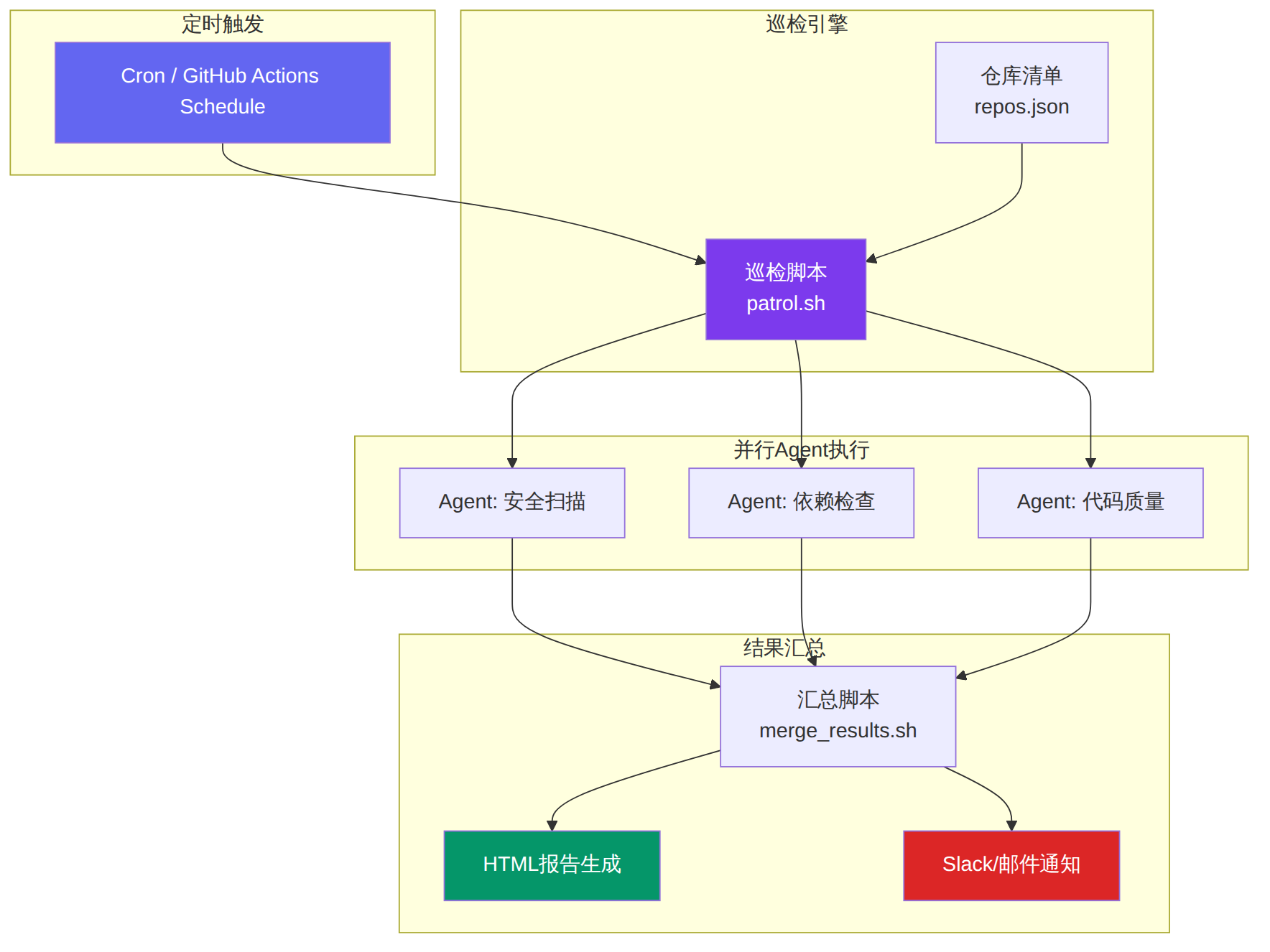
下面构建一个完整的多仓库自动化巡检系统,综合运用`-p`模式、Hooks和批量脚本。
### 5.1 系统架构
> *图表 3*
### 5.2 仓库清单配置
```json
// repos.json
{
"repos": [
{
"name": "frontend-app",
"path": "/home/dev/repos/frontend-app",
"tech_stack": "React 19 + TypeScript + Vite",
"priority": "high"
},
{
"name": "backend-api",
"path": "/home/dev/repos/backend-api",
"tech_stack": "Node.js + Express + PostgreSQL",
"priority": "critical"
},
{
"name": "mobile-app",
"path": "/home/dev/repos/mobile-app",
"tech_stack": "React Native + Expo",
"priority": "medium"
}
]
}
```
### 5.3 主巡检脚本
```bash
#!/bin/bash
# patrol.sh —— 多仓库AI巡检脚本
set -euo pipefail
REPOS_FILE="repos.json"
REPORT_DIR="/tmp/patrol_reports/$(date +%Y%m%d_%H%M%S)"
mkdir -p "$REPORT_DIR"
echo "=========================================="
echo " Claude Code 自动化巡检"
echo " 时间: $(date '+%Y-%m-%d %H:%M:%S')"
echo "=========================================="
# 读取仓库数量
REPO_COUNT=$(jq '.repos | length' "$REPOS_FILE")
for i in $(seq 0 $((REPO_COUNT - 1))); do
REPO_NAME=$(jq -r ".repos[$i].name" "$REPOS_FILE")
REPO_PATH=$(jq -r ".repos[$i].path" "$REPOS_FILE")
TECH_STACK=$(jq -r ".repos[$i].tech_stack" "$REPOS_FILE")
PRIORITY=$(jq -r ".repos[$i].priority" "$REPOS_FILE")
echo ""
echo "--- 巡检仓库: $REPO_NAME (优先级: $PRIORITY) ---"
cd "$REPO_PATH" || { echo "跳过: 路径不存在"; continue; }
# 并行执行三类检查
# 1. 安全扫描
claude -p "你是安全审计专家。扫描当前仓库的代码,重点关注:
- 硬编码的密钥、token或密码
- SQL注入、XSS等OWASP Top 10漏洞
- 不安全的依赖引入
- 敏感数据泄露风险
技术栈: $TECH_STACK
优先级: $PRIORITY
以JSON格式输出发现的问题列表,包含严重程度(_critical/high/medium/low_)和修复建议。" \
--allowedTools "Read,Glob,Grep,Bash" \
--max-turns 8 \
--output-format json \
> "$REPORT_DIR/${REPO_NAME}_security.json" &
# 2. 依赖健康检查
claude -p "分析当前项目的依赖健康状况:
1. 检查package.json(或等效文件)中的过期依赖
2. 识别不再维护的包
3. 发现重复功能的依赖
4. 建议更轻量的替代方案
技术栈: $TECH_STACK
以分类列表输出结果。" \
--allowedTools "Read,Glob,Grep,Bash" \
--max-turns 5 \
--output-format json \
> "$REPORT_DIR/${REPO_NAME}_deps.json" &
# 3. 代码质量评分
claude -p "对当前项目进行代码质量评估,按以下维度打分(1-10):
1. 代码可读性
2. 架构合理性
3. 测试覆盖率(估算)
4. 错误处理完备性
5. 文档质量
技术栈: $TECH_STACK
以JSON格式输出评分和改进建议。" \
--allowedTools "Read,Glob,Grep,Bash" \
--max-turns 8 \
--output-format json \
> "$REPORT_DIR/${REPO_NAME}_quality.json" &
# 等待当前仓库的所有检查完成
wait
echo " 仓库 $REPO_NAME 巡检完成"
done
echo ""
echo "=========================================="
echo " 所有仓库巡检完成"
echo " 报告目录: $REPORT_DIR"
echo "=========================================="
```
### 5.4 汇总报告生成
```bash
#!/bin/bash
# generate_report.sh —— 将JSON结果汇总为HTML报告
REPORT_DIR="$1"
OUTPUT_FILE="$REPORT_DIR/patrol_report.html"
cat > "$OUTPUT_FILE" << 'HTML_HEAD'
Claude Code 巡检报告
🔍 Claude Code 自动化巡检报告
生成时间:
HTML_HEAD
echo "" >> "$OUTPUT_FILE"
# 遍历所有安全报告
for f in "$REPORT_DIR"/*_security.json; do
[ -f "$f" ] || continue
REPO=$(basename "$f" | sed 's/_security\.json//')
echo "$REPO - 安全扫描
" >> "$OUTPUT_FILE"
RESULT=$(jq -r '.result // "无结果"' "$f" 2>/dev/null)
echo "
$RESULT
$REPO - 代码质量
" >> "$OUTPUT_FILE"
RESULT=$(jq -r '.result // "无结果"' "$f" 2>/dev/null)
echo "
$RESULT