本教程面向希望在 Claude Code 中构建自定义 MCP(Model Context Protocol)服务器的开发者。你将从零开始学习 MCP 协议架构、掌握 Python FastMCP 与 TypeScript 双语言开发、理解三种传输协议的选型策略,最终完成一个可部署到生产环境的完整 MCP 服务器项目。适合有一定编程基础、希望将自有 API/数据源/内部工具接入 Claude Code 的工程师。
| 条件 | 说明 |
|---|---|
| Claude Code | 已安装并正常运行(claude --version) |
| Python 3.10+ 或 Node.js 18+ | 开发语言二选一 |
| 基础 API 概念 | REST、JSON Schema、进程间通信 |
| 包管理器 | pip/uv(Python)或 npm/pnpm(Node.js) |
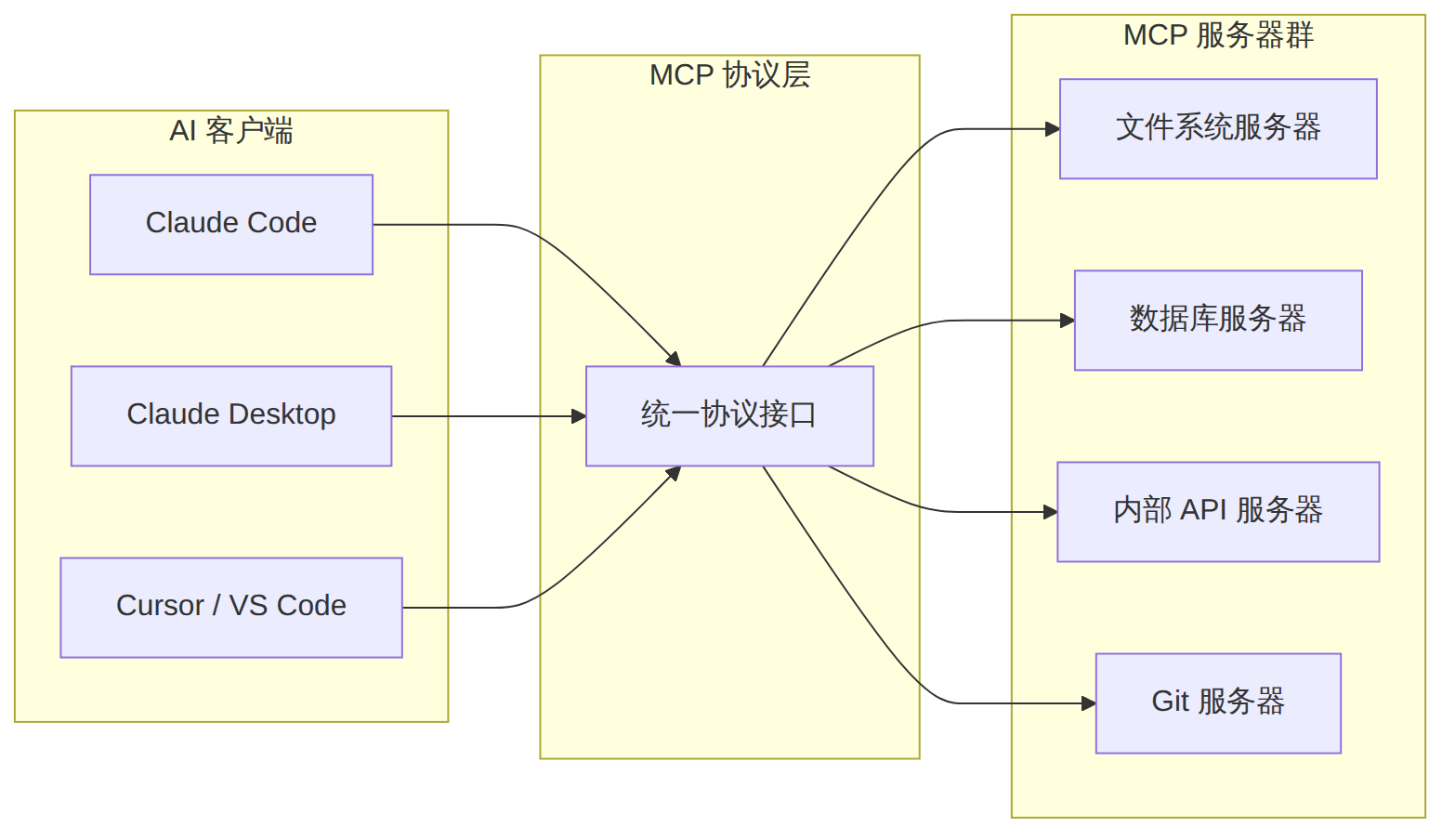
Model Context Protocol(MCP)是 Anthropic 发布的开放标准协议,用于 AI 模型与外部工具/数据源之间的标准化通信。它定义了一套 client-server 架构,让任何 AI 客户端(如 Claude Code)都能通过统一接口调用任意 MCP 服务器暴露的能力。
图表 1
MCP 服务器可以向客户端暴露三种能力:
| 能力 | 用途 | 类比 |
|---|---|---|
| Tools | 让 AI 执行操作(查询数据库、调用 API) | 函数调用 |
| Resources | 向 AI 提供结构化数据(文件内容、数据库 schema) | 数据源 |
| Prompts | 预定义的提示模板(代码审查模板、分析框架) | 提示词模板 |
MCP 支持三种传输方式,不同场景需要不同选择:
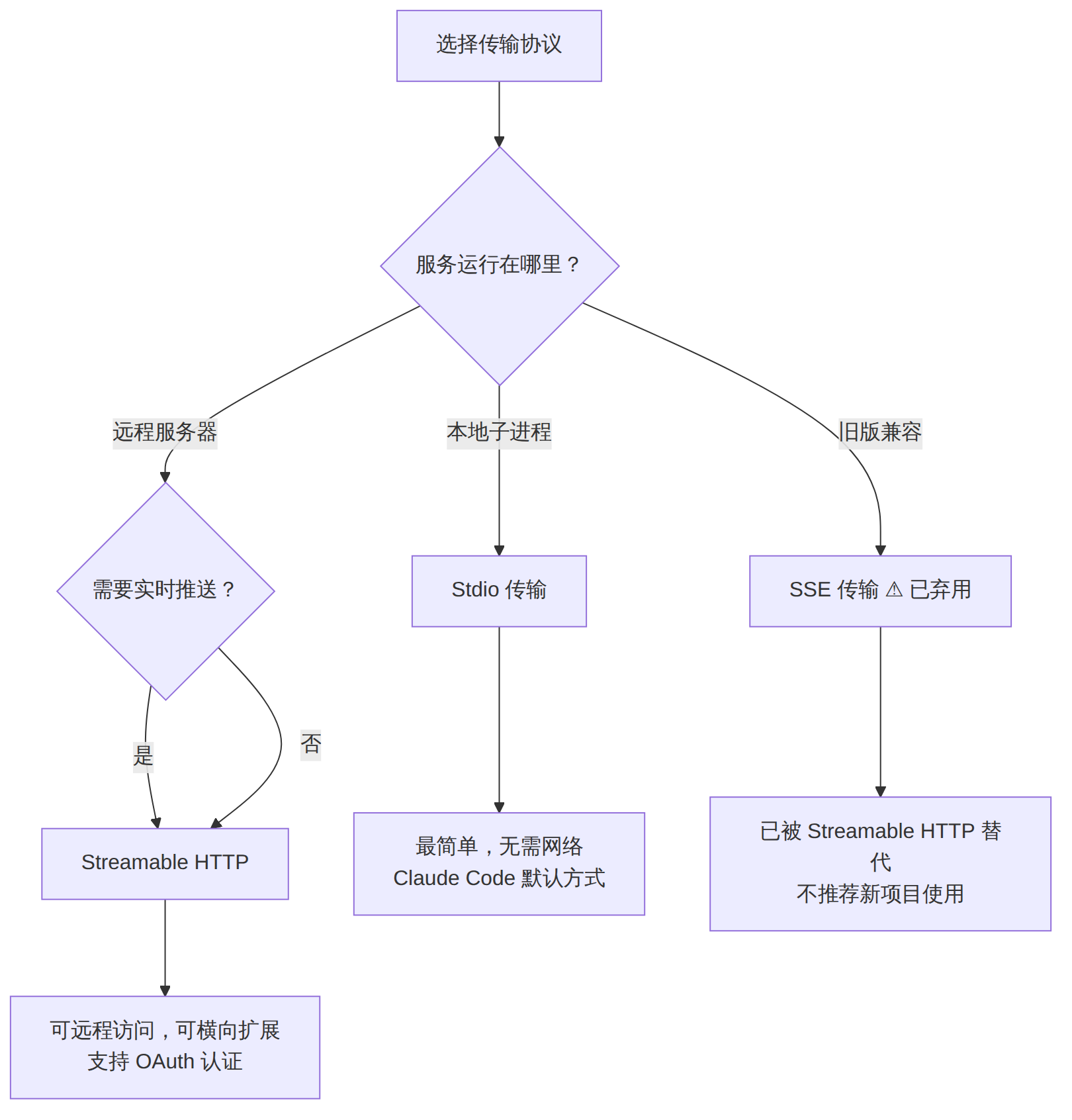
图表 2
| 传输协议 | 适用场景 | Claude Code 支持 |
|---|---|---|
| Stdio | 本地开发、个人工具 | 原生支持 |
| Streamable HTTP | 生产部署、团队共享、远程服务 | 支持(需配置 URL) |
| SSE | 旧版兼容 | 已弃用 |
# 创建项目目录
mkdir my-mcp-server && cd my-mcp-server

# 使用 uv 创建虚拟环境(推荐)
uv init
uv add fastmcp

# 或使用传统 pip
python -m venv .venv
source .venv/bin/activate
pip install fastmcp
创建 server.py:
from fastmcp import FastMCP

# 创建服务器实例
mcp = FastMCP("my-first-server")

@mcp.tool()
def add(a: int, b: int) -> int:
    """Add two numbers together."""
    return a + b

@mcp.tool()
def greet(name: str) -> str:
    """Generate a greeting message."""
    return f"Hello, {name}! Welcome to MCP."

if __name__ == "__main__":
    mcp.run()
运行测试:
# 直接运行(默认使用 stdio 传输)
fastmcp run server.py

# 开发模式(带热重载)
fastmcp dev server.py
from fastmcp import FastMCP

mcp = FastMCP("resource-demo")

# 静态资源 — 返回固定内容
@mcp.resource("config://app")
def get_app_config() -> str:
    """Return application configuration."""
    import json
    return json.dumps({
        "version": "1.0.0",
        "environment": "production",
        "features": ["tool-search", "multi-turn"]
    })

# 动态资源 — URI 模板参数
@mcp.resource("user://{user_id}/profile")
def get_user_profile(user_id: str) -> str:
    """Get a user's profile by ID."""
    import json
    # 实际场景中这里会查询数据库
    profiles = {
        "1": {"name": "Alice", "role": "engineer"},
        "2": {"name": "Bob", "role": "designer"},
    }
    return json.dumps(profiles.get(user_id, {"error": "not found"}))
@mcp.prompt()
def code_review(code: str, language: str = "python") -> str:
    """Generate a code review prompt."""
    return f"""Please review the following {language} code for:
1. Security vulnerabilities
2. Performance issues
3. Best practice violations
4. Readability improvements

```{language}
{code}
```"""

@mcp.prompt()
def debug_error(error_message: str, context: str = "") -> str:
    """Generate a debugging prompt."""
    prompt = f"Help me debug this error:\n\n{error_message}"
    if context:
        prompt += f"\n\nAdditional context:\n{context}"
    return prompt
mkdir my-mcp-ts && cd my-mcp-ts
npm init -y
npm install @modelcontextprotocol/sdk zod
npm install -D typescript @types/node
创建 src/index.ts:
import { McpServer } from "@modelcontextprotocol/sdk/server/mcp.js";
import { StdioServerTransport } from "@modelcontextprotocol/sdk/server/stdio.js";
import { z } from "zod";

// 创建服务器
const server = new McpServer({
  name: "my-typescript-server",
  version: "1.0.0",
});

// 注册工具 — 使用 Zod 定义参数 Schema
server.tool(
  "search_docs",
  "Search documentation for a query",
  {
    query: z.string().describe("Search query string"),
    max_results: z.number().optional().default(5).describe("Maximum results"),
    section: z.string().optional().describe("Documentation section filter"),
  },
  async ({ query, max_results, section }) => {
    // 实际场景中这里会调用搜索 API
    const results = [
      { title: "Getting Started", url: "/docs/start" },
      { title: "API Reference", url: "/docs/api" },
      { title: "Advanced Usage", url: "/docs/advanced" },
    ].filter(r => !section || r.title.toLowerCase().includes(section.toLowerCase()));

    return {
      content: [
        {
          type: "text",
          text: JSON.stringify(results.slice(0, max_results), null, 2),
        },
      ],
    };
  }
);

// 注册带注解的工具 — 标记只读、安全性等
server.tool(
  "get_system_status",
  "Get current system status (read-only)",
  {},
  async () => {
    return {
      content: [
        {
          type: "text",
          text: JSON.stringify({
            status: "healthy",
            uptime: process.uptime(),
            memory: process.memoryUsage(),
          }, null, 2),
        },
      ],
    };
  },
  // Tool Annotations — 告诉客户端此工具的行为特征
  {
    annotations: {
      readOnlyHint: true,        // 不会修改任何状态
      destructiveHint: false,    // 不会造成破坏
      idempotentHint: true,      // 多次调用结果一致
      openWorldHint: false,      // 不访问外部网络
    }
  }
);

// 启动服务器
async function main() {
  const transport = new StdioServerTransport();
  await server.connect(transport);
  console.error("MCP Server running on stdio");
}

main().catch(console.error);
编译并运行:
npx tsc --init
# 在 tsconfig.json 中设置 "outDir": "./dist"
npx tsc
node dist/index.js
MCP Tool Annotations 是 2025-2026 年协议演进中最重要的特性之一。它让服务器能向客户端声明每个工具的行为特征,使 AI 在决策时拥有更好的判断依据。
from fastmcp import FastMCP

mcp = FastMCP("annotated-server")

@mcp.tool(
    annotations={
        "readOnlyHint": True,       # 只读,不修改任何状态
        "destructiveHint": False,   # 非破坏性操作
        "idempotentHint": True,     # 幂等性
        "openWorldHint": False,     # 不访问外部网络
        "title": "Query Database"   # 人类可读标题
    }
)
def query_database(sql: str) -> str:
    """Execute a SELECT query on the database."""
    # 只执行 SELECT,确保安全
    pass

@mcp.tool(
    annotations={
        "readOnlyHint": False,
        "destructiveHint": True,    # 警告:破坏性操作!
        "idempotentHint": False,
        "openWorldHint": False,
        "title": "Delete Records"
    }
)
def delete_records(table: str, condition: str) -> str:
    """Delete records matching the condition."""
    pass
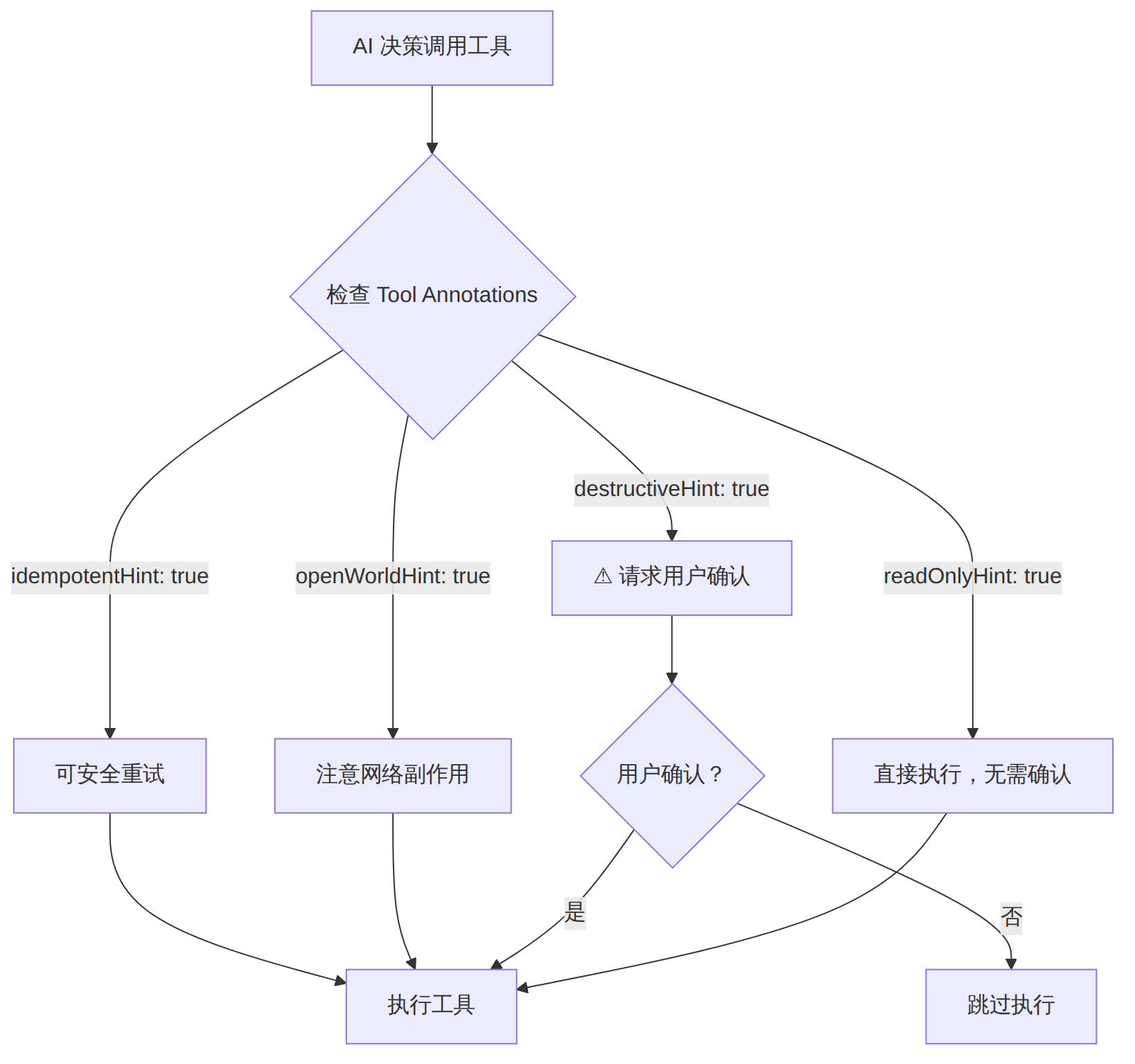
图表 3
Claude Code 的 MCP 配置支持三个层级,优先级从高到低:
| 作用域 | 配置文件 | 用途 |
|---|---|---|
| Local(项目私有) | .claude/settings.local.json |
开发者个人工具,不提交到 Git |
| Project(项目共享) | .mcp.json(项目根目录) |
团队共享工具,提交到 Git |
| User(全局) | ~/.claude/settings.json |
所有项目可用的个人工具 |

图表 4
# 添加本地 stdio 服务器(最常见的方式)
claude mcp add my-server -- python server.py

# 添加带环境变量的服务器
claude mcp add my-api-server \
  -e API_KEY=sk-xxx \
  -e BASE_URL=https://api.example.com \
  -- python api_server.py

# 添加远程 Streamable HTTP 服务器
claude mcp add --transport http http://localhost:8080/mcp

# 指定作用域
claude mcp add my-server -s project -- python server.py
claude mcp add my-server -s user -- python server.py

# 查看已配置的服务器
claude mcp list

# 查看服务器详情和可用工具
claude mcp get my-server

# 临时禁用/启用
claude mcp disable my-server
claude mcp enable my-server

# 删除
claude mcp remove my-server
.mcp.json(项目根目录,可提交到 Git):
{
  "mcpServers": {
    "database": {
      "command": "python",
      "args": ["./tools/db_server.py"],
      "env": {
        "DB_URL": "sqlite:///./data.db"
      }
    },
    "search": {
      "command": "node",
      "args": ["./tools/search/dist/index.js"],
      "env": {}
    },
    "remote-api": {
      "url": "https://mcp.mycompany.com/api"
    }
  }
}
我们将构建一个完整的知识库查询 MCP 服务器,具备以下功能: - 全文搜索知识库文档 - 按分类浏览文档 - 获取文档详情 - 管理标签系统
knowledge-mcp/
├── pyproject.toml
├── README.md
├── server.py
├── knowledge/
│   ├── __init__.py
│   ├── store.py          # 数据存储层
│   └── search.py         # 搜索引擎
├── data/
│   └── sample_docs.json  # 示例数据
├── Dockerfile
└── tests/
    └── test_server.py
knowledge/store.py:
"""In-memory knowledge base store."""
from __future__ import annotations
import json
from dataclasses import dataclass, field, asdict
from pathlib import Path
from typing import Optional


@dataclass
class Document:
    id: str
    title: str
    content: str
    category: str
    tags: list[str] = field(default_factory=list)

    def to_text(self) -> str:
        return f"# {self.title}\n\n{self.content}\n\nCategory: {self.category}\nTags: {', '.join(self.tags)}"


class KnowledgeStore:
    def __init__(self):
        self._docs: dict[str, Document] = {}
        self._next_id = 1

    def add(self, title: str, content: str, category: str, tags: list[str] | None = None) -> Document:
        doc = Document(
            id=str(self._next_id),
            title=title,
            content=content,
            category=category,
            tags=tags or [],
        )
        self._docs[doc.id] = doc
        self._next_id += 1
        return doc

    def get(self, doc_id: str) -> Optional[Document]:
        return self._docs.get(doc_id)

    def search(self, query: str, limit: int = 10) -> list[Document]:
        q = query.lower()
        results = []
        for doc in self._docs.values():
            score = 0
            if q in doc.title.lower():
                score += 10
            if q in doc.content.lower():
                score += 5
            if any(q in tag.lower() for tag in doc.tags):
                score += 3
            if q in doc.category.lower():
                score += 2
            if score > 0:
                results.append((score, doc))
        results.sort(key=lambda x: -x[0])
        return [doc for _, doc in results[:limit]]

    def list_by_category(self, category: str) -> list[Document]:
        return [d for d in self._docs.values() if d.category.lower() == category.lower()]

    def list_categories(self) -> list[str]:
        return sorted(set(d.category for d in self._docs.values()))

    def list_tags(self) -> list[str]:
        tags = set()
        for doc in self._docs.values():
            tags.update(doc.tags)
        return sorted(tags)

    def add_tag(self, doc_id: str, tag: str) -> bool:
        doc = self._docs.get(doc_id)
        if doc and tag not in doc.tags:
            doc.tags.append(tag)
            return True
        return False

    def remove_tag(self, doc_id: str, tag: str) -> bool:
        doc = self._docs.get(doc_id)
        if doc and tag in doc.tags:
            doc.tags.remove(tag)
            return True
        return False

    def load_sample_data(self, path: str | Path) -> int:
        data = json.loads(Path(path).read_text())
        count = 0
        for item in data:
            self.add(
                title=item["title"],
                content=item["content"],
                category=item["category"],
                tags=item.get("tags", []),
            )
            count += 1
        return count
data/sample_docs.json:
[
  {
    "title": "Claude Code MCP 配置指南",
    "content": "MCP 服务器通过 settings.json 或 .mcp.json 配置。支持 stdio 和 streamable HTTP 两种传输方式。stdio 模式下服务器作为子进程运行,HTTP 模式下通过 URL 连接远程服务。",
    "category": "tutorial",
    "tags": ["mcp", "configuration", "claude-code"]
  },
  {
    "title": "FastMCP 装饰器参考",
    "content": "FastMCP 提供 @mcp.tool()、@mcp.resource()、@mcp.prompt() 三个核心装饰器。tool 用于定义可执行操作,resource 用于暴露数据源,prompt 用于定义提示模板。所有装饰器都支持类型注解自动推断 JSON Schema。",
    "category": "reference",
    "tags": ["fastmcp", "python", "decorators"]
  },
  {
    "title": "MCP Tool Annotations 最佳实践",
    "content": "使用 readOnlyHint 标记只读操作,destructiveHint 标记破坏性操作。对于数据库 DELETE、文件覆盖等操作务必设置 destructiveHint: true。idempotentHint 表示多次调用结果一致,适合 GET 类操作。",
    "category": "best-practices",
    "tags": ["mcp", "annotations", "security"]
  },
  {
    "title": "Streamable HTTP 传输部署",
    "content": "Streamable HTTP 是 MCP 2026 推荐的远程传输方式。使用 FastMCP 时通过 mcp.run(transport='streamable-http') 启动。需要配置 CORS、认证中间件。支持 OAuth 2.0 Bearer Token 认证。",
    "category": "deployment",
    "tags": ["http", "deployment", "production"]
  },
  {
    "title": "MCP Inspector 调试工具",
    "content": "MCP Inspector 是官方提供的可视化调试工具。通过 npx @modelcontextprotocol/inspector 启动。可以查看工具列表、测试工具调用、检查资源内容、调试提示模板。支持连接 stdio 和 HTTP 两种传输。",
    "category": "tools",
    "tags": ["debugging", "inspector", "testing"]
  }
]
server.py:
"""Knowledge Base MCP Server — 完整实现."""
from __future__ import annotations
import json
from pathlib import Path
from fastmcp import FastMCP
from knowledge.store import KnowledgeStore

# 初始化
mcp = FastMCP(
    "knowledge-base",
    version="1.0.0",
    instructions="""Knowledge Base MCP Server.

Use 'search' to find documents, 'get_document' to read full content,
'list_categories' to browse by topic, and 'manage_tags' to organize documents.""",
)

store = KnowledgeStore()

# ─── Tools ────────────────────────────────────────────────

@mcp.tool(
    annotations={
        "readOnlyHint": True,
        "destructiveHint": False,
        "idempotentHint": True,
        "title": "Search Knowledge Base",
    }
)
def search(query: str, limit: int = 5) -> str:
    """Search the knowledge base for documents matching the query.

    Args:
        query: Search terms to look for in titles, content, and tags.
        limit: Maximum number of results to return (default: 5, max: 20).

    Returns:
        JSON array of matching documents with id, title, category, and relevance.
    """
    limit = min(limit, 20)
    results = store.search(query, limit=limit)
    if not results:
        return json.dumps({"message": f"No results found for '{query}'"}, ensure_ascii=False)
    return json.dumps([
        {
            "id": doc.id,
            "title": doc.title,
            "category": doc.category,
            "tags": doc.tags,
            "snippet": doc.content[:100] + "...",
        }
        for doc in results
    ], ensure_ascii=False, indent=2)


@mcp.tool(
    annotations={
        "readOnlyHint": True,
        "destructiveHint": False,
        "idempotentHint": True,
        "title": "Get Document",
    }
)
def get_document(doc_id: str) -> str:
    """Retrieve a full document by its ID.

    Args:
        doc_id: The unique document identifier.
    """
    doc = store.get(doc_id)
    if not doc:
        return json.dumps({"error": f"Document '{doc_id}' not found"})
    return json.dumps({
        "id": doc.id,
        "title": doc.title,
        "content": doc.content,
        "category": doc.category,
        "tags": doc.tags,
    }, ensure_ascii=False, indent=2)


@mcp.tool(
    annotations={
        "readOnlyHint": True,
        "destructiveHint": False,
        "idempotentHint": True,
        "title": "List Categories",
    }
)
def list_categories() -> str:
    """List all available document categories."""
    categories = store.list_categories()
    return json.dumps(categories, ensure_ascii=False, indent=2)


@mcp.tool(
    annotations={
        "readOnlyHint": True,
        "destructiveHint": False,
        "idempotentHint": True,
        "title": "Browse by Category",
    }
)
def browse_category(category: str) -> str:
    """List all documents in a specific category.

    Args:
        category: The category name (use list_categories to see available options).
    """
    docs = store.list_by_category(category)
    if not docs:
        return json.dumps({"message": f"No documents in category '{category}'"})
    return json.dumps([
        {"id": d.id, "title": d.title, "tags": d.tags}
        for d in docs
    ], ensure_ascii=False, indent=2)


@mcp.tool(
    annotations={
        "readOnlyHint": False,
        "destructiveHint": False,
        "idempotentHint": False,
        "title": "Manage Tags",
    }
)
def manage_tags(doc_id: str, action: str, tag: str) -> str:
    """Add or remove a tag from a document.

    Args:
        doc_id: The document ID to modify.
        action: Either "add" or "remove".
        tag: The tag name to add or remove.
    """
    if action not in ("add", "remove"):
        return json.dumps({"error": "action must be 'add' or 'remove'"})

    if action == "add":
        success = store.add_tag(doc_id, tag)
        msg = f"Tag '{tag}' added to document {doc_id}" if success else f"Failed to add tag"
    else:
        success = store.remove_tag(doc_id, tag)
        msg = f"Tag '{tag}' removed from document {doc_id}" if success else f"Failed to remove tag"

    return json.dumps({"success": success, "message": msg})


@mcp.tool(
    annotations={
        "readOnlyHint": False,
        "destructiveHint": False,
        "idempotentHint": False,
        "title": "Add Document",
    }
)
def add_document(title: str, content: str, category: str, tags: str = "") -> str:
    """Add a new document to the knowledge base.

    Args:
        title: Document title.
        content: Document content (markdown supported).
        category: Category for classification.
        tags: Comma-separated tags.
    """
    tag_list = [t.strip() for t in tags.split(",") if t.strip()] if tags else []
    doc = store.add(title=title, content=content, category=category, tags=tag_list)
    return json.dumps({
        "id": doc.id,
        "title": doc.title,
        "message": "Document added successfully",
    }, ensure_ascii=False)


# ─── Resources ────────────────────────────────────────────

@mcp.resource("kb://stats")
def get_stats() -> str:
    """Knowledge base statistics."""
    categories = store.list_categories()
    tags = store.list_tags()
    return json.dumps({
        "total_documents": len(store._docs),
        "categories": len(categories),
        "tags": len(tags),
        "category_list": categories,
    }, ensure_ascii=False, indent=2)


@mcp.resource("kb://tags")
def get_all_tags() -> str:
    """List all tags in the knowledge base."""
    return json.dumps(store.list_tags(), ensure_ascii=False, indent=2)


@mcp.resource("kb://category/{category}/index")
def get_category_index(category: str) -> str:
    """Get an index of documents in a category."""
    docs = store.list_by_category(category)
    return json.dumps([
        {"id": d.id, "title": d.title, "tags": d.tags}
        for d in docs
    ], ensure_ascii=False, indent=2)


# ─── Prompts ──────────────────────────────────────────────

@mcp.prompt()
def summarize_topic(topic: str) -> str:
    """Generate a prompt to summarize all knowledge base content about a topic."""
    results = store.search(topic, limit=10)
    docs_text = "\n\n---\n\n".join(d.to_text() for d in results)
    return f"""Summarize the following knowledge base documents about '{topic}'.
Provide key insights, common themes, and actionable takeaways.

{docs_text}"""


@mcp.prompt()
def compare_categories(cat_a: str, cat_b: str) -> str:
    """Compare documents across two categories."""
    docs_a = store.list_by_category(cat_a)
    docs_b = store.list_by_category(cat_b)
    return f"""Compare and contrast the following two categories of knowledge:

## Category: {cat_a}
{chr(10).join(f'- {d.title}' for d in docs_a)}

## Category: {cat_b}
{chr(10).join(f'- {d.title}' for d in docs_b)}

Identify overlaps, differences, and potential connections."""


# ─── 启动 ─────────────────────────────────────────────────

if __name__ == "__main__":
    # 加载示例数据
    data_path = Path(__file__).parent / "data" / "sample_docs.json"
    if data_path.exists():
        count = store.load_sample_data(data_path)
        import sys
        print(f"Loaded {count} sample documents", file=sys.stderr)

    mcp.run()
# 方式一:CLI 命令添加
claude mcp add knowledge-base -s project -- python /path/to/knowledge-mcp/server.py

# 方式二:在项目根目录创建 .mcp.json
.mcp.json:
{
  "mcpServers": {
    "knowledge-base": {
      "command": "python",
      "args": ["./knowledge-mcp/server.py"],
      "env": {}
    }
  }
}
# 使用 MCP Inspector 可视化调试
npx @modelcontextprotocol/inspector python server.py

# 或直接在 Claude Code 中测试
claude -p "搜索知识库中关于 MCP 配置的内容"
claude -p "列出所有知识库分类"
claude -p "获取文档 ID 为 1 的内容"
tests/test_server.py:
"""Unit tests for the knowledge base store."""
import pytest
from knowledge.store import KnowledgeStore


@pytest.fixture
def store():
    s = KnowledgeStore()
    s.add("Python Tips", "Use list comprehensions", "programming", ["python", "tips"])
    s.add("MCP Guide", "Configure MCP servers", "tutorial", ["mcp"])
    s.add("API Design", "REST best practices", "programming", ["api", "rest"])
    return s


def test_add_document(store):
    doc = store.add("New Doc", "Content here", "test")
    assert doc.id == "4"
    assert doc.title == "New Doc"


def test_search_by_title(store):
    results = store.search("Python")
    assert len(results) == 1
    assert results[0].title == "Python Tips"


def test_search_by_tag(store):
    results = store.search("mcp")
    assert len(results) >= 1


def test_list_categories(store):
    cats = store.list_categories()
    assert "programming" in cats
    assert "tutorial" in cats


def test_manage_tags(store):
    assert store.add_tag("1", "advanced") is True
    doc = store.get("1")
    assert "advanced" in doc.tags

    assert store.remove_tag("1", "advanced") is True
    assert "advanced" not in doc.tags
MCP Inspector 是官方提供的可视化调试工具:
# 安装并启动 Inspector
npx @modelcontextprotocol/inspector python server.py

# Inspector 会打开浏览器界面,可以:
# 1. 查看所有注册的 Tools / Resources / Prompts
# 2. 填写参数并调用 Tool
# 3. 查看 Resources 返回的内容
# 4. 测试 Prompts 生成的文本
# 5. 查看完整的 JSON-RPC 通信日志
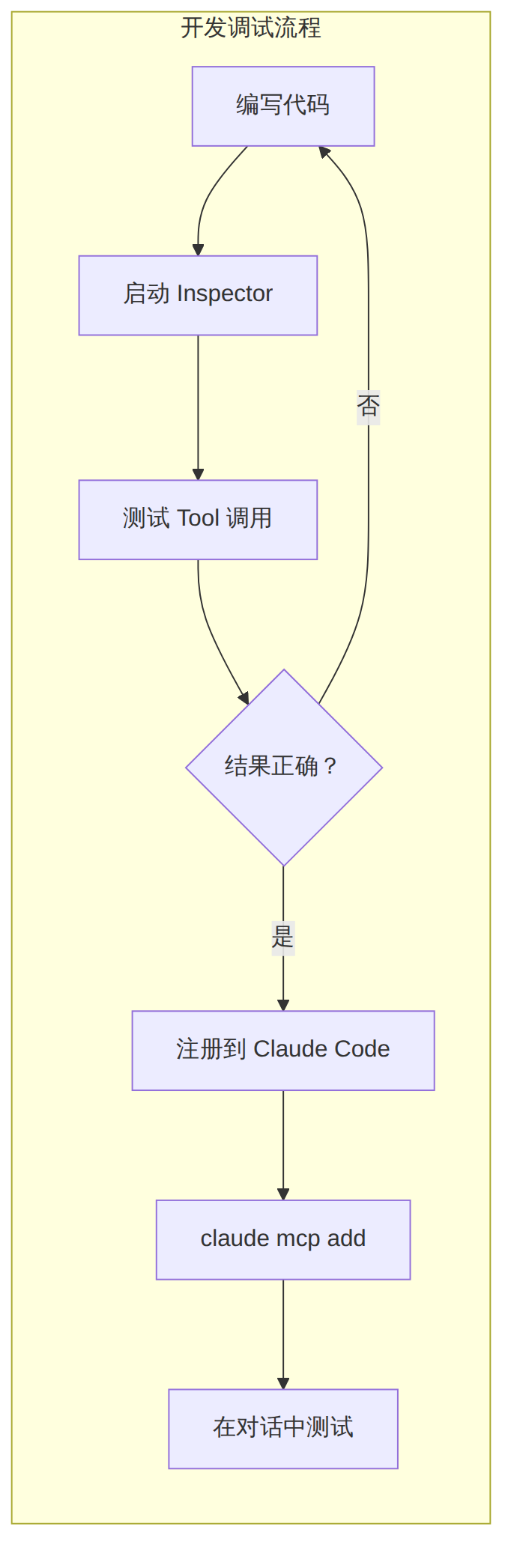
图表 5
Dockerfile:
FROM python:3.12-slim

WORKDIR /app

# 安装 uv
COPY --from=ghcr.io/astral-sh/uv:latest /uv /usr/local/bin/uv

# 复制依赖文件
COPY pyproject.toml uv.lock ./
RUN uv sync --frozen --no-dev

# 复制源码
COPY . .

# 默认使用 stdio 传输
CMD ["uv", "run", "fastmcp", "run", "server.py"]
docker-compose.yml(HTTP 模式远程部署):
version: "3.8"
services:
  knowledge-mcp:
    build: .
    ports:
      - "8080:8080"
    environment:
      - MCP_TRANSPORT=streamable-http
      - MCP_PORT=8080
    command: uv run fastmcp run server.py --transport streamable-http --port 8080
# 连接 Docker 化的远程 MCP 服务器
claude mcp add --transport http http://localhost:8080/mcp
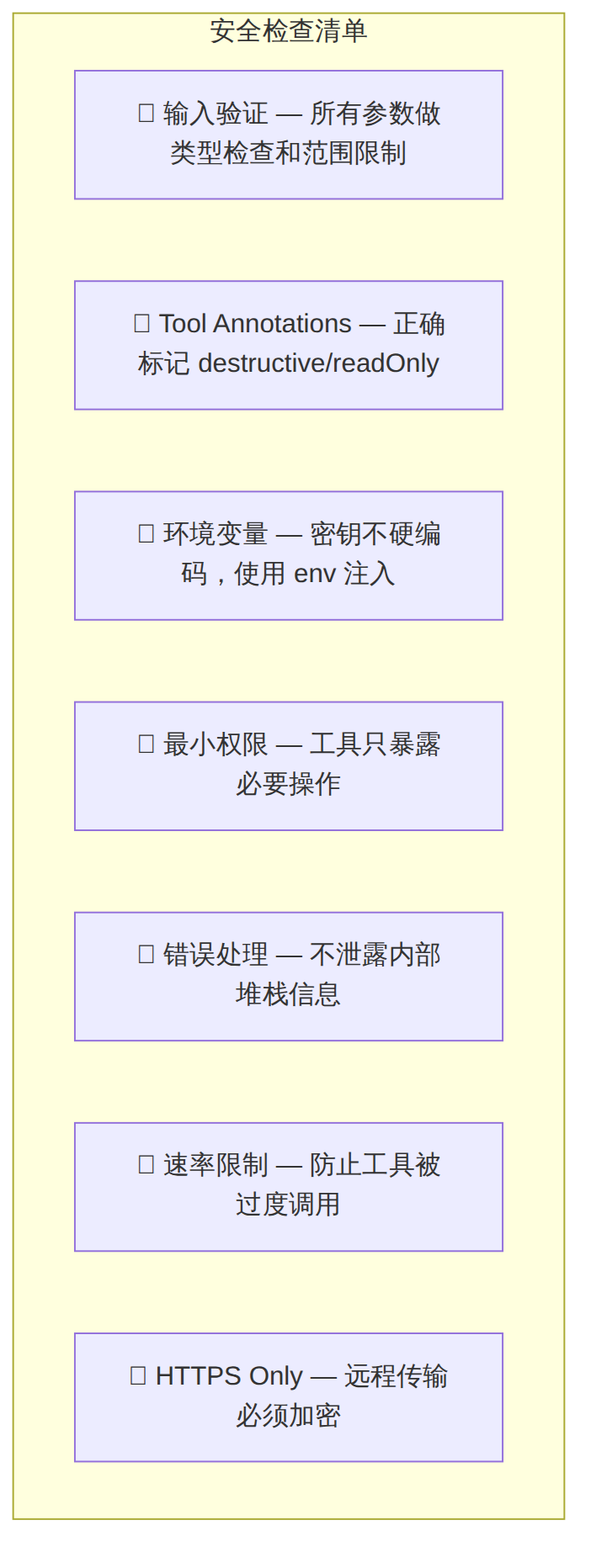
图表 6
核心安全原则:
destructiveHint: true — 让客户端有机会请求确认claude mcp list 显示服务器但工具不可用# 检查服务器是否正常启动
claude mcp get your-server-name
# 手动运行服务器查看错误输出
python server.py
# 检查 JSON 配置格式
cat .mcp.json | python -m json.tool
最常见原因是 stdio 模式下服务器输出到了 stdout。MCP 协议使用 stdout 通信,所有日志必须输出到 stderr:
import sys
# ✅ 正确:日志输出到 stderr
print("Debug info", file=sys.stderr)

# ❌ 错误:输出到 stdout 会破坏 MCP 协议
print("Debug info")
MCP 使用 JSON Schema 描述参数。确保 Python 类型注解正确:
# ✅ 正确
@mcp.tool()
def search(query: str, limit: int = 10) -> str:
    ...

# ❌ 错误 — 缺少类型注解
@mcp.tool()
def search(query, limit=10):
    ...
# 某些操作可能较慢,可以在配置中增加超时
# .mcp.json 或 settings.json
{
  "mcpServers": {
    "slow-server": {
      "command": "python",
      "args": ["server.py"],
      "timeout": 60000
    }
  }
}

图表 7
| 资源 | 链接 |
|---|---|
| MCP 官方文档 | https://modelcontextprotocol.io |
| MCP GitHub 规范 | https://github.com/modelcontextprotocol |
| FastMCP PyPI | https://pypi.org/project/fastmcp/ |
| TypeScript SDK | https://github.com/modelcontextprotocol/typescript-sdk |
| MCP Inspector | https://github.com/modelcontextprotocol/inspector |
| Claude Code MCP 文档 | https://code.claude.com/docs/en/mcp |
| OWASP MCP 安全指南 | https://genai.owasp.org/resource/a-practical-guide-for-secure-mcp-server-development/ |
| MCP Tool Annotations 博文 | https://blog.modelcontextprotocol.io/posts/2026-03-16-tool-annotations/ |
| 维度 | 评估 |
|---|---|
| 适合训练营类型 | AI 工具开发营、LLM 应用开发营、企业 AI 集成营 |
| 教学时长 | 4-6 小时(含实操) |
| 难度等级 | 中级(需要 Python/TS 基础) |
| 实操占比 | 70% 编码 + 20% 调试 + 10% 部署 |
| 分组建议 | 2-3 人一组,每组选择不同业务场景(CRM、监控、文档管理) |
| 考核方式 | 每组完成一个可运行的 MCP 服务器并在 Claude Code 中成功调用 |
[!tip] 51学通信知识星球 星主:爱卫生(微信:gprshome201101)——公众号「51学通信」创办者,19 年通信行业运维与讲师经验,著有《GPRS网络信令实例详解》《EPC原理与实践》《5G核心网原理与实践》三本纸质书(各大电商平台有售)。 星球定位:深耕 5G 核心网、IMS、NFV/AI、云原生等 ICT 领域,主打运维岗位与信令分析。 当前规模:5200 篇主题 / 990 个回答,198 元/年。 加入福利:加入星球后请加爱卫生微信,拉您进知识星球年度陪伴与答疑群——不限量回复您的各种问题,另有群内分享。 AI 加持:51学通信知识星球已作为 skill 接入 WorkBuddy,使用 deepseek-4-flash 在海量星球帖子中精准找贴、找视频、找 FAQ 和案例,做总结、找文档和 PPT 等场景全覆盖。
